Participating Frequently
July 3, 2024
Answered

Unwanted forward arrows appearing at bottom of page

  • July 3, 2024
  • 3 replies
  • 2311 views

Hi, I'm neither a developer or professional designer, I just do my own site(s).

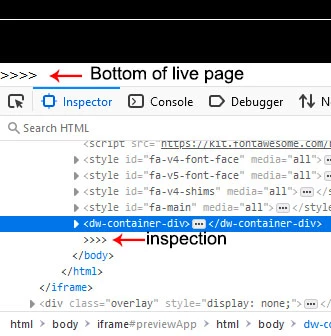
I have spent days (seriously, days) trying to remove the forward arrows (or whatever they are) that keep appearing at the bottom of my page as per the below image. I can't give a link to the page as the site is currently up using WordPress. Can anyone help?

Many thanks,

BJBarker.
 

Correct answer Nancy OShea

Brian,

I removed the email signature from your reply for your protection. Your personal data could get into the wrong hands. 

Please don't use EMAIL to reply to public web forums unless you disable your email signature beforehand.


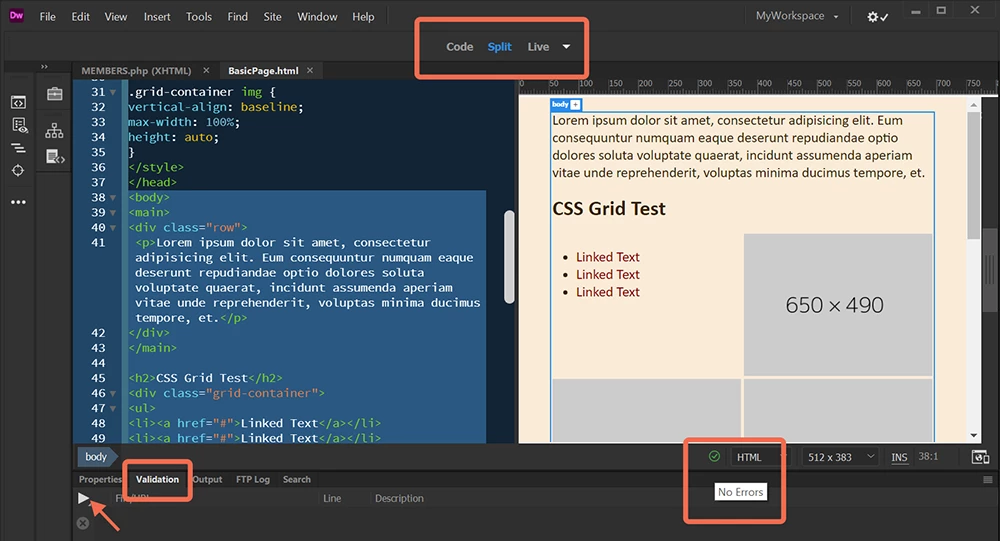
Run your code through DW's built-in Validation Tool and fix reported errors.

Window > Results > Validation.  Click the white triangle to Check Current Document.


Error-free code is denoted in DW by a green checkmark.  When errors are present, you'll see a red X.  See screenshot.


Hope that helps.


3 replies

Legend
July 3, 2024

Where is the code coming from? You have an iframe set up so that code is being inserted into your page from somewhere else.....you may have control over that code or you may not if its coming from an external source which is not under your control.

Participating Frequently
July 3, 2024

Hi and thank you for your reply. I think you are quite correct on both counts, one, I noticed that iframe too and I did not insert it and neither is it showing in my code and two (Where is the code coming from), I'm using a Bootstrap Portfolio Template so it is out of my control. I'm guessing it's back to the drawing board for me but thanks again. Brian

Nancy OShea
Community Expert
Community Expert
July 4, 2024

Real-Time Preview uses an iframe sourced from Adobe's servers.

I have mine turned off from Preferences. 


I use old fashioned Local Preview in Browser. Right click on Tab > Open in Browser... select a browser from the list.


Nancy O'Shea— Product User & Community Expert
Community Expert
July 3, 2024
quote

Hi, I'm neither a developer or professional designer, I just do my own site(s).

I have spent days (seriously, days) trying to remove the forward arrows (or whatever they are) that keep appearing at the bottom of my page as per the below image. I can't give a link to the page as the site is currently up using WordPress. Can anyone help?

Many thanks,

BJBarker.



By @brianb12394023


What do you mean by you can't provide a link because it's wordpress? As long as the site has a URL it doesn't matter what the CMS is. If it is wordpress though, it could be possible that a plugin are causing issues like what you are seeing.

Participating Frequently
July 3, 2024

Hi, thanks for your reply. What I mean is I have a site done in WordPress
and I'm having problems with it (load speed) so dismiss WordPress from my
query. I am building the same site in Dreamweaver with the view to replacing
the WP one but I'm having the problem as posted. I've been up and down, in
and out on Google trying to find a solution to no avail. I've checked the
'never close tags' option in DW preference but still they appear. I have
deleted them numerous times in my work space (backend I think it's called).
I'm 100% happy with my design except for this issue.

Regards,

Brian.
[Email signature, private personal data removed by moderator.]

Nancy OShea
Community Expert
Nancy OSheaCommunity ExpertCorrect answer
Community Expert
July 3, 2024

Brian,

I removed the email signature from your reply for your protection. Your personal data could get into the wrong hands. 

Please don't use EMAIL to reply to public web forums unless you disable your email signature beforehand.


Run your code through DW's built-in Validation Tool and fix reported errors.

Window > Results > Validation.  Click the white triangle to Check Current Document.


Error-free code is denoted in DW by a green checkmark.  When errors are present, you'll see a red X.  See screenshot.


Hope that helps.


Nancy O'Shea— Product User & Community Expert
BenPleysier
Community Expert
Community Expert
July 3, 2024

A link would be helpful.

Wappler is the DMXzone-made Dreamweaver replacement and includes the best of their powerful extensions, as well as much more!
Participating Frequently
July 3, 2024

Thank you Ben, the only link I could give you is the Dreamweaver preview but I don't know enough to know if that would work or not. I'll look up Wappler.

Brian.