


Inspiring
November 27, 2017
Answered

Update auf DW CC 2018 - Classroom-files gelöscht

  • November 27, 2017
  • 2 replies
  • 388 views

Hallo

gestern habe ich das Update von DW CC 2017 heruntergeladen - es heisst nun DW CC 2018.

Es sind offenbar wieder einige Anpassungen gemacht worden - ich freue mich darauf, sie zu entdecken!

Leider sind damit files von DW CC 2017 gelöscht worden.

Mein Problem: Ich habe "Classroom in a Book" für DW CC 2017 release gekauft und möchte noch etwas nachsehen bzw. mit den Lesson Files arbeiten. Das geht leider nicht mehr, weil die CSS und die JS-Dateien gelöscht worden sind. Die Lesson-Files sind somit nicht mehr zu gebrauchen.

Das ist sicher ein Fehler, denn ich habe ja für das Buch bezahlt.

Was kann ich tun?

Danke

MS
    This topic has been closed for replies.
    Correct answer PizzaPasta

    Hi Pziecina, Hi Nancy

    thanks for your answers.

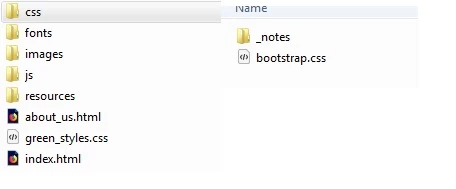
    My problem was, that the training lessons of "Classroom in a Book" didn't work anymore because the css-files have been deleted. For example the folder for Lesson 1:

    The files I created are already working.

    Finally I found the way to resolve the problem: I unzipped the Classroom-files once again and now, everything is working fine.

    2 replies

    Nancy OShea
    Community Expert
    Community Expert
    November 27, 2017

    Go to Site > Manage Sites

    Do your see your site in the list?

    If you do not see it, click on New Site.

    Nancy

    Nancy O'Shea— Product User & Community Expert
    PizzaPastaAuthorCorrect answer
    Inspiring
    November 28, 2017

    Hi Pziecina, Hi Nancy

    thanks for your answers.

    My problem was, that the training lessons of "Classroom in a Book" didn't work anymore because the css-files have been deleted. For example the folder for Lesson 1:

    The files I created are already working.

    Finally I found the way to resolve the problem: I unzipped the Classroom-files once again and now, everything is working fine.

    pziecina
    Legend
    November 27, 2017

    The files are probably still on your computer, unless you saved the files into the same folder as your Dw 2017 installation.

    It is also possible, (if the files were not saved to the Dw installation folder) that Dw2018 failed to pick up the site definition from 2017, (you did define the site?).