
Inspiring
March 29, 2020
Answered

Updated DW But my Previous Prefs Don't Get Recognized

  • March 29, 2020
  • 1 reply
  • 1606 views

Hello:


I upgrade to the latest DW CC 2020, v. 20.1. Instead of my preferences from the previous 2019 version being recognized, I find default prefs being applied, which will take a lot of time to re-enter appropriately. When I clicked the upgrade button, I never saw an option to import the previous version's prefs. Is there no longer such an option?


How do I reactivate the DW 2019 preference settings that are in my desktop files?


And, is there an intuitive way for subscribers to upgrade DW while enabling previous preference settings to be recognized and applied? If so, where do I find and pursue that intuitive process?


Thank you, friends.


Warren


    This topic has been closed for replies.
    Correct answer Nancy OShea

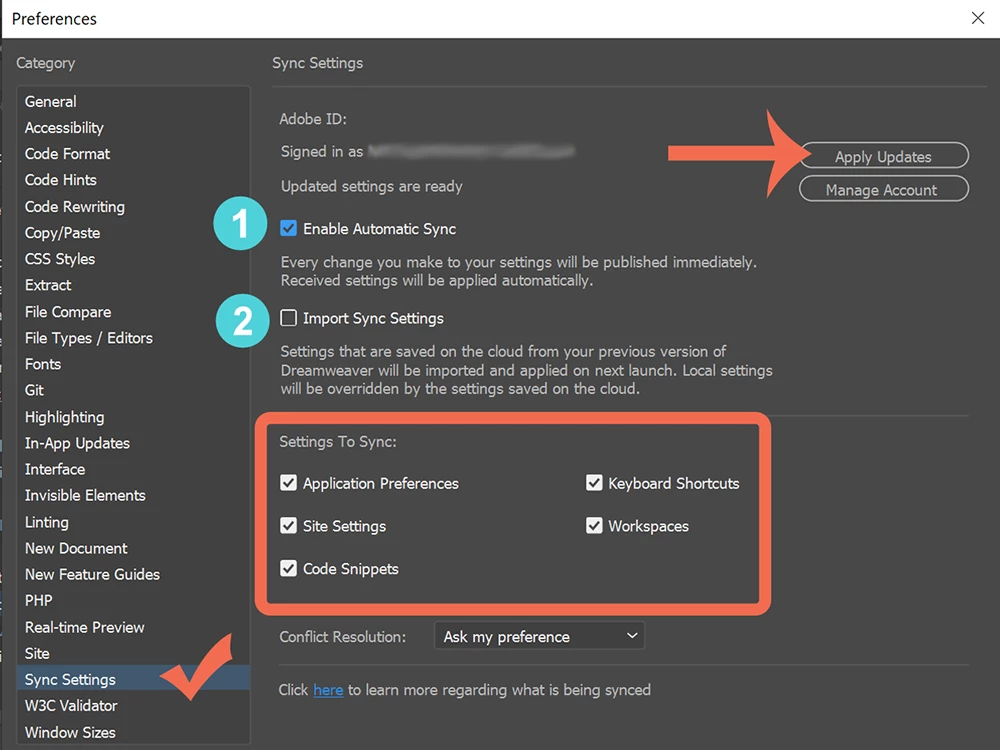
    Go to Edit > Preferences > Sync Settings.  See screenshot below. If you synced old settings to the Creative Cloud, you can import them.  Restart your computer after import.


    1 reply

    Nancy OShea
    Community Expert
    Nancy OSheaCommunity ExpertCorrect answer
    Community Expert
    March 29, 2020

    Go to Edit > Preferences > Sync Settings.  See screenshot below. If you synced old settings to the Creative Cloud, you can import them.  Restart your computer after import.


    Nancy O'Shea— Product User & Community Expert
    wcampAuthor
    Inspiring
    March 29, 2020

    Hi, Nancy. I'm glad to find your e-reply.


    I opened my DW 2020 Preferences file (on a Catalina Macintosh) to Sync Settings and clicked the "Apply Updates" button. I then closed the application and reopened it, only to see settings and options I don't want, such as code hints, rulers, and so on that I don't want to see or use. And my 2019 workspace layout isn't in the drop-down selection from which to choose.   (  ; - (


    I shut down and reopened the app but the new preferences appear. It appears that the old prefs file was not relocated to the appropriate support folder.


    Might you have another suggestion, Nancy?


    Nancy OShea
    Community Expert
    Community Expert
    March 30, 2020

    Do you still have 2019 installed on your machine?

    1. Open DW 2019 and sync settings to the cloud. When done, close 2019.

    2. Open 2020. Import settings from the cloud.

    3. Shut down all apps & restart computer.


    Nancy O'Shea— Product User & Community Expert