


katier47840401
Participant
September 6, 2017
Answered

Updating Template Page

  • September 6, 2017
  • 1 reply
  • 394 views

Hi all-

I'm still a bit of a beginner with dreamweaver, but I took over our company website from another employee who has since left the company. The site's layout needs some updating/tweaking (copyright in the footbox, updated projects, update to new font), so I’ve updated the portfoliotemplate.dwt template that I've noticed is attached to the majority of the portfolio project pages. However, when I attempt to select the Update Files option (to update all linked pages to the template), or to update a page with this template, this box pops up:
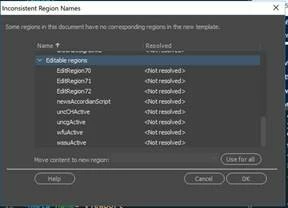
I know this means that the editable regions don't align, but if the page was originally created from this template, and I didn't add any additional regions, then why is this happening? ANY insight would be appreciated. Thanks in advance.

This topic has been closed for replies.
Correct answer Jon Fritz

Those (aside from the first one) are Optional Region comments. That code would be in the <head> section of your page and would tell DW when to include the editable region, depending on a true or false setting.

They should have corresponding comments in the <body> somewhere like...

<!-- TemplateBeginIf cond="urbanDesignLinks" -->

<!-- TemplateEndIf -->

...and only show if the value were set to "true" in the <head> section.

1 reply

Jon Fritz
Community Expert
Community Expert
September 6, 2017

DW uses sets of standard HTML comment tags that are formatted in a specific way for the program to understand them as Editable Regions. If someone stripped these comment tags with a different editor, DW wouldn't know what to do when it runs into a page that says it's connected to the template (the template comment is still there next to the <html> tag,) but is missing the individual Editable Region comments.

An example would be...

<!-- InstanceBeginEditable name="EditRegion70" -->

<!-- InstanceEndEditable -->

If you know where the regions are supposed to be (say from inspecting a functioning child page) you could drop them into the same locations on the broken pages using a text editor outside DW.

katier47840401
Participant
September 6, 2017

Thanks for the feedback Jon. That makes sense. I did attempt to give that a shot, but am still a bit confused. The box that pops up is the following:

And in the child pages, the only reference to those properties is the following:

!-- InstanceBeginEditable name="newsAccordianScript" -->

<!-- InstanceEndEditable -->

<!-- InstanceParam name="PortfolioLinks" type="boolean" value="true" -->

<!-- InstanceParam name="researchParksubNav" type="boolean" value="false" -->

<!-- InstanceParam name="healthcareSubLinks" type="boolean" value="false" -->

<!-- InstanceParam name="servicesSubNav" type="boolean" value="false" -->

<!-- InstanceParam name="subNavOption" type="boolean" value="false" -->

<!-- InstanceParam name="HigherEdSubLinks" type="boolean" value="false" -->

<!-- InstanceParam name="MasterPlanSubLinks" type="boolean" value="false" -->

<!-- InstanceParam name="mixedDensitysubNav" type="boolean" value="false" -->

<!-- InstanceParam name="prototypicalSubNav" type="boolean" value="false" -->

<!-- InstanceParam name="sustainableSubNav" type="boolean" value="true" -->

<!-- InstanceParam name="aboutTeamSubNav" type="boolean" value="false" -->

<!-- InstanceParam name="aboutSideNav" type="boolean" value="false" -->

<!-- InstanceParam name="multiFamily" type="boolean" value="false" -->

<!-- InstanceParam name="retailSubNav" type="boolean" value="false" -->

<!-- InstanceParam name="mainSideNav" type="boolean" value="false" -->

<!-- InstanceParam name="urbanDesignLinks" type="boolean" value="false" -->

<!-- InstanceParam name="CivicPublicNav" type="boolean" value="false" -->

I'm unsure what this means. Thoughts?

Jon Fritz
Community Expert
Jon FritzCommunity ExpertCorrect answer
Community Expert
September 6, 2017

Those (aside from the first one) are Optional Region comments. That code would be in the <head> section of your page and would tell DW when to include the editable region, depending on a true or false setting.

They should have corresponding comments in the <body> somewhere like...

<!-- TemplateBeginIf cond="urbanDesignLinks" -->

<!-- TemplateEndIf -->

...and only show if the value were set to "true" in the <head> section.