Inspiring
February 28, 2018
Answered

Upgrade CS6 - CC 2018 - images...

  • February 28, 2018
  • 2 replies
  • 1820 views

Bonjour, Je suis passé de Dreamweaver CS6 à Dreamweaver CC 2018.

Je ne vois plus les images et les éléments des sites sont bloqués.

Même si après un export de site avec le fichier .ste sous CS6, j'importe dans CC 2018.

Ce message apparait : Dreamweaver n'a pas trouvé le fichier : file:///MacHD/Users/yvescadier/Library/Applications_Support/Adobe/Dreamweaver_20CC2022018/fr_FR/Configuration/Shared/LiveEdit/Extensions/InspectModeUI/InspectModeUI.html.

Que dois, faire ?

Par avance, merci

Yves
This topic has been closed for replies.
Correct answer yvesc84087568

I opened an index file with images.

I copied the code.

I created a new page in: HTML 4.01 Transitional

I pasted all the code.

The images appear well.

---

I record.

The images disappear.

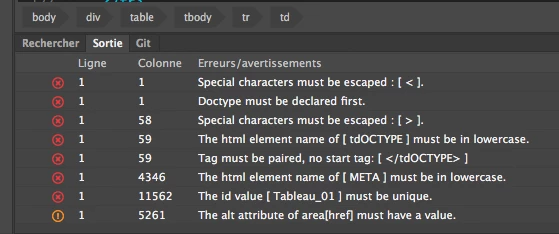
Code errors below.

There must be a conflict between HTML4 and HTML 5?

What should I do ?

In Paris, it's late. Sorry. I'm going to bed.

Thanks for your help...


Hello,

I found what did not work. The jump between the CS6 and the CC 208 requires some adaptation.

It was simple.

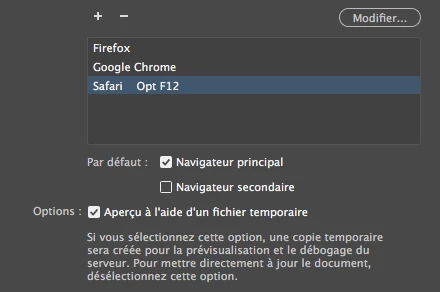
Preference 01

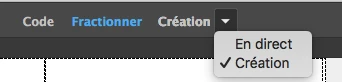
Preference 02

Now I see all the pictures and I find the original vision.

Thank you all for your kind help.

Yves Cadier

2 replies

Nancy OShea
Community Expert
Community Expert
February 28, 2018

<file:///MacHD/Users/yvescadier/Library/Applications_Support/Adobe/Dreamweaver_20CC2022018 fr_FR/Configuration/Shared/LiveEdit/Extensions/InspectModeUI/InspectModeUI.html.>

Are you working in a defined local site folder?

Did you save your document after inserting the image?

Nancy O'Shea— Product User & Community Expert
Inspiring
March 1, 2018

Thank you Nancy for your answer.

The local site is in my Sites folder.

I can not even insert images.

The application is completely blocked.

Thanks for your advices

Nancy OShea
Community Expert
Community Expert
March 1, 2018

Try Restore Preferences

https://helpx.adobe.com/dreamweaver/kb/restore-preferences-dreamweaver-cs6-cc.html

If that does not work,  use the CC Cleaner Tool below followed by a software re-install.

http://helpx.adobe.com/creative-suite/kb/cs5-cleaner-tool-installation-problems.html

Nancy O'Shea— Product User & Community Expert
Inspiring
February 28, 2018

Yves,

I am wondering which Mac OS you are using. I know some users have had trouble running DW and other CC apps on High Sierra.

And this is just a guess, but it could be that you did not get a clean install of DW CC 2018. Have you tried uninstalling it using the CC Desktop app (and then running the CC Cleaner tool to ensure deleting all files associated with the program), and then reinstalling DW CC 2018? Another thought is, you could try installing DW CC 2017 and see if you get more stable results with the previous DW Version.

Bonne chance,

Chris

Inspiring
February 28, 2018

Thanks for your reply.

Some infos...

- Mac System : OS X El Capitan - version 10.11.6

- I uninstalled from the Creative Cloud and install it again

- I restarted my Mac

The previous version of Dreamweaver I was using was CS6

Inspiring
February 28, 2018

Excuse me.

The message is gone quickly.

Maybe I should try a 2017 CC intermediate version?

I have not seen the solution yet.

Many thanks...