
Inspiring
February 17, 2020
Answered

User Interface Problems

  • February 17, 2020
  • 3 replies
  • 830 views

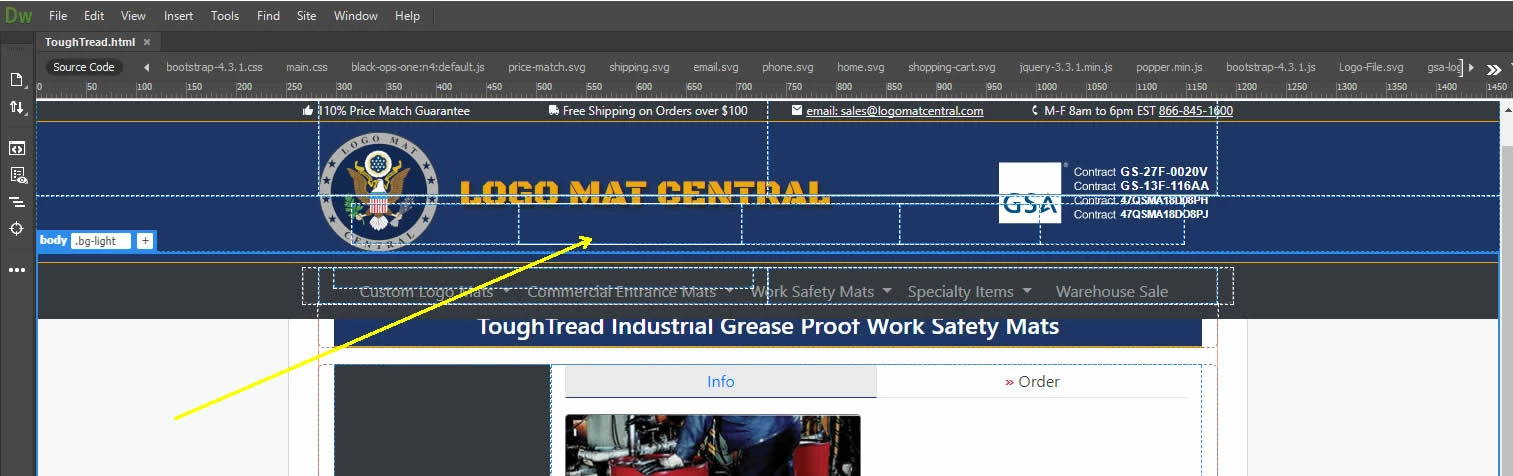
Does anyone know why it is that the interface elements get jumbled up when I scroll? - see image. Any of the dotted blue border interface elements which represent the DIV tags comprising my design get misaligned with the elements when I scroll. This creates quite a bit of confusion as to what is what in the design. I dowloaded an update stating there would be improved interface stability, but this update did not solve any of these issues. I had this same problem in previous versions also. I am running Windows 10.
 

This topic has been closed for replies.
Correct answer Nancy OShea

Insufficient memory, bad drivers or a failing graphics card could all play a part in this. 

  • Update your graphics drivers directly from the graphics card manufcaturer's website. 
  • Restart your computer.


3 replies

Nancy OShea
Community Expert
Community Expert
February 17, 2020

Another thing that sometimes helps is to toggle between Live and Design view from your Document Toolbar.   See screenshot.


Nancy O'Shea— Product User & Community Expert
Nancy OShea
Community Expert
Nancy OSheaCommunity ExpertCorrect answer
Community Expert
February 17, 2020

Insufficient memory, bad drivers or a failing graphics card could all play a part in this. 

  • Update your graphics drivers directly from the graphics card manufcaturer's website. 
  • Restart your computer.


Nancy O'Shea— Product User & Community Expert
Jon Fritz
Community Expert
Community Expert
February 17, 2020

DW's feature-set relies on clean and valid code in order for functions to act correctly. Even small structural errors can cause certain things to fail. this could be one of those times.

Run the validator at http://validator.w3.org/nu to get a listing of any errors you might have in your code and clean them up. Once the code is clean, DW will likely come back in line and behave itself.

If not, post back and share a bit more info with the contributors here and they'll likely be able to find the culprit.