Participant
May 10, 2023
Answered

Using absolute links

  • May 10, 2023
  • 1 reply
  • 410 views

Forgive me if this is a silly question. I haven't used Dreamweaver in quite a number of years and I am much more of a hobbiest than anything else.

I am maintaining my wife's photography site for her. The page header is common across all pages, while the content may, for my simplicity, run several layers deep in a heirarchy. I would like for things like css, scripts, common elements to be maintained in folders at the site level, so I can always reference the menu css as "/css/menu.css". This works fine in a webserver, but in the Dreamweaver live/split mode it does not find it.

I can force it to find the files by using relative links, but I'd prefer not to maintain these.

I have defined a local site path, and for images I have created the images folder in the advanced set up.

Is there something I am missing, or do I have to revert to relative links - certainly doable, but more maintenance.

Thanks

 

    This topic has been closed for replies.
    Correct answer Nancy OShea

    There are three types of link paths:

    https://helpx.adobe.com/dreamweaver/using/linking-navigation.html


    If your local site folder is defined, Dreamwaver automatically manages link paths for you. 

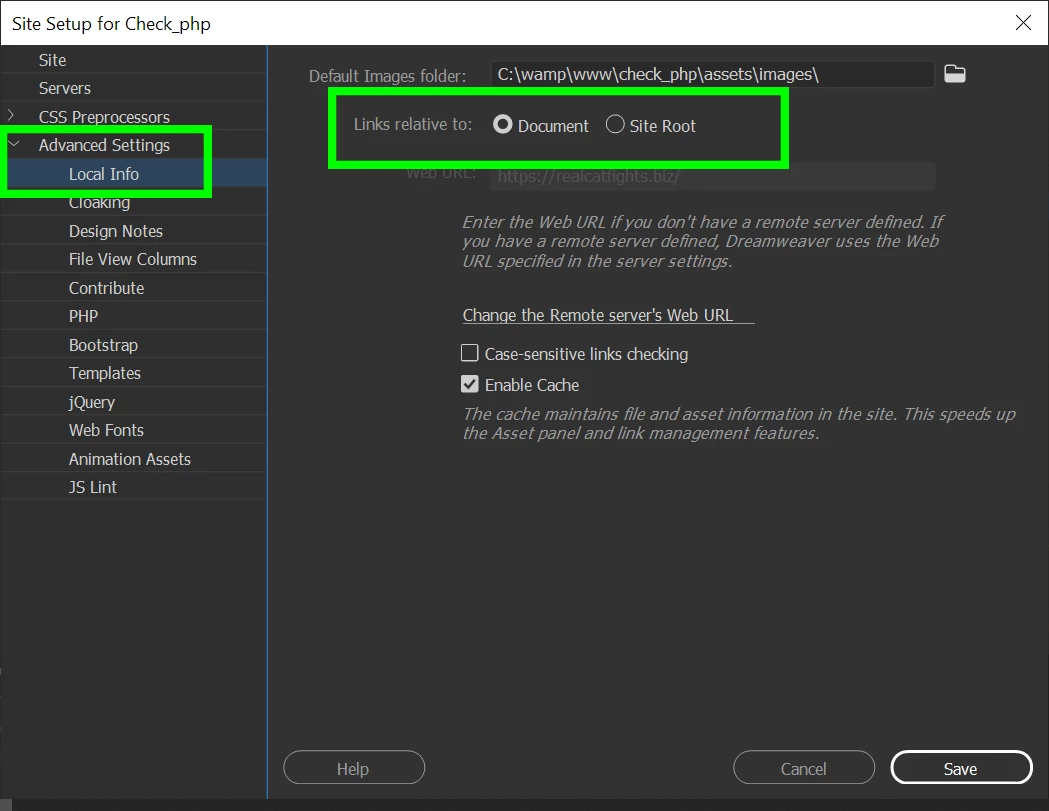
    Go to Site > Manage Sites > C:\MySite\

    See screenshot.


    I use Document Relative links.  They work well locally and on the server.  

    Site-Root Relative links work on the server but may not work locally.  

    Dreamweaver does NOT manage Absolute links for you.


    Hope that helps.


    1 reply

    Nancy OShea
    Community Expert
    Nancy OSheaCommunity ExpertCorrect answer
    Community Expert
    May 10, 2023

    There are three types of link paths:

    https://helpx.adobe.com/dreamweaver/using/linking-navigation.html


    If your local site folder is defined, Dreamwaver automatically manages link paths for you. 

    Go to Site > Manage Sites > C:\MySite\

    See screenshot.


    I use Document Relative links.  They work well locally and on the server.  

    Site-Root Relative links work on the server but may not work locally.  

    Dreamweaver does NOT manage Absolute links for you.


    Hope that helps.


    Nancy O'Shea— Product User & Community Expert
    Participant
    May 10, 2023

    Thank you Nancy. My findings are consistent with what you have written "Site-Root Relative links work on the server but may not work locally." I will revert back to document relative links since that seems to be the only way I can see the changes in "Live" mode.

    Thanks