Inspiring
June 24, 2023
Answered

Using Dreamweaver 2023 for inline styling

  • June 24, 2023
  • 2 replies
  • 1816 views

These days I mostly use Dreamweaver 2023 for inline styling in other files.


I forget the html syntax and css sometimes when I just want to add a snippet of inline styling to a CMS doc for example.  So, I would like to be able to just go to Design View and use the non code styling UI to create what I need and then copy the code to paste elsewhere.


I can't find the UI toolbar that lets me do this.  I just need to be able to select the text and change color, font, size, etc.


Thank you.

This topic has been closed for replies.
Correct answer L e n a
quote

if Dreamweaver has a setting whereby you can enter all of the text for a file in Design View and make multiple changes to properties like you might do in a word processing application.  And then switch to Code View to copy the inline HTML and paste it into a CMS code block

By @JohnnyAir


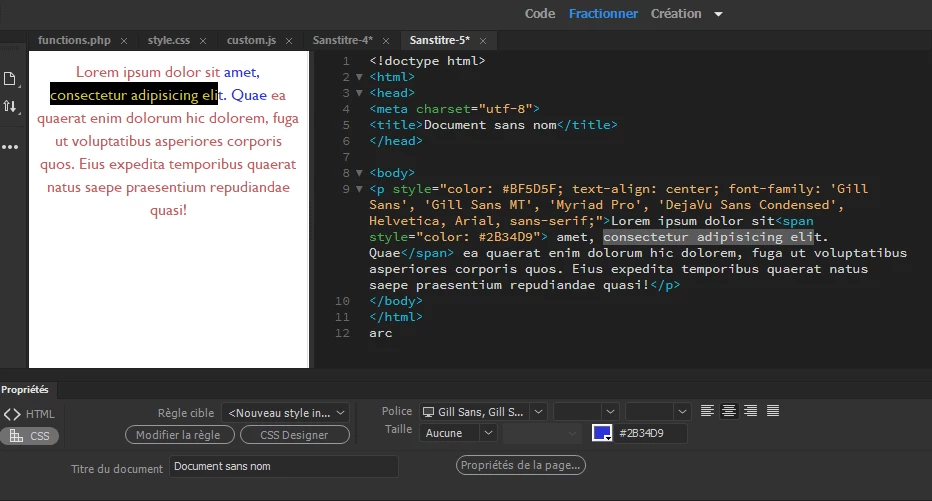
Yes, @JohnnyAir it's exactly as you describe it, you work in Design view mode, you select your text, or the portions of it that need to be modified, and from the property inspector, Ctrl F3, CSS and/or HTML tabs, you apply the desired changes, depending on whether it's visual or structural... then you just have to copy the generated code to paste it into WP for example.


2 replies

Nancy OShea
Community Expert
Community Expert
June 24, 2023

Window > CSS Designer (Shift + F11).


The syntax for inline tag styles is actually very simple.

<div style="property: values; property: values; property: values">

<p>Content goes here...</p>

</div>


Font-family, font-size and color are expressed like this example:

<div style="font-family: Tahoma, Arial, Helvetica, Sans-serif; font-size: 1.25rem; color: tomato">

<p>Content goes here...</p>

</div>


CSS Properties Reference:

https://www.w3schools.com/cssref/index.php


Hope that helps.


Nancy O'Shea— Product User & Community Expert
JohnnyAirAuthor
Inspiring
June 25, 2023

Thanks for that Nancy.

I guess that I was wondering out loud if Dreamweaver has a setting whereby you can enter all of the text for a file in Design View and make multiple changes to properties like you might do in a word processing application.  And then switch to Code View to copy the inline HTML and paste it into a CMS code block

L e n aCommunity ExpertCorrect answer
Community Expert
June 26, 2023
quote

if Dreamweaver has a setting whereby you can enter all of the text for a file in Design View and make multiple changes to properties like you might do in a word processing application.  And then switch to Code View to copy the inline HTML and paste it into a CMS code block

By @JohnnyAir


Yes, @JohnnyAir it's exactly as you describe it, you work in Design view mode, you select your text, or the portions of it that need to be modified, and from the property inspector, Ctrl F3, CSS and/or HTML tabs, you apply the desired changes, depending on whether it's visual or structural... then you just have to copy the generated code to paste it into WP for example.


BenPleysier
Community Expert
Community Expert
June 24, 2023

Will this help?

https://youtu.be/M130QueMOtU


Wappler is the DMXzone-made Dreamweaver replacement and includes the best of their powerful extensions, as well as much more!