
Inspiring
May 28, 2009
Answered

Using dreamweaver.codeHints.addFunction() in CS4

  • May 28, 2009
  • 3 replies
  • 4724 views

Hello,

I have developed an extension (PHP Code Hints) which finds custom PHP variables and functions and adds them to Dreamweaver Code Hints using dw.codeHints.addMenu() and dw.codeHints.addFunction(). It was developed on CS3. Now, both functions have additional parameters on CS4.


PHP Code Hints still works fine on CS4 without any modifications as far as variables (use of addMenu) are concerned. But using addFunction does not yield the desired results: custom functions do not appear anymore in code hints. Yet they seem to be recorded somehow since when you type the parenthesis after the function name in source code, the name of the function and its arguments are shown as a tooltip:
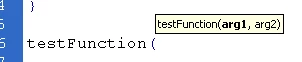
Here's my code which works on CS3:

function AjouterIndicateursFonctions(arrFonctions) {
     var i = 0;


    if (arrFonctions != null) {           
         // Reset function codehints
         dreamweaver.codeHints.resetMenu("CodeHints_Function_Arguments", arrFonctions, "PHP_MySQL");
         // Inserts functions into codehints
         for (i = 0; i < arrFonctions.length; i++) {
             // Rebuilds function list
             dw.codeHints.addFunction(
                         "CodeHints_Function_Arguments",     // Menu group
                         arrFonctions,                                    // Functions to add
                         "PHP_MySQL",                                            // Document types
                         false)                                                        // Case sensitiveness
         }
     }
}

CS4 documentation on dw.codeHints.addFunction() gives the new arguments, but it is not very understandable without an example (the given one has not been updated from... MX?), and types are not always described. So I am stuck on this problem and cannot find an answer. I was advised by David Powers to ask the forum for help, especially from Randy Edmunds.

So can you help on how to use the addFunction() on CS4?

Thank you in advance.

Best regards,


Xavier Pitel

This topic has been closed for replies.
Correct answer Randy Edmunds

Aw, crud, I messed that up. Solution below:

dw.codeHints.addFunction(
    "CodeHints_Function_Arguments",  // Menu group
    arrFonctions,                 // Functions to add
    "PHP_MySQL",                     // Document types
    false)                           // Case sensitiveness

You need to add 2 more parameters to this call so that it looks like this:

dw.codeHints.addFunction(
    "CodeHints_Function_Arguments", // Menu group
    arrFonctions,                 // Functions to add
    "PHP_MySQL",                     // Document types
    false,                           // Case sensitiveness

    false,                           // bClassPattern (default)

    true)                           // bAddToObjectMethodList

The bAddToObjectMethodList parameter does default to true as the documentation states, but you need to use false. And there are several other parameters between those 2, so here's what I used to get it to work:

dw.codeHints.addFunction(
     "CodeHints_Function_Arguments",     // Menu group
     arrFonctions,                   // Functions to add
     "PHP_MySQL",                       // Document types
     false,                             // Case sensitiveness
     "",             // object
     "",             // description
     "",             // icon
     "",             // source
     "",             // DocURI
     false,         // bClassPattern
     false);         // bAddToObjectMethodList

I just added empty strings for the other parameters to mimic the defaults. Play around with it and see if you need/want to put something in those.

Regards,

Randy

3 replies

Participant
June 6, 2009

how to use a dreamweaver extensions to add an mp3 to my cat breeds web page http://www.catwebsite.org?

Randy Edmunds
Adobe Employee
Adobe Employee
June 6, 2009

Please start a new forum post for new questions.

Try searching the Dreamweaver Exchange for "mp3":

http://www.adobe.com/cfusion/exchange/index.cfm?searchfield=mp3&search_exchange=3&search_category=-1&search_license=&search_rating=&search_platform=0&search_pubdate=&num=25&startnum=1&event=search&sticky=true&sort=0&Submit=

Randy

Randy Edmunds
Adobe Employee
Adobe Employee
June 2, 2009

Xavier,

dw.codeHints.addFunction(
    "CodeHints_Function_Arguments",  // Menu group
    arrFonctions,                 // Functions to add
    "PHP_MySQL",                     // Document types
    false)                           // Case sensitiveness

You need to add 2 more parameters to this call so that it looks like this:

dw.codeHints.addFunction(
    "CodeHints_Function_Arguments", // Menu group
    arrFonctions,                 // Functions to add
    "PHP_MySQL",                     // Document types
    false,                           // Case sensitiveness

    false,                           // bClassPattern (default)

    true)                            // bAddToObjectMethodList

The documentation here:

http://help.adobe.com/en_US/Dreamweaver/10.0_API_Ref/WS5b3ccc516d4fbf351e63e3d117f9e08d19-7ff9.html

states that bAddToObjectMethodList defaults to true, but that is incorrect. It actually defaults to false.

Sorry for the disconnect,

Randy

Randy Edmunds
Adobe Employee
Randy EdmundsCorrect answer
Adobe Employee
June 4, 2009

Aw, crud, I messed that up. Solution below:

dw.codeHints.addFunction(
    "CodeHints_Function_Arguments",  // Menu group
    arrFonctions,                 // Functions to add
    "PHP_MySQL",                     // Document types
    false)                           // Case sensitiveness

You need to add 2 more parameters to this call so that it looks like this:

dw.codeHints.addFunction(
    "CodeHints_Function_Arguments", // Menu group
    arrFonctions,                 // Functions to add
    "PHP_MySQL",                     // Document types
    false,                           // Case sensitiveness

    false,                           // bClassPattern (default)

    true)                           // bAddToObjectMethodList

The bAddToObjectMethodList parameter does default to true as the documentation states, but you need to use false. And there are several other parameters between those 2, so here's what I used to get it to work:

dw.codeHints.addFunction(
     "CodeHints_Function_Arguments",     // Menu group
     arrFonctions,                   // Functions to add
     "PHP_MySQL",                       // Document types
     false,                             // Case sensitiveness
     "",             // object
     "",             // description
     "",             // icon
     "",             // source
     "",             // DocURI
     false,         // bClassPattern
     false);         // bAddToObjectMethodList

I just added empty strings for the other parameters to mimic the defaults. Play around with it and see if you need/want to put something in those.

Regards,

Randy

Inspiring
June 5, 2009

Thank you so much, Randy, for showing the right solution.

I am still curious about the description (where does it appear?), the source (what is it?), the bAddToObjectMethodList(how to use it?) and the restriction (which strings are allowed?) arguments, though. I wish the documentation would be a little more explicit and give thorough examples on these new arguments.

Thanks again,

Xavier

Randy Edmunds
Adobe Employee
Adobe Employee
May 29, 2009

Xavier,

I have developed an extension (PHP Code Hints) which finds custom PHP variables and functions and adds them to Dreamweaver Code Hints using dw.codeHints.addMenu() and dw.codeHints.addFunction(). It was developed on CS3. Now, both functions have additional parameters on CS4.


PHP Code Hints still works fine on CS4 without any modifications as far as variables (use of addMenu) are concerned. But using addFunction does not yield the desired results: custom functions do not appear anymore in code hints. Yet they seem to be recorded somehow since when you type the parenthesis after the function name in source code, the name of the function and its arguments are shown as a tooltip...

Yes, there are new parameters added, but they are all optional, so it should not make a difference.

Did you check to see if the function names are in the list, but maybe in a different place (i.e. not in alphabetic order) ?

Otherwise, send me a private e-mail in this forum so I can get a copy of your extension.

Randy

Inspiring
May 29, 2009

Hello Randy,

Thank you for your answer.

I have double-checked, but custom functions do not appear in the list, even in non-alphabetical order. And should they be in non-alphabetical order, it would not be a problem if they are correctly selected as you type. But none of this happens.

There's one paramater that seems not to be optional - 'source' -, but that should default to "empty", maybe that's the problem?

I have sent you my extension through private mail.

If you test it on CS3 and CS4, you'll see that it works on the former, but partly on the latter. As previously indicated, though, customs functions seem to be recorded somehow since when you type the parenthesis after the function name in source code, the name of the function and its arguments are shown as a tooltip...

Thanks a lot for your help.

Best regards,

Xavier Pitel