

Answered
Vertical navigation will not display right
Vertical navigation will not display right. How to fix?
I know it should work as I have stripped away all the other code and it works correctly in the DW CS6 I have and in Firefox. I use NoteTab and Firefox for the grid and Flex code.
<!DOCTYPE html>
<html>
  <head>
    <title>Responsive 3 Col Grid Flex </title>
    <meta charset="utf-8">
    <meta http-equiv="X-UA-Compatible" content="IE=edge">
    <meta name="viewport" content="width=device-width, initial-scale=1">

<style>

@import url('https://fonts.googleapis.com/css2?family=Open+Sans&display=swap');

body {
background-color: #5F9EA0;
margin-right: auto;
margin-left: auto;
margin-top: 0px;
margin-bottom: 0px;
padding: 0px;

}

.container {
  display: flex;
  flex-direction: column;
  min-height: 100vh;
padding: 0px;
margin: 0px
}


@media (min-width: 768px) {
.container {
display: grid;
grid-template-columns: 200px 1fr 200px;
grid-template-rows: auto 1fr auto;
  }
}

header {
grid-column: span 3;
padding: 0px;
margin: 0px;
text-align: center;
background-color: #6699ff;
color: black;
}

main {
flex: 1;
padding-top: 15px;
padding-right: 20px;
padding-bottom: 20px;
padding-left: 20px;
margin: 0px;
background-color: #ffffd9;
}

nav {
background-color: #ffa07a;
padding: 20px;
text-align: center;
}

aside {
padding: 20px;
background-color: #ffa07a;
text-align: center;
}

footer {
grid-column: span 3;
padding: 0px;
text-align: center;
background-color: #66cdaa;
color: black;
}

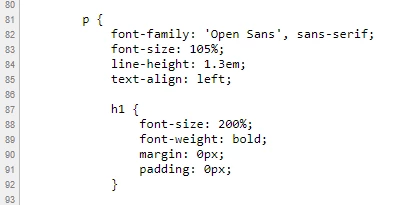
p {
font-family: 'Open Sans', sans-serif;
font-size: 105%;
line-height: 1.3em;
text-align: left;

h1 {
font-size: 200%;
font-weight: bold;
margin: 0px;
padding: 0px;
}

h2 {
font-size: 180%;
font-weight: bold;
margin: 0px;
padding: 0px;
}

h3 {
font-size: 150%;
font-weight: bold;
margin: 0px;
padding: 0px;

}

/* navigation menu */


ul {
list-style-type: none;
margin: 0px;
padding: 0px;
width: 200px;
border: 1px solid #555;
margin-top: 0px;
background-color: #FFFFFF;
}

li a {
display: block;
color: #000000;
text-decoration: none;
padding-top: 4px;
padding-right: 0px;
padding-bottom: 4px;
padding-left: 0px;
font-family: "open sans";
font-size: 100%;
font-weight: bold;

}

li {
    text-align: center;
    border-bottom: 1px solid #555555;
}

li:last-child {
    border-bottom: none;
}

li a.active {
	background-color: #66CC99;
	color: #000000;
}

li a:hover:not(.active) {
    background-color: #555555;
    color: white;
}

</style>
  </head>
<body>

  <div class="container">
   <header><h1>Title</h1></header>
   <nav><h3>Navigation</h3>

  <ul>
  <li><a class="active" href="#home">Menu</a></li>
  <li><a href="https://www.google.com/">HTML</a></li>
  <li><a href="#contact">CSS</a></li>
<li><a href="#menu">Grid</a></li>
<li><a href="#menu">Flex</a></li>
<li><a href="#menu">Is</a></li>
  <li><a href="#about">Driving</a></li>
<li><a href="#menu/">Me</a></li>
  <li><a href="#menu">Crazy</a></li>
<li><a href="https://www.quackit.com">Quackit Help </a></li>
</ul>


</nav>


   <main>
     <h2>Main Content</h2>
     <p>Lorem Ipsum is simply dummy text of the printing and typesetting industry. Lorem Ipsum has been the industry's standard dummy text ever since the 1500s, when an unknown printer took a galley of type and scrambled it
</p>
<p>Lorem Ipsum is simply dummy text of the printing and typesetting industry. Lorem Ipsum has been the industry's standard dummy text ever since the 1500s, when an unknown printer took a galley of type and scrambled it
</p>
<p>Lorem Ipsum is simply dummy text of the printing and typesetting industry. Lorem Ipsum has been the industry's standard dummy text ever since the 1500s, when an unknown printer took a galley of type and scrambled it </p>
     </main>

     <aside><h3>Sidebar</h3>
<p>Lorem Ipsum is simply dummy text of the printing and typesetting industry. </p>
</aside>
     <footer><h3>Footer</h3></footer>
</div>
  </body>
</html>
Same code but by itself. It works but not when added to the larger layout.
<!DOCTYPE html>
<html>
<head>
<meta charset="utf-8">
<title>Navigation Menu</title>
<meta name="viewport" content="width=device-width, initial-scale=1">
  <style>

@import url('https://fonts.googleapis.com/css2?family=Open+Sans&display=swap');


body {
	background-color: #5F9EA0;
	margin: 0px;
	padding: 0px;
    }

/* navigation menu */

ul {
list-style-type: none;
margin: 0px;
padding: 0px;
width: 200px;
border: 1px solid #555;
margin-top: 0px;
background-color: #FFFFFF;
}

li a {
display: block;
color: #000000;
text-decoration: none;
padding-top: 4px;
padding-right: 0px;
padding-bottom: 4px;
padding-left: 0px;
font-family: "open sans";
font-size: 100%;
font-weight: bold;
}
li {
    text-align: center;
    border-bottom: 1px solid #555555;
}

li:last-child {
    border-bottom: none;
}

li a.active {
	background-color: #66CC99;
	color: #000000;
}

li a:hover:not(.active) {
    background-color: #555555;
    color: white;
}

</style>
</head>
<body>
  <ul>
  <li><a class="active" href="#home">Menu</a></li>
  <li><a href="https://www.google.com/">HTML</a></li>
  <li><a href="#contact">CSS</a></li>
<li><a href="#menu">Grid</a></li>
<li><a href="#menu">Flex</a></li>
<li><a href="#menu">Is</a></li>
  <li><a href="#about">Driving</a></li>
<li><a href="#menu/">Me</a></li>
  <li><a href="#menu">Crazy</a></li>
<li><a href="https://www.quackit.com">Quackit Help</a></li>
</ul>

</body>
</html>


 AdChoices