
Known Participant
February 25, 2020
Answered

View controls when working on a file in version 20.1

  • February 25, 2020
  • 1 reply
  • 622 views

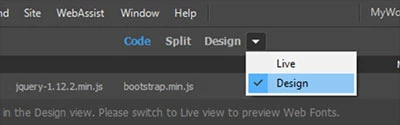
You guys have taken out the view control (Code, Live, Design) for a file that was just below the file name.


You took it out once before but every complained and you put it back. Everyone complains because it is such a pain in the A.. to have to go up to the View menu each time.


Please put and leave the view option back where it was. Thanks
This topic has been closed for replies.
Correct answer Nancy OShea

Are you asking about the Document Toolbar in this screenshot?  

You need to enable it from Window > Toolbars.  And if necessary, click and dock the toolbar where desired.  I keep mine on top.   Then SAVE your custom workspace. See working with custom workspaces below.

https://helpx.adobe.com/hk_en/dreamweaver/using/customizing-dreamweaver-workspace.html


When your custom workspace is saved, be sure to sync it to the Creative Cloud from your DW Preferences panel.  See below for details.

https://helpx.adobe.com/dreamweaver/using/synchronizing-dreamweaver-settings-creative-cloud.html


1 reply

Nancy OShea
Community Expert
Nancy OSheaCommunity ExpertCorrect answer
Community Expert
February 25, 2020

Are you asking about the Document Toolbar in this screenshot?  

You need to enable it from Window > Toolbars.  And if necessary, click and dock the toolbar where desired.  I keep mine on top.   Then SAVE your custom workspace. See working with custom workspaces below.

https://helpx.adobe.com/hk_en/dreamweaver/using/customizing-dreamweaver-workspace.html


When your custom workspace is saved, be sure to sync it to the Creative Cloud from your DW Preferences panel.  See below for details.

https://helpx.adobe.com/dreamweaver/using/synchronizing-dreamweaver-settings-creative-cloud.html


Nancy O'Shea— Product User & Community Expert