
Participant
September 12, 2019
Answered

View remote images in Design View

  • September 12, 2019
  • 2 replies
  • 802 views

I'm trying to update an image map and have brought in code from a remote page. When I am in split view, with Code and Design View, I can see the image maps but not the remote image. If I switch from Design to Live view, I can see the remote image but not the image map. Is there a way to see the remote image while in Design View in Dreamweaver CC 2019? Attached is a partial screen showing broken links in the Design View. I don't want to have to download the actual images to my local machine just to edit the image maps. Thank you in advance for assistance.

This topic has been closed for replies.
Correct answer Nancy OShea

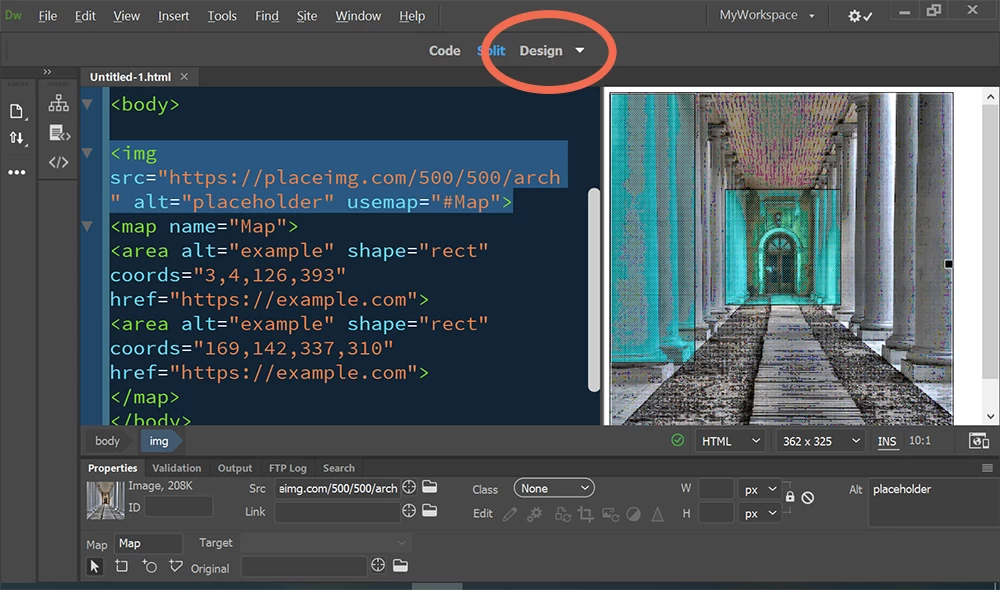
I am no fan of old fashioned image maps as they are not responsive.   But I can see remotely hosted placeholder images in Design View.  See screenshot.  Save document and hit F5 to refresh.

.


Here is the code I used.

<!doctype html>
<html lang="en">
<head>
<meta charset="utf-8">
<title>Image Map Test</title>
</head>
<body>
<img src="https://placeimg.com/500/500/arch" alt="placeholder" usemap="#Map">
<map name="Map">
<area alt="example" shape="rect" coords="3,4,126,393" href="https://example.com">
<area alt="example" shape="rect" coords="169,142,337,310" href="https://example.com">
</map>
</body>
</html>


2 replies

Nancy OShea
Community Expert
Nancy OSheaCommunity ExpertCorrect answer
Community Expert
September 12, 2019

I am no fan of old fashioned image maps as they are not responsive.   But I can see remotely hosted placeholder images in Design View.  See screenshot.  Save document and hit F5 to refresh.

.


Here is the code I used.

<!doctype html>
<html lang="en">
<head>
<meta charset="utf-8">
<title>Image Map Test</title>
</head>
<body>
<img src="https://placeimg.com/500/500/arch" alt="placeholder" usemap="#Map">
<map name="Map">
<area alt="example" shape="rect" coords="3,4,126,393" href="https://example.com">
<area alt="example" shape="rect" coords="169,142,337,310" href="https://example.com">
</map>
</body>
</html>


Nancy O'Shea— Product User & Community Expert
Jon Fritz
Community Expert
Community Expert
September 12, 2019

I have had similar issues on and off with every version of DW up to CC2019 (which seems to work correctly for me). Because of that I always work with local images until I need to upload. At that point, I use DW's F&R tool to add the remote image path. 

I don't think there is a fool-proof way to get them to show otherwise.