
BROnstott
Known Participant
December 1, 2020
Answered

W3C validation and PHP

  • December 1, 2020
  • 6 replies
  • 1735 views

I have a website that uses HTML5 and PHP.  I use DW 21. 

When I submit the pages to W3C validation, any page with a <?PHP> tag on it generates a validation error.


For example, this line <?php if (!isset($_SESSION)) { session_start(); } ?> generates this validation error:

Error       C:\xampp\htdocs\Partnership\index.php Saw <? . Probable cause: Attempt to use an XML processing instruction in HTML. (XML processing instructions are not supported in HTML.)      2


I'm sure this is because the php commands have not been stripped out before it gets to the validator.  Is there a way to avoid these errors?
    This topic has been closed for replies.
    Correct answer Nancy OShea

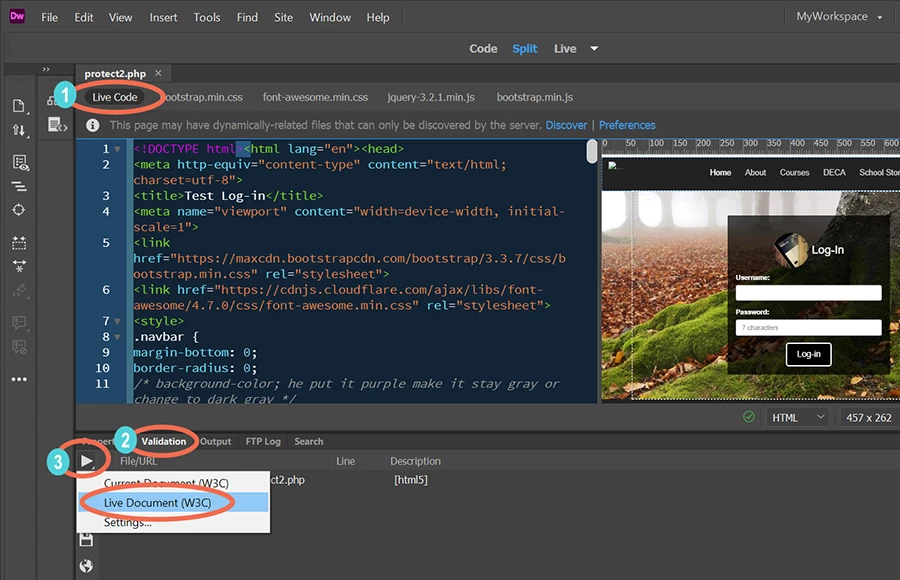
    1. In Dreamweaver CC 21.0, switch to Live Code from the View menu.

    2. Go to Window > Results > Validation.

    3. In the Validation panel, click the white triangle and select Live Document.  See screenshot.


    NOTE:  I have a local testing server defined in my site settings so I can parse PHP files locally.


    6 replies

    BROnstott
    BROnstottAuthor
    Known Participant
    December 2, 2020

    Thanks Nancy.  That works like a charm.  I started using DW long before live view came along; hadn't paid much attention to it.  Thanks again.

    Jon Fritz
    Community Expert
    Community Expert
    December 2, 2020

    To correctly validate a .php page from Dreamweaver...

    1. Make sure your local server is running
    2. Open the .php page in DW. If the page is open first, the correct option for validating will be grayed out
    3. Open the Validation window under Window > Results > Validation if it's not already
    4. Click the Reports button (play arrow icon) in the upper left of the Validation window and choose "Live Document (W3C)". Oddly, this option will be grayed out if you click it while DW doesn't have your systems focus (say, while bouncing back and forth from a web browser while typing a forum post, LOL). Turning on Live Code in the View menu is not necessary.


    That should do it.

    Legend
    December 2, 2020

    Sounds like PHP is not being parsed or you are submitting raw code to the validator. Are you copy and pasting code into the validator or a URL?

    Paul-M - Community Expert
    Legend
    December 1, 2020

    You should not be getting that error as you are processing the php though XAMPP. Sounds as though your testing server is NOT parsing the php code.


    Does this happen wherever you insert php code in your page - the specific line you posted as an example should go before the <!DOCTYPE html> tag but if you are getting the same error for other php code inserted within the html then something is wrong.


    Nancy OShea
    Community Expert
    Community Expert
    December 1, 2020

    "You should not be getting that error as you are processing the php though XAMPP."

    Not quite true.


    1. Copying and pasting PHP code from DW into the online HTML5 validation service will produce validation errors.  That's expected.


    2. Checking PHP code in DW will also produce validation errors unless one switches to Live Code and validates the Live Document.   IIRC, these features didn't exist until Creative Cloud.


    Nancy O'Shea— Product User & Community Expert
    Legend
    December 2, 2020

    Well it looks to me like the OP IS processing their page via XAMPP from their post. They are definitely NOT pasting code into the online validator because it wouldn't return this -  C:\xampp\htdocs\Partnership\index.php


    I dont know how Dreamweaver handles the request through XAMPP (in this view or that view) but in normal circumstances the parsing error shouldn't occur, so something isnt quite right. Either the server is not parsing the php or Dreamweaver is not set up correctly to parse the code.


    At this stage, if none of the suggestions posted, work, I would just try another web editor to test the set up. If the same issue occurs then its a server issue, if it parses then its a Dreamweaver issue.

    Nancy OShea
    Community Expert
    Nancy OSheaCommunity ExpertCorrect answer
    Community Expert
    December 1, 2020

    1. In Dreamweaver CC 21.0, switch to Live Code from the View menu.

    2. Go to Window > Results > Validation.

    3. In the Validation panel, click the white triangle and select Live Document.  See screenshot.


    NOTE:  I have a local testing server defined in my site settings so I can parse PHP files locally.


    Nancy O'Shea— Product User & Community Expert
    Legend
    December 1, 2020

    OP does have a local testing server installed:


    C:\xampp\htdocs\Partnership\index.php


    Community Expert
    December 1, 2020

    In order to validate your pages you should validate the code that is generated from a server (testing or live) which won't contain PHP as that would have been processed.