


pliles
Inspiring
January 23, 2017
Answered

Way To Change HIGHLIGHTING In Code View

  • January 23, 2017
  • 2 replies
  • 1823 views

When I do edit in the code view, the text associated with my selection changes and gets a  greenish background.  I am "old", 72, and I'd sure

like to change it to another color.... Something I can see  ha ha
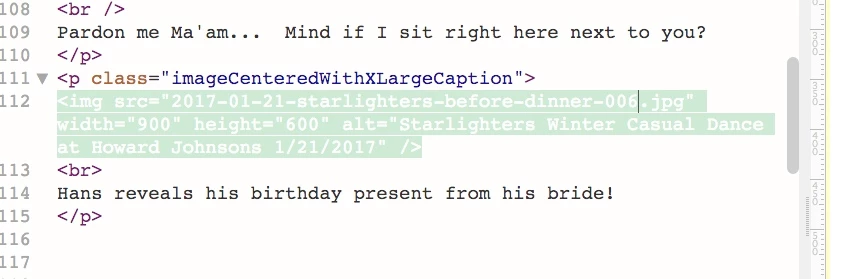
I tried to go through preferences several times but alas, nothing I did changed the highlighting?

What did I miss?

    This topic has been closed for replies.
    Correct answer Nancy OShea

    See this post from 3 days ago. 

    Solution: White on Mint Green Code Color.

    Nancy

    2 replies

    Known Participant
    January 24, 2017

    This retarded highlighting "feature" was the last straw for me and one of the reasons I installed DW 2017 last night, and uninstalled it not even 24 hours later. I mean, seriously, I have to edit a stylesheet just to make the freaking code visible to the naked eye? Which  moron at Adobe thought up that idea? And did anyone consider the possibility of offering the long-time standard color schemes as one of the available options, or would that go against some company policy requiring that Adobe annoy its long-time users as much as possible?

    I spent the better part of today farting around with DW 2017 trying to disable crap like the highlighting that OP mentioned, marveling at how a company that specializes in creativity software managed to come up with such an utterly ugly UI, cursing at the auto-indent feature in the code window (I can indent my own code, thank you), and generally trying to re-learn how to use a program that I've been using for almost 20 years. I didn't get a blasted minute of revenue work done. I finally gave up and went back to CS6.

    Does anyone at Adobe actually use this software for revenue work? Does anyone realize that moving things around that have been in the same place since DW was first introduced so we have to go searching for them costs developers money? Does anyone at Adobe care?

    When I downloaded my first trial copy of DW back in the late 1990s, I couldn't wait to buy it. (Yeah, we bought it and owned it back then, before it became subscription ransomware.) If I downloaded 2017 as a trial having never used DW before, it would have lasted about three minutes before I uninstalled it -- and that's assuming that I even managed to get past the vomitous default UI. I can't believe Adobe actually designed something that unspeakably ugly.

    When I have to sit down for a whole workday to try to figure out how to use the same software that I've been using productively for 20 years, I may as well just fire up Notepad like we did in the old days. At least I would have gotten some revenue work done. And Notepad is free.

    I tell you what: As I said in another thread, the day Fireworks stops working is the day I say goodbye to Adobe altogether. I can find better replacements for literally everything that Adobe makes -- many of them FOSS -- except Fireworks. The rest of your software just keeps getting worse and worse with every new version.

    Richard

    BenPleysier
    Community Expert
    Community Expert
    January 24, 2017

    Hi Richard,

    Nice rant although I would not have used some of the expressions like calling anyone a moron. I don't think that anyone in the Dreamweaver Development team is stupid. In fact I tend to go the other way.

    If a product has been neglected in the past without even a flinch from the users, it does not say much for those users. There is now a dynamic Team behind the development of Dreamweaver. They have made a lot of improvements and yes, they have made some errors. Some of these errors are of an emotional nature like code colouring, others are more intrusive. The good part is that these errors are being worked on as we speak. Improved versions have already appeared while future updates are in the pipeline. This highlights one of the benefits of a Creative Cloud system, the updates are available in real time.

    To cut a long story short, if you have a problem with Dreamweaver CC 2017, please report the problem by going to Help > Submit Bug/Feature Request. Nancy's solution is a good start to a better enjoyment of the product.

    To finish off, this is a user-to-user forum and I am one of those users without an affiliation to Adobe.

    Wappler is the DMXzone-made Dreamweaver replacement and includes the best of their powerful extensions, as well as much more!
    Known Participant
    January 24, 2017

    deleted

    Nancy OShea
    Community Expert
    Nancy OSheaCommunity ExpertCorrect answer
    Community Expert
    January 24, 2017

    See this post from 3 days ago. 

    Solution: White on Mint Green Code Color.

    Nancy

    Nancy O'Shea— Product User & Community Expert
    pliles
    plilesAuthor
    Inspiring
    January 24, 2017

    Thank you Nancy...  It worked very well and I can now see the highlights!   You have probably reduced the wrinkles around my eyes by 50%!

    Really appreciate you assistance.

    I am sorry I created a "hornets nest"  :-)