limakid2015
Inspiring
November 9, 2017
Answered

Web form validation

  • November 9, 2017
  • 6 replies
  • 1644 views

Two years ago, it was also a concern for me but many things change for good or for bad, for that reason I bring to the attention the topic about the optimal workflow for a good form validation. I heard in the last weeks MANY kinds of validation:
- Through HTML 5
- Client side validation

- Server side validation

- Customized validation (I read this in the bootstrap documentation).

- Browser validation

- Bootstrap classes for validation ("has-success", "has-danger", and so on...)

- PHP, JavaScript, jQuery validation...

So, I don't think that is possible to use all of them, it might be even useless. But, is it possible to use two of them? For example: bootstrap validation plus server side? What is a good trend today for this?


If I choose two kinds of validation, that means to use two kinds of coding. It might br some complicated how to place the tags or scripts in the code editor, right? Or should I just choose the one easier for me, because in our days all might more secure than last year for example, don't you think so? Thanks again for your comprehension.

I put this post in DREAMWEAVER forum because is the most approximate to the issue; I am using brackets and bootstrap 4, finally!


This topic has been closed for replies.
Correct answer BenPleysier

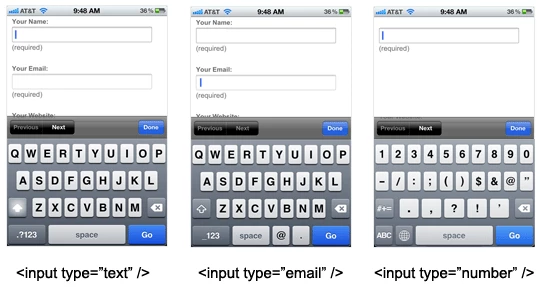
HTML5 form input types are much more than just to validate (client side) the input, they also facilitate inputs for handheld devices.

On a desktop, input type email will look like a normal text field

while on a mobile phone, the popup keyboard is optimised for the input of an email address.

For contemporary web design, the input type is not an option.

6 replies

Preran
Community Manager
Community Manager
November 10, 2017

[Actual name removed by moderator]

limakid2015

Has your question been answered or do you need more information? If any of the posts came close to answering your question, please mark it as correct for the benefit of other users.

Thanks.

Preran

pziecina
Legend
November 10, 2017

The one thing no one has mentioned so far, is the one thing only the developer of the site will know.

Connection speed.

If you are developing a site for your local area and you know that everyone will have a good connection speed, (both broadband and mobile) then use whatever method you feel most comfortable using for browser side validation. No matter which you use custom error messages are almost always possible, and styling can be done using css in all cases.

If however like me your user can be anywhere in the world, and they may even be using a shared dial-up connection , then keeping everything within strict download size limits becomes much more important. In such a case 3rd party js and any extra files to download becomes a problem to be avoided.

The one thing that every site must do, is server-side validation, as this is the one validation that will not only be your catch-all validation, but the one that will also stop malicious users sending you spam, or even the one that will stop them using your server as a means of sending spam to others.

BenPleysier
Community Expert
Community Expert
November 10, 2017

As said by others above, most simple forms need no more than HTML5 for client side validation and PHP for server side validation. Combine the HTML5 with a bit of eye candy as per http://getbootstrap.com/docs/4.0/components/forms/ and add a CAPTCHA as per reCAPTCHA: Easy on Humans, Hard on Bots and you are ready to run.

At the moment I use the DMXZone validator for both client and server side as per https://www.dmxzone.com/go/32902/app-connect-form-validator , but prior to that I used Examples - FormValidation which is a much cheaper option.

Of course, you could hand code the whole process yourself, but my experience is that your time can be better utilised elsewhere.

Wappler is the DMXzone-made Dreamweaver replacement and includes the best of their powerful extensions, as well as much more!
Nancy OShea
Community Expert
Community Expert
November 9, 2017

The complexity of your form will dictate which is best.   If it's a simple log-in form, you don't need much eye candy.  But say you have a complicated survey and you want to engage users with lots of visual incentives to keep going.   Then jQuery +  Bootstrap's  .has-success will come in handy. 

Nancy O'Shea— Product User & Community Expert
Legend
November 10, 2017

https://forums.adobe.com/people/Nancy+OShea  wrote

If it's a simple log-in form, you don't need much eye candy. 

That is in the eye of the beholder. I always think the html 5 built in form validations looks kind of cheap and cheerful but if time is of the essence and you arent too good at coding, its a good option.

BenPleysier
Community Expert
BenPleysierCommunity ExpertCorrect answer
Community Expert
November 10, 2017

HTML5 form input types are much more than just to validate (client side) the input, they also facilitate inputs for handheld devices.

On a desktop, input type email will look like a normal text field

while on a mobile phone, the popup keyboard is optimised for the input of an email address.

For contemporary web design, the input type is not an option.

Wappler is the DMXzone-made Dreamweaver replacement and includes the best of their powerful extensions, as well as much more!
Legend
November 9, 2017

Depends how pretty you want the validation to be. If its not a concern then just use html5 and a server side validation like php. If you want something  with a bit of eye-candy use some javascript or jquery for the client side.

pziecina
Legend
November 9, 2017

I would just use html5 form validation for the browser, then server-side validation on the server, as this would cover all user cases if done correctly.

Including any other form of validation is a waste of time, even pre html5 supporting browsers would be caught by the server-side validation. One could argue that none html5 supporting browser users would have to re-enter all the information again, should there be an error, but if someone, (a user) is that worried about re-entering info they would have updated to a more modern, and more secure browser anyway.

Nancy OShea
Community Expert
Community Expert
November 9, 2017

I also use  HTML5 + PHP validation.

If you really need to give user feedback without a page re-load, then add your favorite client-side validation to the mix.

Nancy O'Shea— Product User & Community Expert
pziecina
Legend
November 9, 2017

There is the html5 constraints validation api -

https://developer.mozilla.org/en-US/docs/Web/Guide/HTML/HTML5/Constraint_validation

This would allow the html5 validation to be used for more complexed and customized form validation, prevent form submission if there is an error not caught by individual fields when info inputted, and allow all form fields to remain filled in if not submitted.

A number of browsers have implemented the feature to retain form field info, untill submitted, but I don't think IE9 had the feature, (cannot check as no longer installed).

Unfortunatly Dw does not support js code hinting/completion, or help for the api, but then again most other ide's also do not.