Known Participant
April 2, 2018
Answered

Website Troubles - two column layout

  • April 2, 2018
  • 2 replies
  • 790 views

Hello, Ive been trying to find the answer to this for so long now, and Im sure its pretty simple.

I want to be able to have some text on the side, as well as the centre, like a separate column/box for key information.

This is my site: theosparks.co.uk

If you click on one of the portfolio boxes, you'l see there is text in the middle of the page, I want to have another smaller column on the right hand side of the page, for some key bits of information to be (this section I want to be a lot smaller than the main section, its just for key bits of information).

Can someone please point me in the right direction to make this a reality?

Thank you Dream Weaver gurus.

All the best,

Theo.

This topic has been closed for replies.
Correct answer Nancy OShea

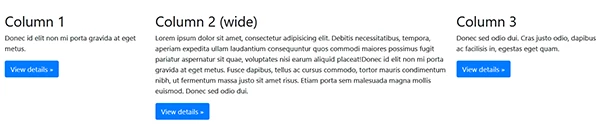
For 3 column layout, use this code in project pages.

<div class="container-fluid">

<div class="row">

<div class="col-md-3">

<h2>Column 1</h2>

<p>Donec id elit non mi porta gravida at eget metus.  </p>

<p><a class="btn btn-primary" href="#" role="button">View details &raquo;</a></p>

</div>

<div class="col-md-6">

<h2>Column 2 (wide)</h2>

<p>Lorem ipsum dolor sit amet, consectetur adipisicing elit. Debitis necessitatibus, tempora, aperiam expedita ullam laudantium consequuntur quos commodi maiores possimus fugit pariatur aspernatur sit quae, voluptates nisi earum aliquid placeat!Donec id elit non mi porta gravida at eget metus. Fusce dapibus, tellus ac cursus commodo, tortor mauris condimentum nibh, ut fermentum massa justo sit amet risus. Etiam porta sem malesuada magna mollis euismod. Donec sed odio dui. </p>

<p><a class="btn btn-primary" href="#" role="button">View details &raquo;</a></p>

</div>

<div class="col-md-3">

<h2>Column 3</h2>

<p>Donec sed odio dui. Cras justo odio, dapibus ac facilisis in, egestas eget quam. </p>

<p><a class="btn btn-primary" href="#" role="button">View details &raquo;</a></p>

</div>

</div>

</div>

2 replies

Nancy OShea
Community Expert
Nancy OSheaCommunity ExpertCorrect answer
Community Expert
April 2, 2018

For 3 column layout, use this code in project pages.

<div class="container-fluid">

<div class="row">

<div class="col-md-3">

<h2>Column 1</h2>

<p>Donec id elit non mi porta gravida at eget metus.  </p>

<p><a class="btn btn-primary" href="#" role="button">View details &raquo;</a></p>

</div>

<div class="col-md-6">

<h2>Column 2 (wide)</h2>

<p>Lorem ipsum dolor sit amet, consectetur adipisicing elit. Debitis necessitatibus, tempora, aperiam expedita ullam laudantium consequuntur quos commodi maiores possimus fugit pariatur aspernatur sit quae, voluptates nisi earum aliquid placeat!Donec id elit non mi porta gravida at eget metus. Fusce dapibus, tellus ac cursus commodo, tortor mauris condimentum nibh, ut fermentum massa justo sit amet risus. Etiam porta sem malesuada magna mollis euismod. Donec sed odio dui. </p>

<p><a class="btn btn-primary" href="#" role="button">View details &raquo;</a></p>

</div>

<div class="col-md-3">

<h2>Column 3</h2>

<p>Donec sed odio dui. Cras justo odio, dapibus ac facilisis in, egestas eget quam. </p>

<p><a class="btn btn-primary" href="#" role="button">View details &raquo;</a></p>

</div>

</div>

</div>

Nancy O'Shea— Product User & Community Expert
Known Participant
April 2, 2018

Thank you so much Nancy.

Is there any way to make column 2 wider?

Theo.

Nancy OShea
Community Expert
Community Expert
April 2, 2018

Bootstrap is a 12-box grid system.

col-nd-3 + col-md-6 + col-md-3 = 12

or  2 + 8 + 2 = 12

or 1 + 10 + 1 = 12

Use the col sizes that best fit your layout and add up to 12

Nancy O'Shea— Product User & Community Expert
Nancy OShea
Community Expert
Community Expert
April 2, 2018

Why are you using modal windows for your project pages?  Your page speed performance scores an F.

Latest Performance Report for: http://theosparks.co.uk/ | GTmetrix

A better approach would be to put projects on individual pages with whatever multi-column layout you wish to use. 

Also you have way too many (174) code errors.   You should fix those.

Showing results for http://theosparks.co.uk/ - Nu Html Checker

Nancy O'Shea— Product User & Community Expert