



hans-g.
Legend
Jan 22, 2020 4:15 PM UTC
Answered

Wechsel zwischen Entwurfs- und Codeansicht

DW Vers. 2015.3:

War da nicht früher die Möglichkeit in der Menüzeile (der unter dem Dateinamen) per Klick zwischen Entwurfs- und Codeansicht zu wechseln.
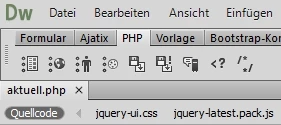


In meinem DW kann ich nur über Ansicht >>> Entwurf bzw. Ansicht >>> Code zwischen beiden wählen.
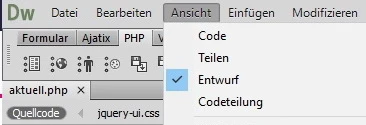
Ok, das ist nur ein Klick mehr, aber ich fand die Lösung früher einfacher.


Vielleicht ist die Lösung in den Einstellungen versteckt und ich habe sie nur nicht gefunden.

Danke schon mal für einen Hinweis.


Hans-Günter

This topic is closed to new replies. Start a new post to keep the conversation going.
Nancy OShea
Nancy OSheaCorrect answer
Community Expert
Jan 24, 2020 11:41 PM UTC

Hi Hans,

Which version of DW do you have open?

If you have DW CC 2017 or higher, go to Window > Toolbars.  You should see 3 options:  Document, Standard and Common.  The Document Toolbar shows Code | Split | Design/Live.


Nancy O'Shea— Product User & Community Expert

2 replies

Nancy OShea
Community Expert
Nancy OSheaCommunity ExpertCorrect answer
Community Expert
Jan 24, 2020 11:41 PM UTC

Hi Hans,

Which version of DW do you have open?

If you have DW CC 2017 or higher, go to Window > Toolbars.  You should see 3 options:  Document, Standard and Common.  The Document Toolbar shows Code | Split | Design/Live.


Translate
Nancy O'Shea— Product User & Community Expert
hans-g.
hans-g.Author
Legend
Jan 29, 2020 3:49 PM UTC

Hi Nancy,

please excuse me, I couldn't answer earlier.


You are right in the higher versions of DW I can find these options. Because of my problems with my issue displaying include files correctly, I prefer to use DW CC 2015 (!). It seemed to me as if this DW became changed provided in the above manner.


Many thanks

Hans-Günter

http://hansgd.de  ;-)))


Translate