


Weird "gutters" in page
Hi everyone! I'm currently working on a site and I've got a visual issue going on here. I'm trying to design it to fit the screen exactly width-wise while being scrollable lengthwise. I'm not very far into the design so things are still in the rough.
The issue I'm having is that the site is scrollable width-wise and has these tiny spaces showing- as if the background image doesn't fill the space... But it should as far as I know because its width is scaled to 100% of <body>, and my menu extends into the negative space. Is there something wrong with my meta-viewport? Is the padding in my menu pushing something?
I need to stop the horizontal scrolling and get rid of the weird gutter space on either side of the background image. Hope my description helps! I pasted code below!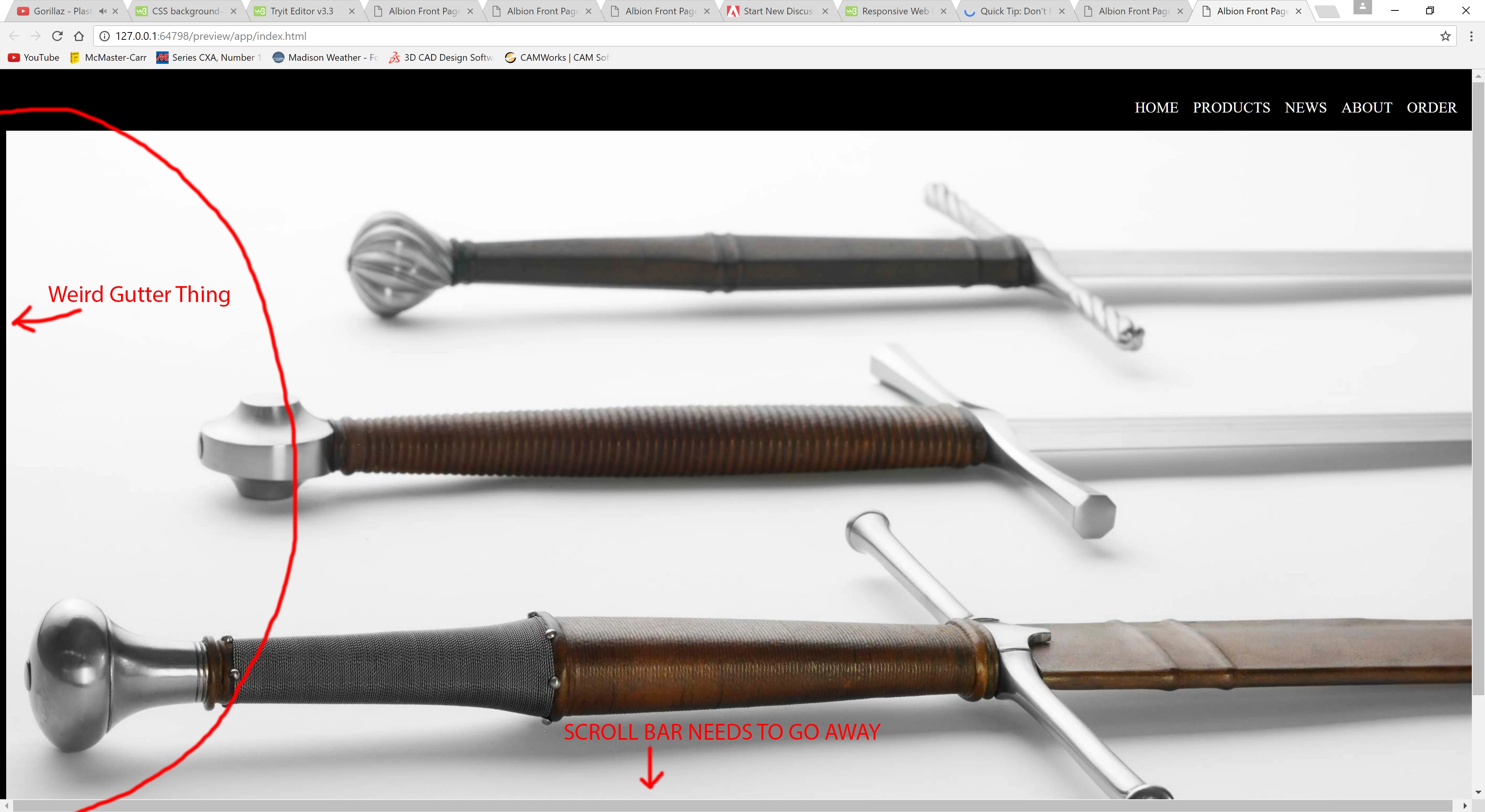
THE HTML
<!doctype html>
<html>
<head>
<meta charset="utf-8"></meta>
<title>Albion Front Page</title>
<meta name="viewport" content="width=device-width">
<!--Style_Sheet-->
<link href="Albion Front Page Style Sheet.css" rel="stylesheet" type="text/css">
</head>
<body style="position: absolute; width: 100%; background-image: image()">
<img src="images/AboutAlbionImage.jpg" width="100%" alt=""/><!--Header!-->
<header>
<!--Navigation_Menu-->
<nav>
<ul id="menu">
<li><a href="#" style="text-decoration: none">
<p> ORDER</p>
</a></li>
<li><a href="#" style="text-decoration: none">
<p> ABOUT</p>
</a></li>
<li><a href="#" style="text-decoration: none">
<p> NEWS</p>
</a></li>
<li><a href="#" style="text-decoration: none">
<p> PRODUCTS</p>
</a></li>
<li><a href="#" style="text-decoration: none">
<p style="text-decoration: none"> HOME</p>
</a></li>
</ul>
</nav>
</header>
<!--Main Content-->
<main>
<section class="hero"></section>
<section class="intro"></section>
</main>
<section class="artworks">
<article class="artwork">
<div class="artwork-piece">
<figure>image</figure>
</div>
<div class="artwork-description"></div>
</article>
</section>
</main>
<!--End Main Content-->
<!--Footer-->
<footer class="Feet"></footer>
<!--End Footer-->
</body>
</html>
THE CSS:
@charset "utf-8";
/* CSS Document */
html,
html* {box-sizing: border-box;
margin: 0;
padding: 0;}
body {
font-size: 1vw;
background: black;
text-decoration: none;
padding: 0em;
margin-top: 0em;
}
header {
position: fixed;
padding:0em;
z-index: 1000;
top: 0;
left: 0;
width: 100%;
text-decoration: none
}
nav {
z-index: 400;
top: 0;
left: 0;
opacity; .95;
background: #000000;
float: right;
display: inline-block;
width: 100%;
text-decoration: none;
position: fixed
}
menu {
height: 5%;
display: inline-block;
float: right;
text-decoration: none;
}
li{ text-decoration: none
display: inline-block;
float: right;
padding-right: 1%
}
a href{color: #FFFFFF;}
@11220649-face {
font-family:Centaur;
src: url('your_font.ttf');
}
p{color: white; text-decoration: none;}

 AdChoices