


Inspiring
February 27, 2023
Answered

What causes this new colored dot to appear in the source code?

Hi, all:


I see a new thing happening lately (running DW 21.2 on Mac OS Monterey).

While a page is open in DW, I find that sometimes, when I delete a related file in the list of local files, a strange colorful dot appears on the page's source code. (See my first attachment that shows what appeared when I made four repetitive deletions for testing purposes.)

 

The effect it causes can be seen in the next attachment.
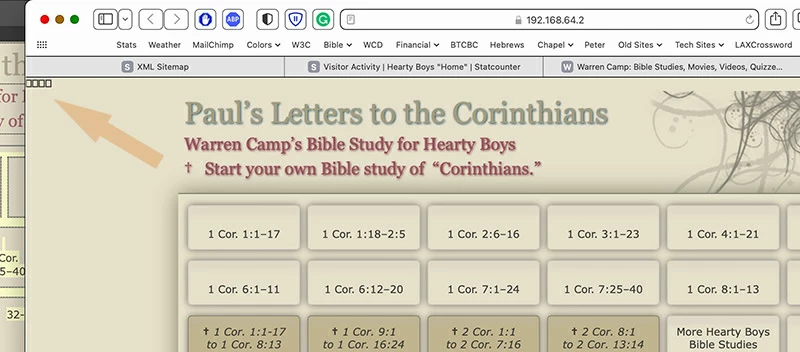
 

I want to prevent DW from creating these colorful dots in the source code that aren't easy to spot. They may be on saved pages without me realizing that they're there.


I tried copying/pasting on in the "Find field but DW doesn't recognize them as a character.


Have you seen these occurrences? Is there a way to prevent them? How can I find them on saved pages?


Wondering Warren

    This topic is closed to new replies. Start a new post to keep the conversation going.
    Nancy OShea
    Nancy OSheaCorrect answer
    Community Expert
    March 6, 2023

    Hi:


    I tried it twice on a new blank page. Both attempts created that red dot.


    I'll now try chatting with a technician using virtual assistant. . . Stay tuned.


    Do not talk to the Chat Bot.  In the Chat box type AGENT follwed by ENTER key.

    Wait for a human.


    Nancy O'Shea— Product User & Community Expert

    33 replies

    Nancy OShea
    Community Expert
    Community Expert
    February 27, 2023

    Never seen this either. 


    Are you copying & pasting content from other apps without stripping out unwanted junk code?


    When pasting from other apps, use Edit > Paste Special > Text Only or Text with Structure.


    Hope that helps.


    Translate
    Nancy O'Shea— Product User & Community Expert
    wcampAuthor
    Inspiring
    February 27, 2023

    Hi, Nancy:


    I'm careful with pasting text. These instances occur when I'm cleaning house or deleting unwanted files.

    Have you tried the TEST delete that I described?


    Just wondering. . .

    Translate
    Nancy OShea
    Community Expert
    Community Expert
    February 27, 2023

    No thanks. 

    I don't delete files until I'm certain I have no links to them.  Ctrl/Cmd + Shift +  F > Find All.


    Good site management requires careful planning. 😉


    Translate
    Nancy O'Shea— Product User & Community Expert
    Community Expert
    February 27, 2023

    I've personally never seen this happen on my DW mac version. How are you deleting the related file? What exact steps are you taking? Ie: Are you looking at the file explorer and deleting it? Are you deleting it via the Mac finder? Was the file in any way related to the code it is being inserted into?

    Translate
    wcampAuthor
    Inspiring
    February 27, 2023

    Hi, Ben:


    After reading your e-reply, I did a TEST delete, as follows.


    1. A page was already open in Code view. The blinking white cursor line was present at the last active location. It doesn't matter where.


    2. I selected a sample file from the Local list: my 404 page.


    3. With it selected, I deleted that file. When I deleted it, a colored dot appeared next to the blinking cursor character.


    It's that easy to create! Try it and let me/us know if it happens to you on your Mac.


    I seldom notice that I created those colored dots during my workflow. I hope to learn how to prevent such occurrences in the future, Ben. What do you suggest?

    Translate