Inspiring
Nov 22, 2019 12:19 AM UTC
Answered

What happened to the web safe color picker?!

It used to be when I opened the color picker and clicked on the "hex" option, it would give me swatches of web safe colors. Now it just gives me the same interface as the RGB one. Most of the time, I just want a basic red, gray, black, white, etc., but now I have to hunt and peck for the right color.

Anyway to get the simple swatches back?

This topic is closed to new replies. Start a new post to keep the conversation going.
anissa_thompson
anissa_thompsonCorrect answer
Community Expert
Dec 5, 2019 4:30 AM UTC

"And do keep in mind: Dreamweaver isn't a graphic design tool... "

Exactly. And that's why it should have a simple, basic color picker for CSS, not an advanced one.


Maybe there's a way to install a palette?


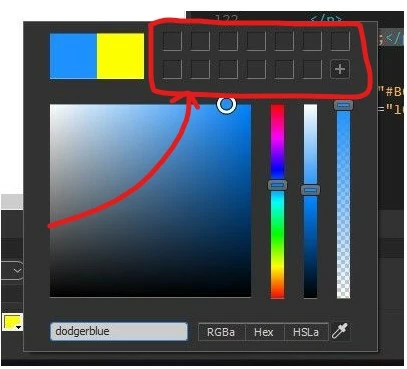
It's a round-about way, but you could use the same color picker to store up to 13 color swatches in the upper right corner: 


Hope this helps! Make sure to press "✔ Correct Answer" on this post if this answers your question. Happy Creating!Anissa • @anissat

7 replies

anissa_thompson
Community Expert
Community Expert
Nov 22, 2019 1:14 AM UTC

The color picker is actually pretty handy... Instead of hunting for a hex code, try typing in the exact color name you're looking for:


CSS names work too:


Translate
Hope this helps! Make sure to press "✔ Correct Answer" on this post if this answers your question. Happy Creating!Anissa • @anissat
tacticsAuthor
Inspiring
Nov 22, 2019 1:58 AM UTC

That's great if you know the name. But I don't think you can type in "purple that's not too dark and kind of bluish"...


Swatches still exist in Photoshop, so why not in DW?

Translate
anissa_thompson
Community Expert
Community Expert
Nov 22, 2019 2:37 AM UTC

For a quick reference you can use https://htmlcolorcodes.com/color-names/ to see some of the most common names.

When I need a quick & easy larger color picker, I hit Google: https://www.google.com/search?q=hex+color+picker, or use Dreamweaver's Assets: Color Panel and/or CC Libraries to store the colors I need.


And do keep in mind: Dreamweaver isn't a graphic design tool... 

Translate
Hope this helps! Make sure to press "✔ Correct Answer" on this post if this answers your question. Happy Creating!Anissa • @anissat
Nancy OShea
Community Expert
Community Expert
Nov 22, 2019 1:12 AM UTC

I use the CSS code hints for color swatches.  See screenshot.


Back when people still used VGA displays that only supported 256 colors, we needed web safe colors.  These days, everyone has  support for 16+ million true colors.  So web safe color swatches are irrelevant.


Translate
Nancy O'Shea— Product User & Community Expert