

Participant
March 21, 2017
Answered

Whats happening here?

  • March 21, 2017
  • 1 reply
  • 417 views

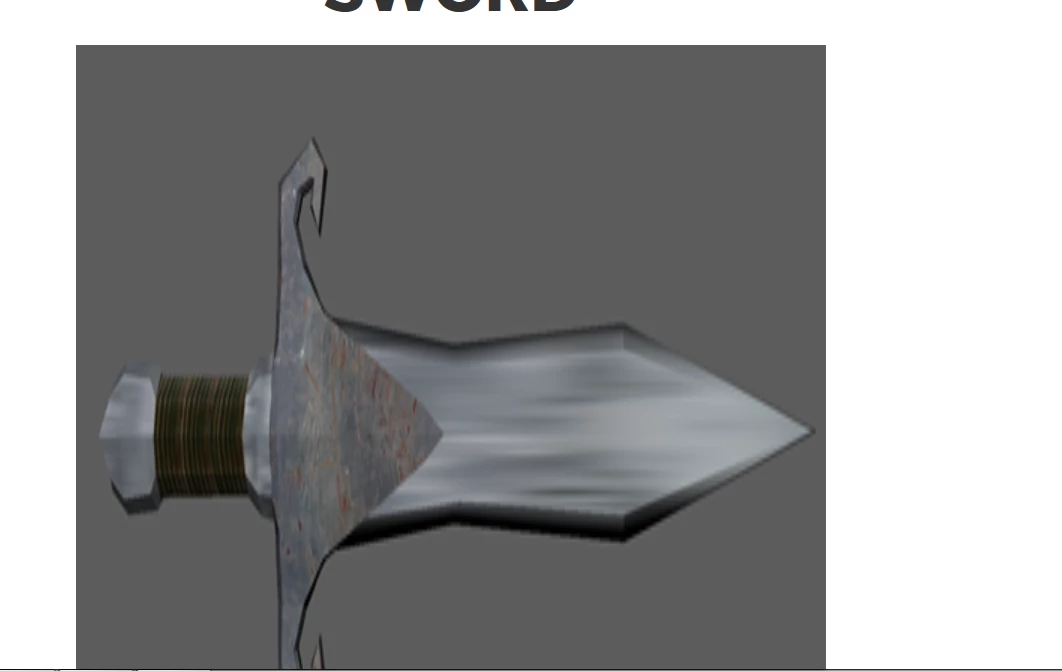
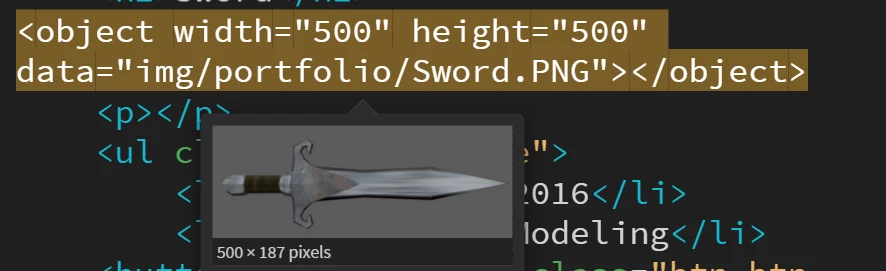
Ok so I have an image(top) in my portfolio scaled it weird, but I scaled the image down (bottom)and it still looks the same
This topic has been closed for replies.
Correct answer BenPleysier

The intrinsic dimensions of the image are 500 x 187 pixels. When you change these dimensions to read 500 x 500, then you are changing the height/width ratio resulting in a distorted image.

Also not sure why you are using OBJECT to embed the image. Although this is correct usage, it may be better to have a look at using the IMG tag.

1 reply

BenPleysier
Community Expert
BenPleysierCommunity ExpertCorrect answer
Community Expert
March 21, 2017

The intrinsic dimensions of the image are 500 x 187 pixels. When you change these dimensions to read 500 x 500, then you are changing the height/width ratio resulting in a distorted image.

Also not sure why you are using OBJECT to embed the image. Although this is correct usage, it may be better to have a look at using the IMG tag.

Wappler is the DMXzone-made Dreamweaver replacement and includes the best of their powerful extensions, as well as much more!
Participant
March 21, 2017

So where would I put the IMG tag?

Jon Fritz
Community Expert
Community Expert
March 21, 2017

Rather than using <object> you would use <img> as in...

<img src="image/portfolio/Sword.PNG" alt="a sword">

...you then add css to your stylesheet to control the image width...

img[alt="a sword"] {

     max-width:500px;

}

The max-width setting of 500 pixels will allow the image to scale up to 500 pixels wide (with the height being calculated automatically using the image's own aspect ratio), it will scale down with its parent element in smaller screens if that parent element is set to a % or VW/VH setting.

HTML tutorial: http://www.w3schools.com/html
CSS tutorial: http://www.w3schools.com/css

DW really assumes you have both under your belt to work with it efficiently.

