Participating Frequently
Nov 29, 2016 2:52 PM UTC
Answered

When using split view in CC 2017, code is very slow to respond

I use Dreamweaver CC 2017 in split view code-design.  When I open a file, the design section is immediately active, but the code section is frozen and takes a long time before it is responsive.  I can make changes in the design section, but they do not appear in the code.  I cannot make changes directly to the code until the file has been open for about a minute.  Any suggestions?

    This topic is closed to new replies. Start a new post to keep the conversation going.
    Nancy OShea
    Nancy OSheaCorrect answer
    Community Expert
    Dec 2, 2016 4:24 PM UTC

    The local site folder on the primary hard drive the same as DW.

    The sleep mode is disabled.

    I am running Windows 10 Professional (x64) Version 1607, Core i5 processor, 8GB ram.

    Intel(R) HD Graphics 4600

    Charles


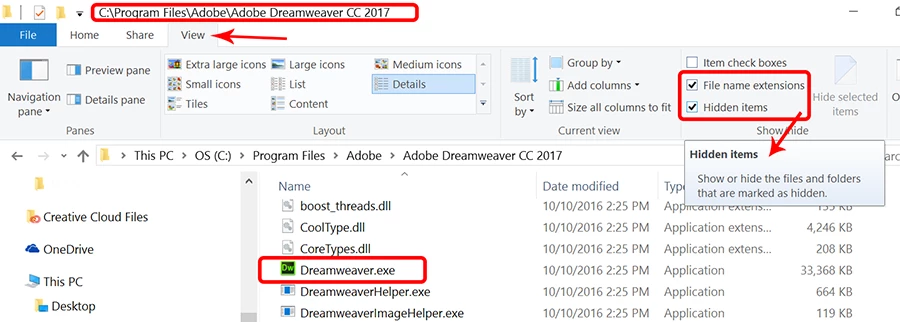
    In your File Manager, show Hidden Items (see screenshot).

    Nancy O'Shea— Product User & Community Expert

    11 replies

    Preran
    Legend
    Nov 29, 2016 3:34 PM UTC

    Can you try the solutions in DIY troubleshooting kit for Dreamweaver  and let us know if they helped?

    Thanks,

    Preran

    Translate
    chk3273Author
    Participating Frequently
    Nov 29, 2016 5:19 PM UTC

    I don't know which issues I am supposed to try.

    Charles

    Translate
    Nancy OShea
    Community Expert
    Community Expert
    Nov 29, 2016 5:53 PM UTC

    Start with Crashes & Freezes .

    Also it might be prudent to check your code for validation errors just in case that's causing code view to choke.

    Go to Window > Results > Validation.

    Click the large triangle to check current document.

    Fix any reported errors and save your file.

    Nancy

    Translate
    Nancy O'Shea— Product User & Community Expert