This topic has been closed for replies.
Correct answer Jon Fritz

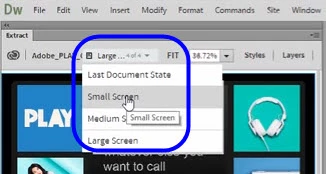
I think you misunderstand what that screenshot is showing. It's not a "preview your document in 3 sizes" menu. That is the Document State menu which is populated by your PS Layer Comps.

The designer of the PS file being used in Extract in your screen shot labeled their Layer Comps Small Screen, Medium Screen and Large Screen.

Page 4 of this document explains how to make Layer Comps in PS http://art.gcc.mass.edu/docs/art263/comps.pdf

Once you upload a PSD with Layer Comps, you'll have the option to view each.

1 reply

Community Expert
January 31, 2017

That feature, called Extract, has been around in DW for a little while now.  I believe since the original CC releases if my memory serves me well.  Here's a link to the Adobe article about how it is used.  If you have any specific questions about how it works feel free to post back.

How to extract assets from PSD files into Dreamweaver web pages

Participant
January 31, 2017

I mean to say i have DWcc 2015.1 and i did not found only the highlight(in screen shot) feature to check the PSD in three modes. i can see only desktop view of PSD file.

Jon Fritz
Community Expert
Jon FritzCommunity ExpertCorrect answer
Community Expert
January 31, 2017

I think you misunderstand what that screenshot is showing. It's not a "preview your document in 3 sizes" menu. That is the Document State menu which is populated by your PS Layer Comps.

The designer of the PS file being used in Extract in your screen shot labeled their Layer Comps Small Screen, Medium Screen and Large Screen.

Page 4 of this document explains how to make Layer Comps in PS http://art.gcc.mass.edu/docs/art263/comps.pdf

Once you upload a PSD with Layer Comps, you'll have the option to view each.