Known Participant
December 8, 2016
Answered

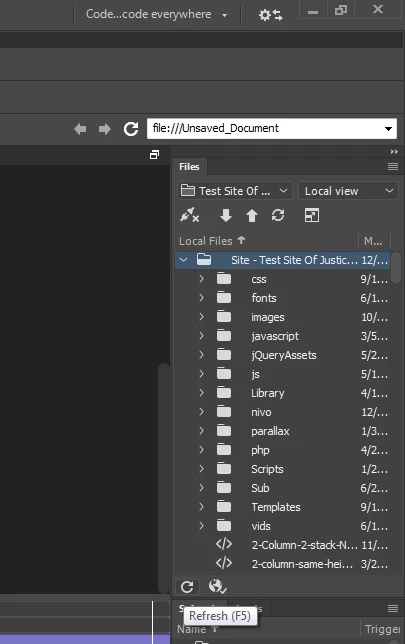
Where is the site window refresh button in Dreamweaver 2017?

in Dreamweaver 2017 I can't find a refresh button on the site files.  Previous versions had both a sync button and a refresh button. This only has a sync button. How can I refresh without a refresh button?  I've had to quit the whole program and reopen it to get images I just put there to show up.  I used to just be able to hit the refresh button. Is it hidden somewhere?

    This topic is closed to new replies. Start a new post to keep the conversation going.
    Jon Fritz
    Jon FritzCorrect answer
    Community Expert
    December 8, 2016

    It's on the bottom left of the Files window...

    It's hard to see, but it's also in the bottom left of the Expanded window too.

    6 replies

    Nancy OShea
    Community Expert
    Community Expert
    December 8, 2016

    Are you working in a defined local site folder?  That's really important.

    Images appear instantly for me.  And I save my work often with Ctrl+S so no problems.   The keyboard shortcut on Windows is F5 to Refresh.

    Nancy

    Translate
    Nancy O'Shea— Product User & Community Expert
    elhzAuthor
    Known Participant
    December 8, 2016

    I was in a defined local site folder but I have an old slow computer so things sometimes take a while to show up. John Fritz answered the question of where they put the button.

    Translate
    Jon Fritz
    Community Expert
    Jon FritzCommunity ExpertCorrect answer
    Community Expert
    December 8, 2016

    It's on the bottom left of the Files window...

    It's hard to see, but it's also in the bottom left of the Expanded window too.

    Translate
    elhzAuthor
    Known Participant
    December 8, 2016

    Now I see it.  I was looking for it at the top where it used to be  Thanks!

    Translate
    Jon Fritz
    Community Expert
    Community Expert
    December 8, 2016