
martinr82627281
Participant
September 21, 2018
Answered

Where is the yellow Syntax Bar?

  • September 21, 2018
  • 1 reply
  • 432 views

So far I have always worked with the DW 2014 version because I always liked this yellow info bar on the top:
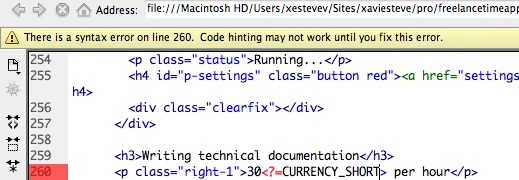
In DW 2018 the Infobar is gone away. I know about Linting but I do not want to see any small javascript error (for example "expected '===" instead of '==') .

I just want to know if the code is basically okay and has not syntax errors. Therefore my question: How can I get this InfoBar back?

    This topic has been closed for replies.
    Correct answer B i r n o u

    so now the yellow bar is down the document window

    you can also edit the linting prefs, going to the text file and edit as you like your code to be controlled...

    please let know if you need further explanation

    1 reply

    B i r n o u
    B i r n o uCorrect answer
    Legend
    September 21, 2018

    so now the yellow bar is down the document window

    you can also edit the linting prefs, going to the text file and edit as you like your code to be controlled...

    please let know if you need further explanation

    martinr82627281
    Participant
    October 17, 2018

    Thank you. Where could I find infos about the liniting prefs and its text file? there are many entries and I don't know what it means. for example:

            "array-bracket-newline": 0,

            "array-bracket-spacing": 0,

    martinr82627281
    Participant
    October 17, 2018

    I just want to have syntax errors, not infos like (you did not use function etc.)