denisl529635
Participant
May 17, 2018
Answered

Where's .navbar-default??

  • May 17, 2018
  • 1 reply
  • 524 views

Yesterday as I built a responsive menu I deleted the <div. col-sm-12> and inserted and nested the "Basic Menu" it all worked perfectly.  Today, I do the exact same thing and now instead of showing "nav .navbar .navbar-default" it reads <nav class="navbar navbar-expand-lg navbar-light bg-light">.  How do I work with this... I'm still learning the 2018 release and no where in the book does it tell me how to continue with this new code.  HELP!!!!

This topic has been closed for replies.
Correct answer BenPleysier

Your first version uses Bootstrap 3, see Bootstrap Navigation Bar

The second version uses Bootstrap 4, see Bootstrap 4 Navigation Bar

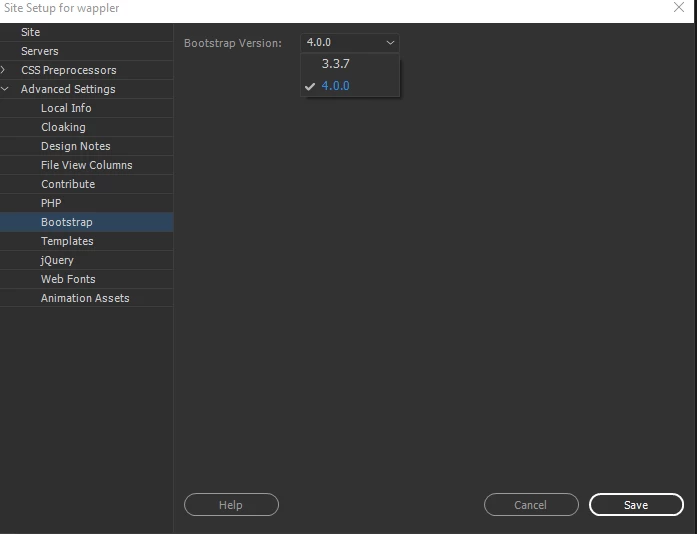
You need to set your project to use the version of Bootstrap that you wish to use. In Site Setup as per

1 reply

BenPleysier
Community Expert
BenPleysierCommunity ExpertCorrect answer
Community Expert
May 17, 2018

Your first version uses Bootstrap 3, see Bootstrap Navigation Bar

The second version uses Bootstrap 4, see Bootstrap 4 Navigation Bar

You need to set your project to use the version of Bootstrap that you wish to use. In Site Setup as per

Wappler is the DMXzone-made Dreamweaver replacement and includes the best of their powerful extensions, as well as much more!
denisl529635
Participant
May 18, 2018

Thank you so much!!