shrimpnewsinternational
Participant
June 27, 2020
Answered

Where's the Date Modified Column in DW 2020?

  • June 27, 2020
  • 1 reply
  • 584 views

Where's the Date Modified Column in DW 2020's Files Window?

    This topic has been closed for replies.
    Correct answer Nancy OShea

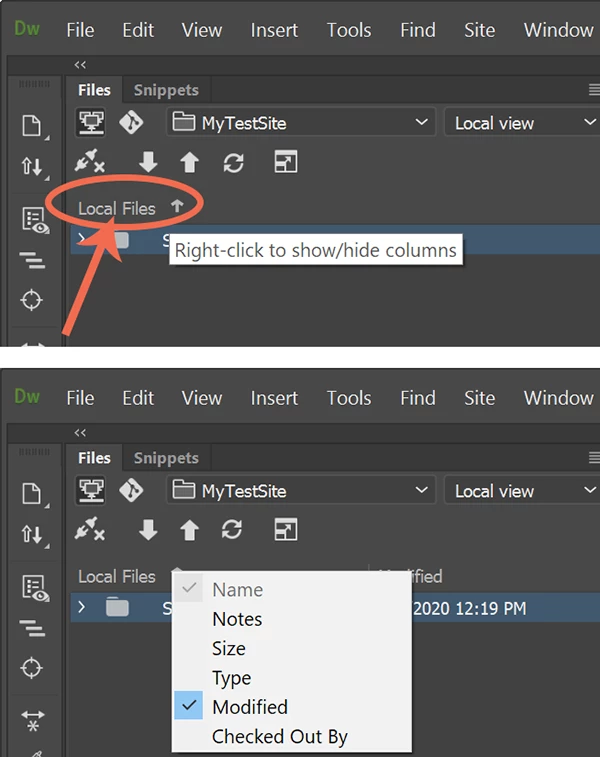
    Open Files Panel (F8). 

    Right-click to show context menu.  See screenshots.
     

    1 reply

    Nancy OShea
    Community Expert
    Nancy OSheaCommunity ExpertCorrect answer
    Community Expert
    June 27, 2020

    Open Files Panel (F8). 

    Right-click to show context menu.  See screenshots.


    Nancy O'Shea— Product User & Community Expert
    shrimpnewsinternational
    Participant
    June 28, 2020

    Hi Nancy,


    Thanks, you nailed it.  Why does Adobe make it so difficult to find that feature?  In my previous version of DW 2020, it was an invisible spot to the right of the words "Local Files".  Hmmmm....  I really got excited when I saw "Size" in the right-click, drop-down menu, hoping that I would be able to increase the size of the type in the Files Panel.  Yes, I'm an old guy with declining vision and have to use a magnifying with the Files Panel.  Adobe should be ashamed of itsself for not taking its original uses into consideration when it designs its software.

    Nancy OShea
    Community Expert
    Community Expert
    June 28, 2020

    As someone who went from 20/1440 (clinically blind) vision to 20/15, I fully appreciate what you're struggling with.  To increase text size in app menus, you have to go to your operating system's display settings.  


    Nancy O'Shea— Product User & Community Expert