July 21, 2021
Answered

White gap appears to left of SVG image.

  • July 21, 2021
  • 3 replies
  • 449 views

I am getting so sick of things not doing what I tell it to. I could just scream! Why dows DW no do what I tell it to do? Why do I keep getting a white gap to the left of my SVG image?


Seriously,what is the point? I have put a border of the same colour - nothing changes,

I have expented the width by 10 px (It's a 2,000px image) - & oh look at that, what a shock, nothing changes.


Oh hang on, no wait, that's right, it's not a hock becaue don't aything dare make my life just that little bit easer! 


.image_container{
	background-image:url("../assets/banners_borders/sludge_bottom.svg");
	background-repeat: no-repeat;
	height: 200px;
	background-size: cover;
	width: 100%;
}


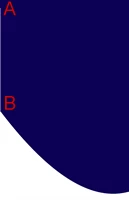
As you seein the image below, start at the top left corner, you can see a slight indent in the blue & the next thing that doesn;t do what I am blatantely obviously telling it to do, is going to have an axe put throygh it. 


Why?!

This topic has been closed for replies.
Correct answer B i r n o u

this gives the impression that the coordinates of the point at the top left (A), differs (on the x-axis) by 1 point, from the point at the bottom left (B).
said differently the right of the left part of your vector shape (AB), is not a pure vertical parallel to the ordinate axis.
correct your vector shape, (by moving the B point 1 pixel to the left), then export a new SVG, and check if the 'blur' left effect still appears ?

3 replies

July 21, 2021

Nancy,


I think you need to take a leaf out of Birnou's book here, s/he has actually come up with a fesaable solution. I'm not saying it works as I have not tried this yet, but his/her time was clearly better spent coming up with a possible solution than the time you have spent in writing your reply. Unless you actually have a contribution to this discussion, then cease from following this thread   

Nancy OShea
Community Expert
Community Expert
July 21, 2021
quote

I am getting so sick of things not doing what I tell it to. I could just scream! Why does DW not do what I tell it to do?

=============

@18187696 

I don't know what any of this has to with Dreamweaver.  This is obviously a coding issue.  Screenshots and partial code fragments tell us nothing, sorry.  Kindly upload your work to a public server you control and post the URL to your online page here for us to examine. 


A distant 2nd & much less preferable option would be to post your entire code in a web forum reply.  Hopefully another unpaid forum volunteer with some free time will come by and reconstruct it for you.


Nancy O'Shea— Product User & Community Expert
B i r n o u
B i r n o uCorrect answer
Legend
July 21, 2021

this gives the impression that the coordinates of the point at the top left (A), differs (on the x-axis) by 1 point, from the point at the bottom left (B).
said differently the right of the left part of your vector shape (AB), is not a pure vertical parallel to the ordinate axis.
correct your vector shape, (by moving the B point 1 pixel to the left), then export a new SVG, and check if the 'blur' left effect still appears ?