higgsyd
Inspiring
June 22, 2017
Answered

Why am I not seeing line numbers highlighted in red for lines which have errors?

  • June 22, 2017
  • 4 replies
  • 1132 views

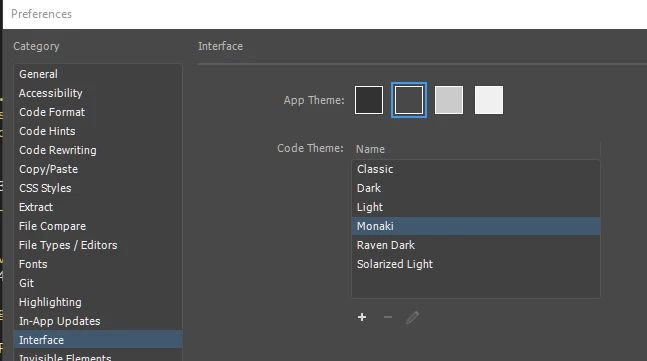
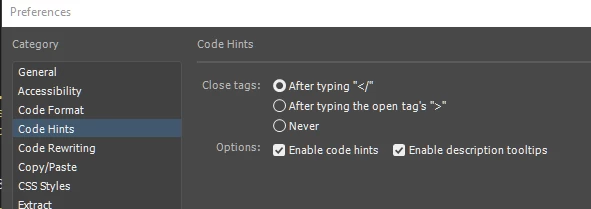
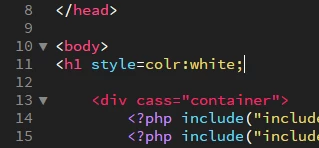
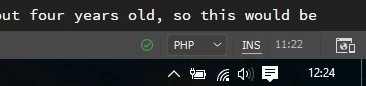
Saw a recent discussion here which showed errors in the html being highlighted by showing the line numbers in red.  I have two syntax errors below but no red highlighting.  I have "Enable code hints" checked.. Is there a setting/s I am missing? I am on 2017.5  I am working with a defined site and the Monaki theme. Is that green tick showing in the bottom-right corner of my screen suggesting all is ok?

thanks
This topic has been closed for replies.
Correct answer higgsyd

thanks everyone.  I save all my files as .php so have never seen this highlighting!.  I just saved one as .html and now I see the red highlighting OK.  All my pages in my present site are saved as .php  I did this because I always use  <?php include...  statements (to bring in common code), and, unless I am wrong, the includes will not work if they appear in a normal .html page  many thanks, Dave

4 replies

higgsyd
higgsydAuthorCorrect answer
Inspiring
June 22, 2017

thanks everyone.  I save all my files as .php so have never seen this highlighting!.  I just saved one as .html and now I see the red highlighting OK.  All my pages in my present site are saved as .php  I did this because I always use  <?php include...  statements (to bring in common code), and, unless I am wrong, the includes will not work if they appear in a normal .html page  many thanks, Dave

Jon Fritz
Community Expert
Community Expert
June 22, 2017

That is correct, unless you modify your server to parse php within .html pages, php scripts and includes won't work within a .html page.

If you're just looking for something that will list html errors in your final output page, use File > Validate > Current Document W3C, or enter your page address (or the full source code) into the form at http://validator.w3.org/nu

higgsyd
higgsydAuthor
Inspiring
June 24, 2017

thanks John, yes I do use the W3C validation service.  How would I go about "modify your server to parse php within .html pages"? Can do that with my xampp?

Jon Fritz
Community Expert
Community Expert
June 22, 2017

Oops, I didn't notice that first image you posted showed PHP in the language dropdown.

Linting is only available for .html, .css and .js file extensions. If you have a .php page, it won't work there.

Legend
June 22, 2017

https://forums.adobe.com/people/Jon+Fritz+II  wrote

Oops, I didn't notice that first image you posted showed PHP in the language dropdown.

Linting is only available for .html, .css and .js file extensions. If you have a .php page, it won't work there.

That's why its mostly rubbish, most programs have poor support for code errors because linting is not supported fully in multi-language pages. Some have a stab at it and get bits right but you cant rely on it.

Jon Fritz
Community Expert
Community Expert
June 22, 2017

I haven't bothered with Linting since Adobe switched it to firing only on save.

If I'm being forced to save the document to see issues, I'd rather use actual validation tools that follow the specs than the Linter and its "not actually errors" error highlighting.

Jon Fritz
Community Expert
Community Expert
June 22, 2017

Is your Linting turned on?

Go to Edit > Preferences > Linting to make sure the Enable Linting box is checked.

If it is checked, Inayal may be right...

In previous versions of DW where linting was available, it would fire on open, edit and save of the document. You would see your linting warnings in real time. The latest version of DW only fires on document save so you won't be warned about possible errors until after they're part of a saved document.

Participating Frequently
June 22, 2017

I think your document is not saved. Please try saving document and then you should see line numbers in red.