higgsyd
Inspiring
September 22, 2017
Answered

Why can I not move an image up the page?

  • September 22, 2017
  • 1 reply
  • 405 views

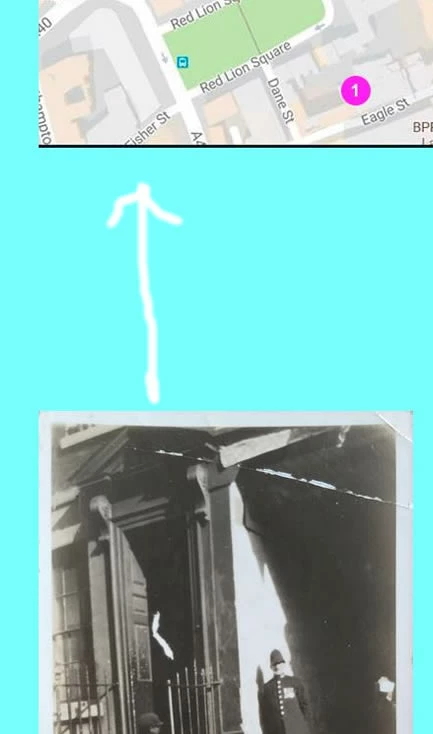
I have floated left the other images on this page but cannot get the image of the policeman to float up and sit beneath the map image.  I have tried adding a float left but it doesn't fix it.  The policeman image img tag was originally surrounded by a div tag which I found stretched right across the page because it was a block element and I thought that was stopping it moving up but removing the div tag didn't fix it either. - any ideas you clever people?  Here is the page in question

http://v33.ancestry.higgsy.co.uk/street_harpur_mews.php

How I want it moved up:

Many thanks in anticipation...

This topic has been closed for replies.
Correct answer osgood_

Think about the structure of your page, you have 2 columns, so code 2 columns.

Below is the 'content' section coded into 2 columns (shown in red):

<div class="content">

<h2 class="centered_text">Harpur Mews</h2>


<div class="content_col_1">

<img src="http://v33.ancestry.higgsy.co.uk/archive/map5a.jpg" alt="" width="720" height="955" class="fltlft_margin_RB"/>


<img src="http://v33.ancestry.higgsy.co.uk/archive/744_Policeman_in_Harpur_Mews_w380.jpg" width="380" height="651" alt=""/><br/>

<span class="archive_text">Archive:</span> 744


</div>

<!-- end content_col_1 -->


<div class="content_col_2">


<div><img src="http://v33.ancestry.higgsy.co.uk/archive/streets/755_Dombey St Harpur Mews 2013-06-27 15.29.55_w380.jpg" width="380" height="509" alt=""/><br/>

<p class="para_width"><span class="archive_text">Archive:</span>

755 Harpur Mews. This is on the south side of Dombey Street. The old pictures below show a street party in this mews to celebrate the king's anniversary in 1936</p></div>


<div class="fltlft_margin_RB"><img src="http://v33.ancestry.higgsy.co.uk/archive/streets/756_Dombey St Harpur Mews 2013-06-27 15.30.07_w380.jpg" width="380" height="509" alt=""/><br>

<span class="archive_text">Archive:</span> 756 A closer look...</div>


</div>

<!-- end content_col_2 -->

<div class="clear_float spacer">

<hr/>

</div>

<!-- end clear_float -->

</div>

<!-- end .content -->

Add the below css selectors to your css stylesheet:

.content_col_1 {

float: left;

width: 720px;

}

.content_col_2 {

float: left;

width: 380px;

margin-left: 25px;

}

1 reply

osgood_Correct answer
Legend
September 22, 2017

Think about the structure of your page, you have 2 columns, so code 2 columns.

Below is the 'content' section coded into 2 columns (shown in red):

<div class="content">

<h2 class="centered_text">Harpur Mews</h2>


<div class="content_col_1">

<img src="http://v33.ancestry.higgsy.co.uk/archive/map5a.jpg" alt="" width="720" height="955" class="fltlft_margin_RB"/>


<img src="http://v33.ancestry.higgsy.co.uk/archive/744_Policeman_in_Harpur_Mews_w380.jpg" width="380" height="651" alt=""/><br/>

<span class="archive_text">Archive:</span> 744


</div>

<!-- end content_col_1 -->


<div class="content_col_2">


<div><img src="http://v33.ancestry.higgsy.co.uk/archive/streets/755_Dombey St Harpur Mews 2013-06-27 15.29.55_w380.jpg" width="380" height="509" alt=""/><br/>

<p class="para_width"><span class="archive_text">Archive:</span>

755 Harpur Mews. This is on the south side of Dombey Street. The old pictures below show a street party in this mews to celebrate the king's anniversary in 1936</p></div>


<div class="fltlft_margin_RB"><img src="http://v33.ancestry.higgsy.co.uk/archive/streets/756_Dombey St Harpur Mews 2013-06-27 15.30.07_w380.jpg" width="380" height="509" alt=""/><br>

<span class="archive_text">Archive:</span> 756 A closer look...</div>


</div>

<!-- end content_col_2 -->

<div class="clear_float spacer">

<hr/>

</div>

<!-- end clear_float -->

</div>

<!-- end .content -->

Add the below css selectors to your css stylesheet:

.content_col_1 {

float: left;

width: 720px;

}

.content_col_2 {

float: left;

width: 380px;

margin-left: 25px;

}

higgsyd
higgsydAuthor
Inspiring
September 23, 2017

Many thanks I osgood that worked a treat you have certainly gave given me a good idea about how to split the page vertically I never have seen that technique before ,thanks again David