
Known Participant
May 11, 2020
Question

Why can't I change the color of my SVG graphic?

  • May 11, 2020
  • 3 replies
  • 882 views

Is there some valid reason as to why Dreamwever is refusing to allow me to change to color on my SVG grapic despte this being the correct colour when created in Illustrator and before I copy and paste it into my HTML document?


This its the SVG code:

<svg id="Layer_9" data-name="Layer 9" xmlns="http://www.w3.org/2000/svg" viewBox="0 0 842.89 125.04"><defs><style>.cls-1{fill:#e0dddd;}</style></defs><path class="cls-1" d="M841.89,354.53H0V277.15c290.88,4.39,589-107.15,841.89,0Z" transform="translate(0.5 -229.99)"/></svg>

 The colour code asper the snippet above is 

#E0DDDD

and this is the result I get a blur color.


I am getting absolotly bloody sick of this software doing what it wants to. I'm the user, I if tell it change the color, I expect it to change the bloody color! 
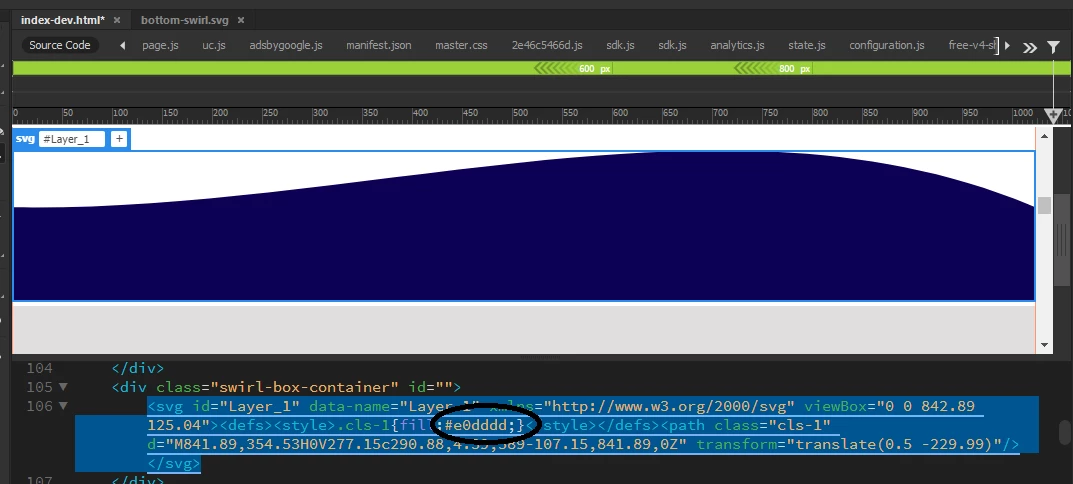
 

    This topic has been closed for replies.

    3 replies

    Nancy OShea
    Community Expert
    Community Expert
    May 11, 2020

    "I am getting absolotly bloody sick of this software doing what it wants to."

    Don't blame Dreamweaver for your malformed code.  If you don't clean it up first, that code will fail in all editors.


    How to hand code SVG

    https://webdesign.tutsplus.com/tutorials/how-to-hand-code-svg--cms-30368


    Nancy O'Shea— Product User & Community Expert
    Legend
    May 11, 2020

    Why not just add the fill to the path:


    <svg xmlns="http://www.w3.org/2000/svg" viewBox="0 0 842.89 125.04">
    <path fill="#e0dddd" d="M841.89,354.53H0V277.15c290.88,4.39,589-107.15,841.89,0Z" transform="translate(0.5 -229.99)"/>
    </svg>


    OR


    <svg xmlns="http://www.w3.org/2000/svg" viewBox="0 0 842.89 125.04">
    <path class="cls-1" d="M841.89,354.53H0V277.15c290.88,4.39,589-107.15,841.89,0Z" transform="translate(0.5 -229.99)"/>
    </svg>


    Then add the css outside of the svg in either a linked stylesheet or embedded in the <head></head> section of the page:


    <style>

    .cls-1 {

    fill: #e0dddd;

    }

    </style>

    BenPleysier
    Community Expert
    Community Expert
    May 11, 2020

    Illustrator does not have a clue about HTML/CSS


    The proper code for the graphic:

    <svg id="Layer_9" data-name="Layer 9" xmlns="http://www.w3.org/2000/svg" viewBox="0 0 842.89 125.04">
    	<path class="cls-1" d="M841.89,354.53H0V277.15c290.88,4.39,589-107.15,841.89,0Z" transform="translate(0.5 -229.99)" />
    </svg>
    

    the CSS for the graphic:

    .cls-1 {
    	fill: #e0dddd;
    }
    

    The CSS can be put in the head section of the page or in another document. The colour can be changed to suit.

    Wappler is the DMXzone-made Dreamweaver replacement and includes the best of their powerful extensions, as well as much more!