sonofmrsnak
Inspiring
November 3, 2016
Answered

Why can't I enable file view mode to see files by date?

  • November 3, 2016
  • 2 replies
  • 1262 views

Have been using 2015, and now am attempting to use 2017. I see that Adobe eliminated the expanded local file view menus on initial view, but even though ftp is connected and I would assume that "server" is "enabled" (I can upload files), I can't for the life of me figure out how to enable the option to view files by date. The FAQ is no help, as it appears to leave out information that Adobe assumes I know.

What am I missing?

    This topic has been closed for replies.
    Correct answer Jon Fritz

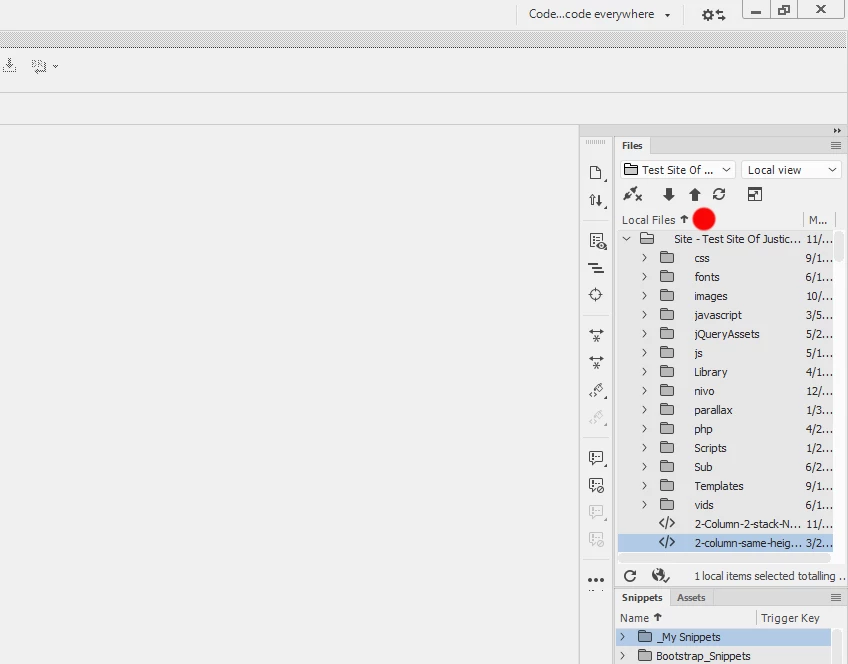
    Are you saying nothing happens when you right click where the red dot in the screenshot is, or are you trying somewhere else?

    2 replies

    Nancy OShea
    Community Expert
    Community Expert
    November 3, 2016

    Right click on the bar next to Local Files.  Select desired headers from drop list.

    Nancy O.

    Nancy O'Shea— Product User & Community Expert
    sonofmrsnak
    Inspiring
    November 3, 2016

    Thanks!

    Since Adobe didn't put any icon there, I never would have found this. Never would have ever thought to try this. What they needed to have done is place a menu icon up above.

    I did go back and re-read the FAQ, and missed the added text under the illustration, which is quite ambiguous. I would have added a "right click" notation in the illustration. Still not a good thing that you need to read an FAQ for a simple function like this.

    Nancy OShea
    Community Expert
    Community Expert
    November 3, 2016

    I think headers should be turned on by default instead of making people hunt for them.

    Nancy O'Shea— Product User & Community Expert
    Jon Fritz
    Community Expert
    Jon FritzCommunity ExpertCorrect answer
    Community Expert
    November 3, 2016

    Are you saying nothing happens when you right click where the red dot in the screenshot is, or are you trying somewhere else?