Known Participant
April 1, 2017
Answered

Why does Bootstrap in DW not conform to Bootstrap's default CSS classes?

  • April 1, 2017
  • 9 replies
  • 965 views

I would like to ask Adobe WHY their bootstrap starter templates are not conforming with bootstrap's default css classes?

It took some time to figure out why I could not write into the template as I would via a normal code editor. EG: why is .col-md-6 suddenly .span6 ?? I use Dreamweaver because it is wysiwig.. no other reason.

This customising is totally unacceptable as it will totally confuse those who look to the bootstrap documentation for a deeper understanding.

I am moving further away from using Adobe all the more. The apps are no longer reliable. Trying to tie people into the specific app is not community friendly at all!!

An answer from the Adobe Dev team would be appreciated.

Thanks

This topic is closed to new replies. Start a new post to keep the conversation going.
Correct answer Nancy OShea

Thank you Nancy,

Open the basic marketing site. That was the one I used. I just compared that one to the portfolio template. The portfolio seems correct but the basic marketing uses span4  (??)

Take a peek and let me know if I am totally nuts.


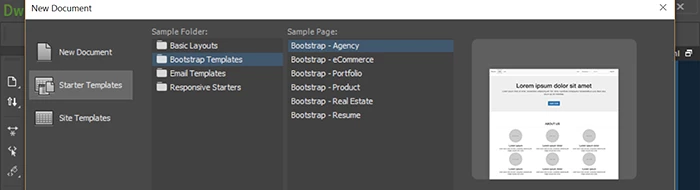
Of the Bootstrap Templates, I have only these:

The other Layout Folders are not Bootstrap.

9 replies

Nancy OShea
Community Expert
Community Expert
April 1, 2017

MichelleDiamond  wrote

An answer from the Adobe Dev team would be appreciated.

Don't count on it.  This is a user-to-user forum.  Adobe developers don't read these posts.  And even if they did, they wouldn't comment   If you want to communicate directly with developers then submit a bug/feature request.  If you're reporting a bug, be sure to include all information so they can reproduce it at their end.  And don't expect a reply.  They rarely send a follow-up unless they need more info.

Nancy

Nancy O'Shea— Product User & Community Expert
Nancy OShea
Community Expert
Community Expert
April 1, 2017

Which Bootstrap starter template are you opening?

As far as I've seen, the BS classes in the starter templates are pretty much as expected

Nancy

Nancy O'Shea— Product User & Community Expert
Nancy OShea
Community Expert
Community Expert
April 1, 2017

DW is not WYSIWYG.  And if you think you can use Bootstrap without some coding skills, you're woefully mistaken.   I will go even further and say that if you can't code, you should not be using DW.  Switch to Adobe Muse.

Dreamweaver is aimed at designers who can & want to work with code.

Muse is aimed at non-coders.  All that ease of use comes at a price though.  If you need to work with code, it's difficult to access.  And if you export to HTML and open your Muse project in a code editor, you won't like what you see.  The code that Muse generates is awful.

Nancy

Nancy O'Shea— Product User & Community Expert
Known Participant
April 1, 2017

Hello Nancy,

I find you remarks rather rude.

I dont use Muse.

I dont use dreamweaver as a designer either. It simply helps me see more or less what I am doing.. Maybe WYSIWIG was the wrong term.

Im busy shutting down so will get back to this in the morning.

To give you an idea.

I added one row in a container with two columns set to col-md-6. Instead of being side by side they stacked. The bootstrap class was not recognised by the css files that were auto generated by DW.

I will check again, and if I am mistaken, I will definitely apologise for my post.

Michelle

Nancy OShea
Community Expert
Community Expert
April 1, 2017

Hello Michelle,

No rudeness was intended.  Everyone comes here with a different skill-set  and different expectations about what the software can do for them.  I have recommended Muse to several people.  Most of them were relieved because they couldn't wok with code .   The point is, we don't know your story until you tell us.

I added one row in a container with two columns set to col-md-6. Instead of being side by side they stacked. The bootstrap class was not recognised by the css files that were auto generated by DW.

OK.  When you create a starter page, you must save and name it first thing in your locally defined site folder.  If you have not defined a site folder yet do that now by going to Site > New Site. 

Before saving,  notice the path to CSS?  It's a temporary file.

After saving as index.html to the local site.   Notice the new assets folders?  And the path to CSS has changed.   Now you're working with a complete site.

Nancy

Nancy O'Shea— Product User & Community Expert