
Participant
September 13, 2020
Question

Why Does Dreamweaver think I am on a different machine than a few days ago and Password question

  • September 13, 2020
  • 1 reply
  • 176 views

First, with the monthly fees that we pay, it would be really great if we can send an email to a support with a screen shot so we can get answers. Oh well.


1. I do not know my passwords. I use a password program to get long passwords. It would be nice if Adobe would let me paste the password rather than have to re-type it.


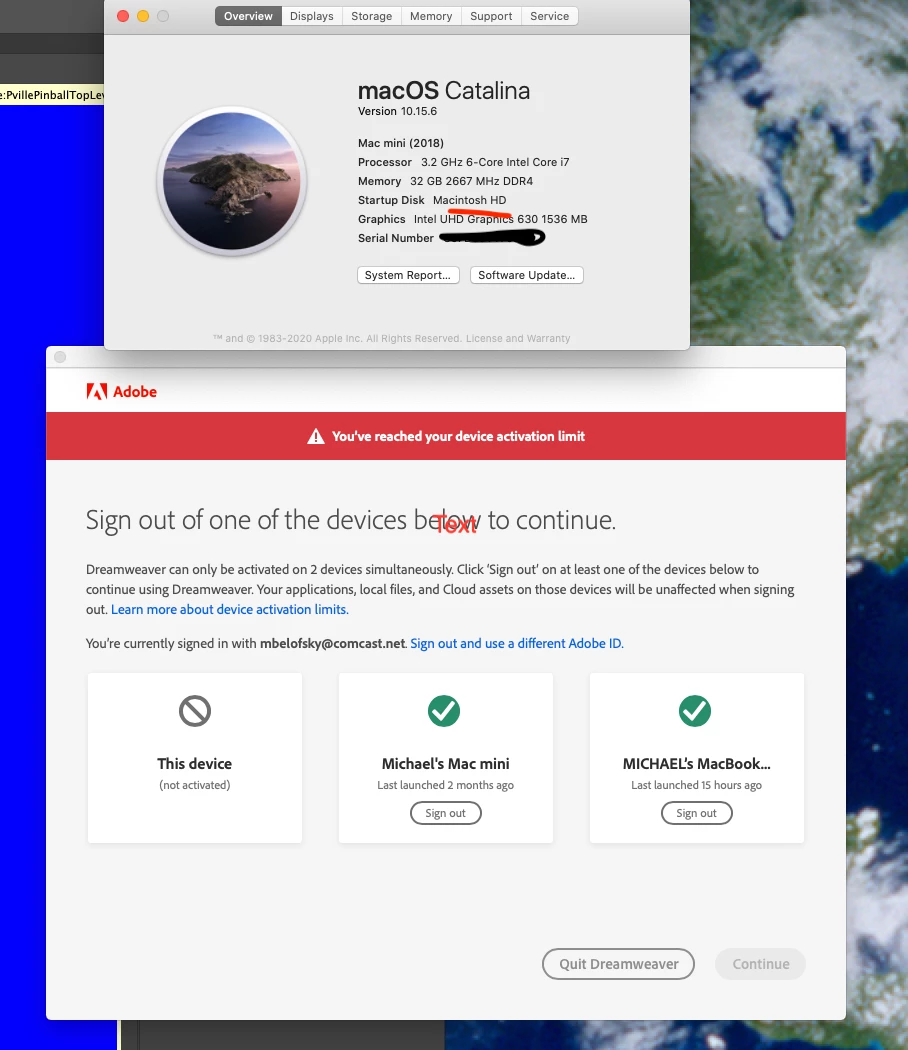
2. I used Dreamweaver a few days ago and it thinks I am on a new machine where nothing that I know of changed. So I have to log out of my Mac Mini (which is this device) so I can continue using Dreamweaver on this device, my mac mini.


    This topic has been closed for replies.

    1 reply

    Nancy OShea
    Community Expert
    Community Expert
    September 13, 2020

    You'll find plenty of online tutorials and user guides.  Help Menu (F1). 

    https://helpx.adobe.com/dreamweaver/tutorials.html


    Submit Bugs/Feature requests to Uservoice from the Help Menu.  Uservoice is what the engineering team sees.  They don't lurk here much.


    When you do have specific questions, post them here with screenshots.  Fellow product users will be happy to help you.


    1. Open Creative Cloud desktop app.

    2. Click the gear icon > General tab > Settings. Select "Always keep Creative Cloud up to date."
    3. Click on your Avatar (top right image).
    4. Sign-out of Creative Cloud.
    5. Close all apps.
    6. Restart your computer.
    7. Open CC Desktop app.
    8. Click your Avatar.
    9. Sign-in with your paid ID and password.


    Nancy O'Shea— Product User & Community Expert
    Participant
    September 13, 2020

    Thank you