Inspiring
November 28, 2017
Answered

Why won't background image show in browser preview?

  • November 28, 2017
  • 4 replies
  • 4060 views

I'm using Dreamweaver cc.

The background image shows in my Live view but does not display in the browser in preview.  Any suggestions?

Thanks

This topic has been closed for replies.
Correct answer AnotherMe

The solution was a simple fix.

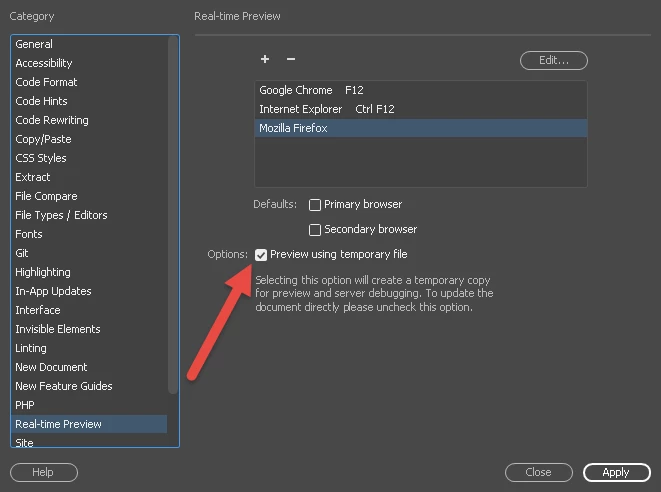
I went to Preferences, clicked on Real-time Preview and selected the check mark for Preview using temporary file.

4 replies

AnotherMeAuthor
Inspiring
November 28, 2017

I have a feeling it's the path to the image.

After managing a totally new site I get this

You tried to access an external HTML page, which can not be opened on the device for preview. Open the page in Dreamweaver to preview the page on the device.

B i r n o u
Legend
November 28, 2017

have you see this one ?

AnotherMeAuthorCorrect answer
Inspiring
November 30, 2017

The solution was a simple fix.

I went to Preferences, clicked on Real-time Preview and selected the check mark for Preview using temporary file.

Nancy OShea
Community Expert
Community Expert
November 28, 2017

Are you working within a defined Local Site Folder?  That's a critical 1st step for all projects.  Without it  DW cannot manage site links and assets for you.

If you haven't set one up yet, to to Site > New Site and create a site folder on your hard drive.  

Example:  C:\MyTestSite\

If you look in your Files panel, (F8), you should see your site folder + any files you've saved to it.

Nancy O'Shea— Product User & Community Expert
Jon Fritz
Community Expert
Community Expert
November 28, 2017

Sounds like something has gone wrong. Without being able to see the entire code of your page, it's impossible to say what though.

Could you post a link to your work in progress, or at minimum, the entire code (html and css) of the page?

Community Expert
November 28, 2017

Let's see the code.  I'm thinking this has something to do with the path of the image, but I cannot be certain without evaluating the code.