


Width in DreamWeaver is different to that in Chrome
Hi, I have previously posted about this issue but still have not found an answer.
I am trying to re-create the Udemy home page using DreamWeaver CS6 but I am having trouble with the width settings.
I have set the "top green bar" width to 100% which fills the width of the screen and closed the div after it.
Then I have created the menu bar which contains the logo, searchbox etc inside a seperate div and also given that a width of 100%
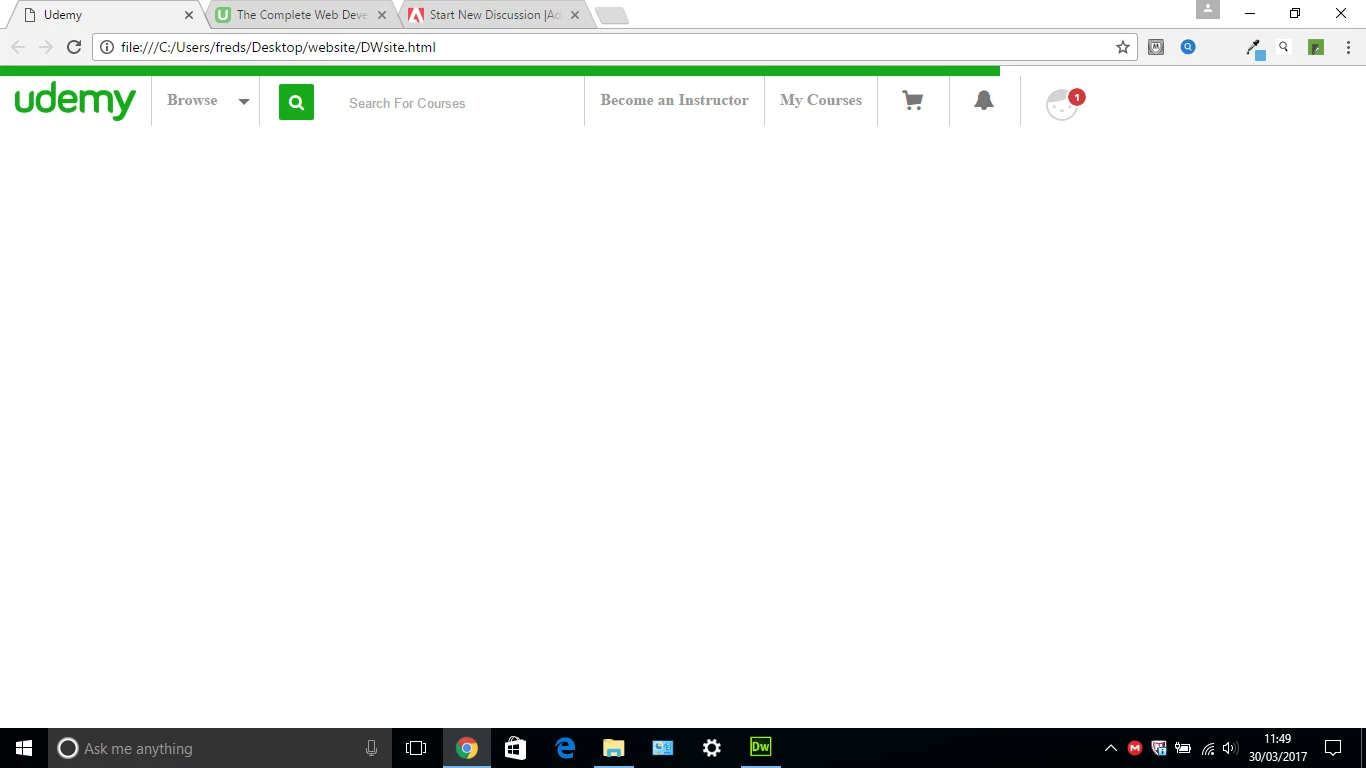
Now the problem is that inside DreamWeaver "live view" and "design view" both sections fill the entire width of the screen but when I view the page in Chrome it does not. Why is this?
I have attached a couple of screenshots, one with the view in DW and the other with the view in Chrome, and for what it is worth I have also copied the code.
I really appreciate any help.
Many thanks
Dan
<!DOCTYPE html PUBLIC "-//W3C//DTD XHTML 1.0 Transitional//EN" "http://www.w3.org/TR/xhtml1/DTD/xhtml1-transitional.dtd">
<html xmlns="http://www.w3.org/1999/xhtml">
<head>
<meta http-equiv="Content-Type" content="text/html; charset=utf-8" />
<title>Udemy</title>
<style>
body {
margin:0;
padding:0;
}
#topline {
background-color:#17aa1c;
width:100%;
height:10px;
margin:0;
}
#topmenubar {
width:100%;
height:50px;
}
#logo {
height:40px;
padding:5px 15px;
float:left;
}
.topmenubarsection {
border-left:1px #cccccc solid;
float:left;
height:100%;
}
.topmenutext {
font-weight:bold;
color:#999999;
margin:15px;
float:left;
}
#arrow {
margin-top:14px;
float:left;
}
#magnify {
padding:5px 15px;
float:left;
}
#searchbox {
font-weight:normal;
width:220px;
height:25px;
border:none;
padding:15px;
float:left;
}
#cart {
padding:10px 20px;
float:left;
}
#bell {
padding:10px 20px;
float:left;
}
#face {
padding:10px 20px;
float:left;
}
</style>
</head>
<body>
<div id="topline"></div>
<div id="topmenubar">
<img id="logo" src="udemylogo.png" />
<div class="topmenubarsection">
<div class="topmenutext">Browse</div>
<img id="arrow" src="arrow.png" />
</div>
<div class="topmenubarsection">
<a href=><img id="magnify" src="magnify.png" /> </a>
<input id="searchbox" type="text" placeholder="Search For Courses" />
</div>
<div class="topmenubarsection">
<div class="topmenutext">Become an Instructor</div>
</div>
<div class="topmenubarsection">
<div class="topmenutext">My Courses</div>
</div>
<div class="topmenubarsection">
<img id="cart" src="cart.png" />
</div>
<div class="topmenubarsection">
<img id="bell" src="bell.png" />
</div>
<div class="topmenubarsection">
<img id="face" src="face.png" />
</div>
</div>
</body>
</html>
.png)
 AdChoices