Participant
November 17, 2018
Answered

won't publish to website

  • November 17, 2018
  • 1 reply
  • 310 views

My computer crashed and I had to reinstall Dreamweaver.  I can change the files on the local computer, but they will not upload to the website.

Can someone help me with the settings so that this will again work for me?

    This topic has been closed for replies.
    Correct answer Nancy OShea

    Do you have your FTP log-in credentials and root directory from your hosting provider?

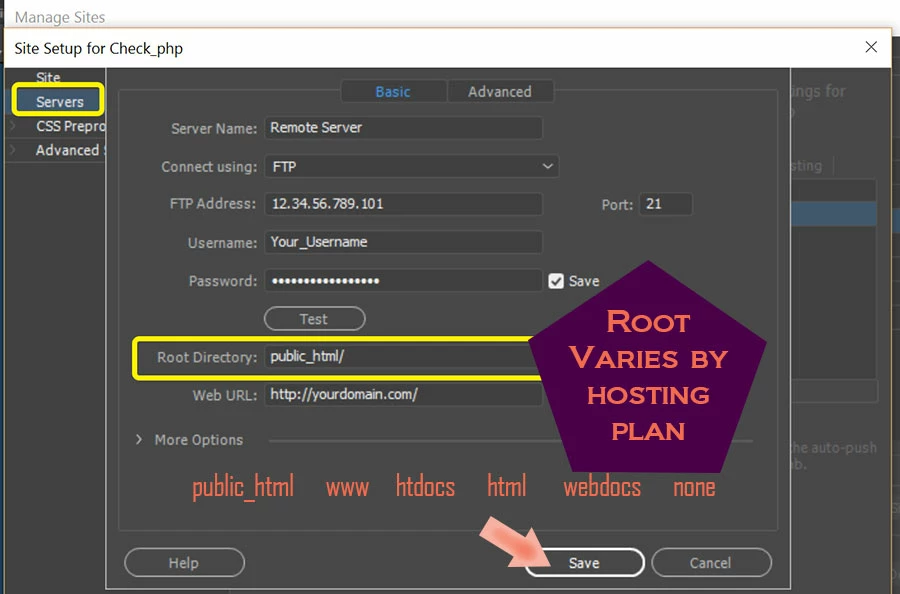
    Go to Site > New Site or Manage Site & click the pencil icon to edit your site settings.   Click on the Servers tab and enter FTP settings as shown in the screenshot below.   If unsure what to enter in the fields, contact your hosting provider.

    1 reply

    Nancy OShea
    Community Expert
    Nancy OSheaCommunity ExpertCorrect answer
    Community Expert
    November 17, 2018

    Do you have your FTP log-in credentials and root directory from your hosting provider?

    Go to Site > New Site or Manage Site & click the pencil icon to edit your site settings.   Click on the Servers tab and enter FTP settings as shown in the screenshot below.   If unsure what to enter in the fields, contact your hosting provider.

    Nancy O'Shea— Product User & Community Expert
    Participant
    November 18, 2018

    This was exact problem.  I was able to get in touch with a tech from our internet provider that also provides our website and he was able to look at it in realtime and see the problem.  Thank you very much