


clp3777Aii
Participant
January 16, 2017
Question

Workspace - Ghosted "attached files" tabs

  • January 16, 2017
  • 1 reply
  • 268 views

DW will not refresh the document window's "attached files" tabs.  It doesn't matter which document I open up, or what site I am working on, if I have linked files to an html document, DW will display them twice in the menu after any changes have been made to the associated linked files.  In every case, one tab of two tabs pointing to an associated file will produce an error message, while the other tab functions properly.

The first image attached shows the workspace menu of one of the documents I am working on.  The second image shows the error message anytime I try and select the ghost tab that flasely appears to be associated with the actual attached file. 
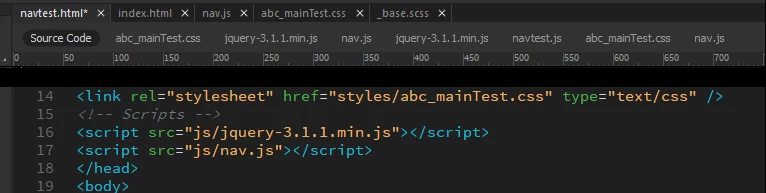
This is frustrating because I use a variety of svg, js, and css files to build my pages and it it tedious to sift through which tabs are working paths and which tabs are ghosted caches or buggy tabs.

This topic has been closed for replies.

1 reply

Nancy OShea
Community Expert
Community Expert
January 17, 2017

That's a new one  I've never encountered.

Try Delete Corrupted Cache.

Deleting a corrupted cache file |Adobe Community

Failing that, try Restore Preferences

Unusual behavior in Dreamweaver? Try restoring preferences.

Please post back with your results.

Nancy O'Shea— Product User & Community Expert
clp3777Aii
Participant
January 17, 2017

I deleted the cache file as Nancy advised.  Also, just on a hunch, I moved the path location of my site's project folders/files to the same drive as the Dreamweaver's application.  I noticed fro task manager that DW had been launching duplicate serverhosts and code-helpers and other such duplicate processes; essentially creating two hosting environments... one for the AppData/Roaming folder and one for the path to my files on the other drive...

Viola... one or all of the steps taken cleared up the ghosted links issue!  I wish I would have checked with each step to see when the issue was corrected, but I didn't think about it at the time.  Any, upon further investigation, it seems others had similar situations here https://forums.adobe.com/thread/1298280  and one person mentioned the same disk fix, but no one seemed to listen to that guy

Thanks
