


Participating Frequently
February 25, 2018
Answered

XML Parsing Error-Dreamweaver CS5.5

  • February 25, 2018
  • 3 replies
  • 3196 views

Hi,

I was trying to open Dreamweaver and got the message that I have an XML parsing fatal error:invalid document structure, line:1, file (and then it lists the file name). I clicked ok & then it gave me this message along w/ the name of the file:

The following panel layout is missing or could not be read: C:\Users\Stephanie\AppData\Roaming\Adobe\DreamweaverCS5.5\en_US\Configuration\Workspace\Designer.xml

The application will not have a correct layout. Please load one from Windows-->Workspace

So...I started looking online for solutions & most of them say to locate the file & either delete it, move it into a new folder or worst case scenario reset your preferences I think.

The problem for me is locating where this file is. I've tried pasting it up through the name of the file into internet explorer with no luck. I've also tried hitting the windows key + R and selecting msconfig and then control panel. I've also tried typing the name of the file in that space when the windows+R window opens. It says that it can't locate it. I've made sure that my hidden files are visible. I don't know where the installation folder would be. I'm stuck. I'm not an advanced techie person so the solutions have to really be dumbed down for me. What am I missing?

Below is the solution I found on an Adobe forum but like I said I'm stuck. I am a Windows user & I own the orginal, legal file.

Here's the solution that I found that I can't figure out how to even find the file:

  • In the installation folder (C:/Program Files/Adobe/Adobe Dreamweaver [version]), click the file Dreamweaver.exe.

  • Hold down the Windows key + Ctrl + Shift and double-click Dreamweaver.exe. (Windows Vista) Continue holding down the keyboard shortcut (Windows key + Ctrl + Shift) even when the User Account Control (UAC) dialog box appears.

  • In the Reset Preferences dialog box, click Yes.
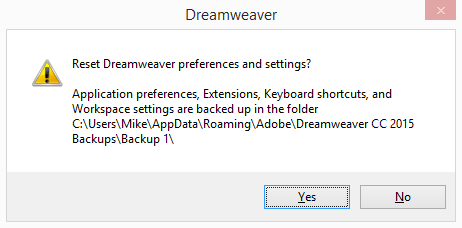
    Reset Preferences

    Click Yes in the Reset Preferences dialog box


    The following file and folder are deleted from your system:
    • Users\[user]\AppData\Roaming\Adobe\Dreamweaver CC [version number] (folder)
    • \HKEY_CURRENT_USER\Software\Adobe\Dreamweaver CC [version number] (registry entry)

    When Dreamweaver launches, it creates a new preferences file and folder.
    This topic has been closed for replies.
    Correct answer BenPleysier

    This means that 'designer.xml' in the user directory has been corrupted.

    One way out of the dilemma is to copy a correct version from the install directory and paste that into the user directory.

    1. Go to your directory where Adobe was installed: C:\Program Files\Adobe\Adobe Dreamweaver CS5.5\configuration\workspace
    2. In the "workspace" folder, copy Designer.xml
    3. Now Go to your "workspace" folder under the Application Data area of your C Drive of your profile: C:\Documents and Settings\userName\Application Data\Adobe\Dreamweaver CS5\en_US\Configuration\Workspace
    4. Paste the copied Designer.xml into that directory.
    5. Restart Dreamweaver

    3 replies

    Participant
    February 21, 2024

    From previous answers, except for Windows 10, see item #3 for the location:


    This means that 'designer.xml' in the user directory has been corrupted.

    One way out of the dilemma is to copy a correct version from the install directory and paste that into the user directory.

    1. Go to your directory where Adobe was installed: C:\Program Files\Adobe\Adobe Dreamweaver CS5.5\configuration\workspace
    2. In the "workspace" folder, copy Designer.xml
    3. Now Go to your "workspace" folder under the Application Data area of your C Drive of your profile: 
      C:\Program Files (x86)\Adobe\Adobe Dreamweaver CS5.5\configuration\workspace
    Participant
    February 21, 2024

    Correction on #3, location should be, or similar to:
    C:\Users\UserName\AppData\Roaming\Adobe\Dreamweaver CS5.5\en_US\Configuration\Workspace

    Nancy OShea
    Community Expert
    Community Expert
    February 21, 2024

    @jerome.esperanza,

    Thank you for resurrecting a 6 year old topic about CS5 that's had no activity since 2018.


    For modern Dreamweaver users who land on this topic, please refer to the screenshot below.


    [Old topic locked by moderator.]


    Nancy O'Shea— Product User & Community Expert
    Participating Frequently
    March 4, 2018

    I wanted to let you guys know that I got it fixed. I hired someone to help walk me through the steps. I'm glad because this post would've gone on forever.

    We renamed the DW file to "old dreamweaver" & followed the rest of the steps that Ben outlined above. The location that Nancy outlined for me helped give him a frame of reference to be able to help me.

    Thank you guys!

    BenPleysier
    Community Expert
    BenPleysierCommunity ExpertCorrect answer
    Community Expert
    February 25, 2018

    This means that 'designer.xml' in the user directory has been corrupted.

    One way out of the dilemma is to copy a correct version from the install directory and paste that into the user directory.

    1. Go to your directory where Adobe was installed: C:\Program Files\Adobe\Adobe Dreamweaver CS5.5\configuration\workspace
    2. In the "workspace" folder, copy Designer.xml
    3. Now Go to your "workspace" folder under the Application Data area of your C Drive of your profile: C:\Documents and Settings\userName\Application Data\Adobe\Dreamweaver CS5\en_US\Configuration\Workspace
    4. Paste the copied Designer.xml into that directory.
    5. Restart Dreamweaver
    Wappler is the DMXzone-made Dreamweaver replacement and includes the best of their powerful extensions, as well as much more!
    Participating Frequently
    February 25, 2018

    Hi Ben,

    Thank you for your swift and thorough reply. The thing is that before I can attempt to follow your instructions I have to be able to locate the file and I don't know how to do that.

    I've tried looking in my documents folder on my computer, I've tried typing that file name into the search bar to search my entire computer and nothing. Any ideas?