Participant
May 4, 2017
Answered

You cannot preview the document open in Dreamweaver. You can only preview HTML or PHP documents.

  • May 4, 2017
  • 3 replies
  • 2489 views

I'm using CC 2017 and I'm experimenting with the real-time browser.

The problem I'm having is that I want to edit styles in the .css file attached to my .html file (so that I can see the changes in real-time). But when I switch to the .css file, the real-time browser window displays:

You cannot preview the document open in Dreamweaver. You can only preview HTML or PHP documents.

I watched a tutorial where the person did just what I'm trying to do with out an error.

Any suggestions would be appreciated.

Steve

    This topic has been closed for replies.
    Correct answer jkos95

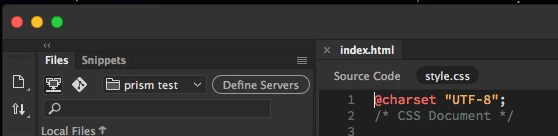
    You actually can do this! It is clever. The reason you get that error is because your HTML and CSS files are both open. Once your CSS page is linked with the <link> tag, close the CSS tab, and just below the file tabs you will see you CSS file name appear next to source code. Now when you switch over, the live view stays open! Screenshot attached to show you. Notice the "index.html" is a tab, and my CSS page is below it, not a different tab.

    3 replies

    jkos95
    jkos95Correct answer
    Participant
    September 21, 2018

    You actually can do this! It is clever. The reason you get that error is because your HTML and CSS files are both open. Once your CSS page is linked with the <link> tag, close the CSS tab, and just below the file tabs you will see you CSS file name appear next to source code. Now when you switch over, the live view stays open! Screenshot attached to show you. Notice the "index.html" is a tab, and my CSS page is below it, not a different tab.

    Nancy OShea
    Community Expert
    Community Expert
    May 4, 2017

    What it's telling you is you can't Real-Time Preview a CSS file. 

    Make changes to your CSS.  Save.

    Switch back to the Source Code tab to see your results.

    Nancy O'Shea— Product User & Community Expert
    Participant
    May 4, 2017

    Thank you. I have actually been doing this. Just hoped that I could see automatic changes to the preview while editing the .css file without having to switch back to the .html file.

    pziecina
    Legend
    May 4, 2017

    You could do this by using split view, or by using css designer to make your changes.

    However if you use css designer to do this, be very careful, and ensure you select the css file from the related files, and save that. Otherwise Dw may not save the changes, even when 'save all' is selected.