


Dmitriy_Usanin
Participant
February 7, 2017
Question

Adobe Configurator installer failed to initialize

  • February 7, 2017
  • 2 replies
  • 2873 views

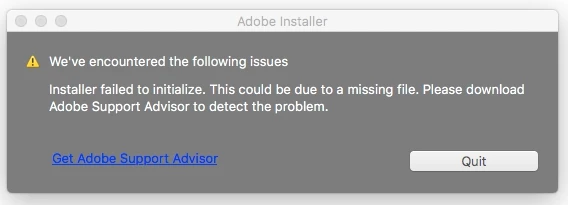
Downloaded Configurator 4  from labs, tried to install, but get a message that "iinstaller failed to initialize". 

Mac Os Sierra 10.12.3. MacBook Pro.

Photoshop CC ver. 2017.0.1 (x64)

I have Adobe Flash Player, Java Runtime Environment  and Adobe Application Manager , using it fine with related applications, so that shouldnot be an issue. There is no log-file in library/logs/adobe/installers which included text "adobe configurator".

And i can't install Adobe Support Advisor, because Extension Manager does not work .

Any ideas?
This topic has been closed for replies.

2 replies

Ten A
Community Expert
Community Expert
February 9, 2017

Unfortunately, Photoshop CC 2017 dosen't support flash based extensions made by Configurator 4.

After Photoshop CC2014, Adobe stop to support flash based extensions. If you want to make extensions for PS CC2017, You can read as reference HTML based extensions articles in below.

https://github.com/Adobe-CEP

APIS Code
Participating Frequently
February 7, 2017

Run that installer from command line.

Dmitriy_Usanin
Participant
February 7, 2017

i have just tryed to run installer from command line. The result is the same:

"iinstaller failed to initialize"

APIS Code
Participating Frequently
February 7, 2017

Have you tried that way? By going to Install.app/Contents/MacOS?