



Simon Henke
Known Participant
June 23, 2019
Answered

Can't publish extension on Adobe Exchange

  • June 23, 2019
  • 2 replies
  • 1422 views

I recently finished my first photoshop CEP extension, however I can't submit it to Adobe Exchange because there seems to be a form validation bug.

The first to steps of the "create listing" form (Details and Images) are no problem. But at Step3 (Upload & Docs) it keeps telling me that the version format is incorrect.

I noticed that there is a version field at the beginning, but as soon as I upload my .ZXP the field simply disappears.

Quite frustrating and I don't understand how a bug like that can be unnoticed all the time. Also, contacted the support weeks ago and didn't get a reply..
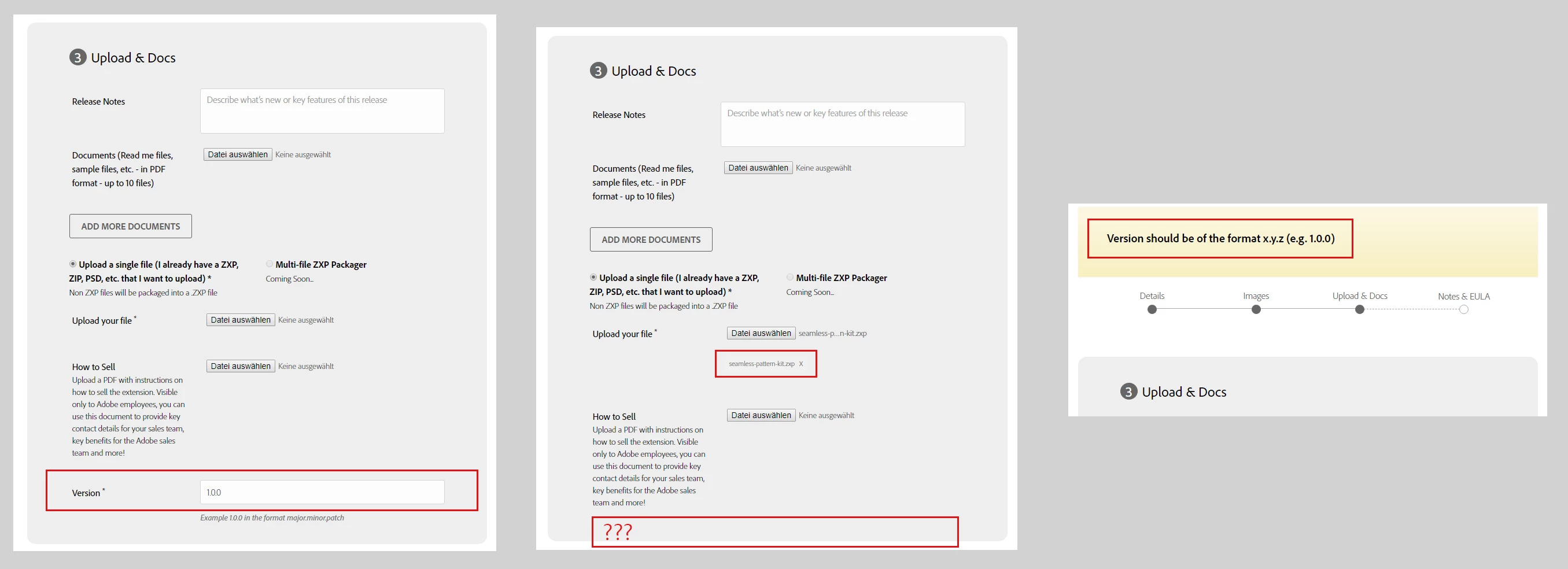
https://i.imgur.com/GJLAjFC.jpg

Any ideas?

This topic has been closed for replies.
Correct answer AnkMaan

Hello Simon,

Version no. should be same in the ZXP file and at the step 3. Even after syncing the version no. in these two places if you get the same error then please feel free to contact us at ccintegrationsreview@adobe.com with your product name and we will check the issue in detail.

Regards,

Ankita Maan

The Creative Cloud Integrations Review Team

2 replies

AnkMaanCorrect answer
Adobe Employee
June 25, 2019

Hello Simon,

Version no. should be same in the ZXP file and at the step 3. Even after syncing the version no. in these two places if you get the same error then please feel free to contact us at ccintegrationsreview@adobe.com with your product name and we will check the issue in detail.

Regards,

Ankita Maan

The Creative Cloud Integrations Review Team

Simon Henke
Known Participant
June 25, 2019

Thanks Ankita Maan,

I finally was able to get past that step of the form.

Some version inside the manifest.xml was still wrong (a leftover from the example template I started with).

This was my first extension so I wasn't aware that the web form actually evaluates the contents inside the .zxp and takes the version from there. The fact that there was a version field which disappeared after uploading the .zxp was what confused me.

One more question:

Are the any examples on what authors should put inside the "How-to-sell"-document?

The description

you can use this document to provide key contact details for your sales team, key benefits for the Adobe sales team and more!

still doesn't make it quite clear for me. I'll leave it out for now, since it isn't a required field.

Regards,

Simon

erinferinferinf
Adobe Employee
Adobe Employee
June 25, 2019

Hi Simon!

Our Go to Market team has made a lot of content to help out. I'd start by watching ths video, which explains the How-to-sell feature (at 9m 35s, the link should go straight there).

This blog post also includes a section on the How-to-Sell document. (It links to this HelpX document.)

Best,

Erin

erinferinferinf
Adobe Employee
Adobe Employee
June 24, 2019

Hi h3design!

That does sound super weird. Which browser are you using, and which version? Also, have you tried a different browser?

I'm asking the review team about it, too.

Regards,

Erin

Simon Henke
Known Participant
June 24, 2019

Thanks for your reply.

I'm using Google Chrome (Version 75.0.3770.100​). I can try out firefox later and post the results here.

Regards,

Simon