


Inspiring
July 14, 2019
Answered

Cannot load extension after setting PlayerDebugMode 1

  • July 14, 2019
  • 1 reply
  • 7489 views

I'm just starting to create my 1st panel and I hope i did everything right.

I'm stuck on the with the alerts about unsigned extensions.

I added PlayerDebugMode 1 to all the CSXS and am still unable to run my 1st panel.

I also restarted my win10 and still the same.

running win10 with latest version of photoshop.

any clue why?
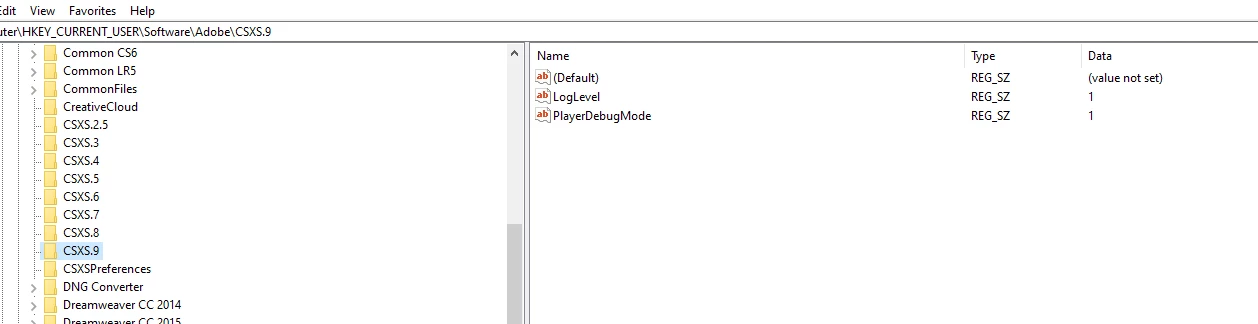
This topic has been closed for replies.
Correct answer karpiyon

where should this code be?

in the manifest.xml?

if yes where?

<?xml version="1.0" encoding="UTF-8"?>

<ExtensionManifest Version="4.0" ExtensionBundleId="com.panel.myTest" ExtensionBundleVersion="1.0.0"

        ExtensionBundleName="GallryToolbox" xmlns:xsi="http://www.w3.org/2001/XMLSchema-instance">

    <ExtensionList>

        <Extension Id="com.danl.panel.extension1" Version="1.0" />

    </ExtensionList>

    <ExecutionEnvironment>

        <HostList>

            <Host Name="PHSP" Version="[14.0,99.9]" />

            <Host Name="PHXS" Version="[14.0,99.9]" />

        </HostList>

        <LocaleList>

            <Locale Code="All" />

        </LocaleList>

        <RequiredRuntimeList>

            <RequiredRuntime Name="CSXS" Version="8.0" />


        </RequiredRuntimeList>

    </ExecutionEnvironment>

    <DispatchInfoList>

        <Extension Id="com.danl.panel.extension1">

            <DispatchInfo >

                <Resources>

                <MainPath>./index.html</MainPath>

                <ScriptPath>./mainFile.jsx</ScriptPath>

                </Resources>

                <Lifecycle>

                    <AutoVisible>true</AutoVisible>

                </Lifecycle>

                <UI>

                    <Type>Panel</Type>

                    <Menu>Gallry Toolbox</Menu>

                    <Geometry>

                        <Size>

                            <Height>200</Height>

                            <Width>200</Width>

                        </Size>

                    </Geometry>

                </UI>

            </DispatchInfo>

        </Extension>

    </DispatchInfoList>

</ExtensionManifest>


Problem solved!!!

I rechecked all my steps and found out that my reg key: PlayerDebugMode had a space at the end of it.

removing the space solved the problem.

1 reply

Justin Taylor-Hyper Brew
Community Expert
Community Expert
July 15, 2019

If you're just starting out, I'd recommend copying one of the sample panels and working from there. There are a lot of factors involved here. Here are some things to check if you're having issues getting your panel up and running:

1. Make sure your panel is in the correct extensions folder and the folder structure is correct (see the cookbook)

2. Is your panel signed? If not, PlayerDebugMode needs to be set for your version

3. Is your manifest.xml setup correctly with the targeted app that you want to use?

4. Ensure there are no extension ID conflicts

5. Check the CEF Log files which should describe why your extension isn't loading.

6. Ensure your permissions are set up correctly for your extension folder and files.

karpiyonAuthor
Inspiring
July 15, 2019

Thank for the reply.

I tested my panel, which loads 5 script i wrote on another Laptop and it is working as expected.

However, on my main working PC it is not even though i set up PlayerDebugMode  =1 in the registry for all SCXS versions.

what else can i check?

Trevor:
Legend
July 15, 2019

<Lifecycle>

    <AutoVisible>true</AutoVisible>

</Lifecycle>