


Inspiring
August 10, 2021
Question

CEP Panel in AI does not display

  • August 10, 2021
  • 3 replies
  • 538 views

As the title indicates extensions in AI does not display my panel.  I used this panel on another system and it worked fine.  In the below image you can see it says "Libraries" which is the default but nothing else.
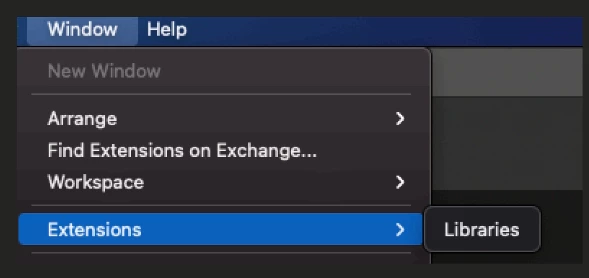
 

I tried the panel in two locations.  The system Library and user library:

Library/Application Support/Adobe/CEP/extensions/ panel info here....

I ran the debug command also.  (Important note: when debug isn't set the panel still appears but is grayed out).  In this case there's no panel at all. 

I restarted.  Any idea what's going on?

This topic has been closed for replies.

3 replies

Community Expert
August 11, 2021

Moving this discussion to the Exchange forum for better help

-Manan

-Manan
Community Expert
August 11, 2021

This should not be the case, did you make sure that you enabled debug for the correct CEP env which is targetted by the version of Illustrator you are working with. For the current version of Illustrator it would be CEP 10 or 11. So you could try both the following commands

defaults write com.adobe.CSXS.10 PlayerDebugMode 1

defaults write com.adobe.CSXS.11 PlayerDebugMode 1

-Manan

-Manan
OhmsGAuthor
Inspiring
August 12, 2021

Yes I did both of them.  When I've missed the debug for some reason the panel still appears and is grayed out.  In this case it doesn't appear at all.

ajabon grinsmith
Community Expert
Community Expert
August 11, 2021

I used this panel on another system and it worked fine. 


Does that "another system" of Illustrator match the version of the problematic one?

OhmsGAuthor
Inspiring
August 12, 2021

Yes