Participant
April 4, 2018
Answered

Create a Extension with *.8bs Plugin

  • April 4, 2018
  • 1 reply
  • 1009 views

Hello,

i have complete my develop of an CEP Extension that works with a *.8bs Plugin (written in C++).

Now i want to publish the Extension but i don't know how to create a zxp File with the Extension and the plugin.

Have anybody a solution for this?

Best regards

Alex

This topic has been closed for replies.
Correct answer Ten A

Here is a sample hybrid extensions directory structure.
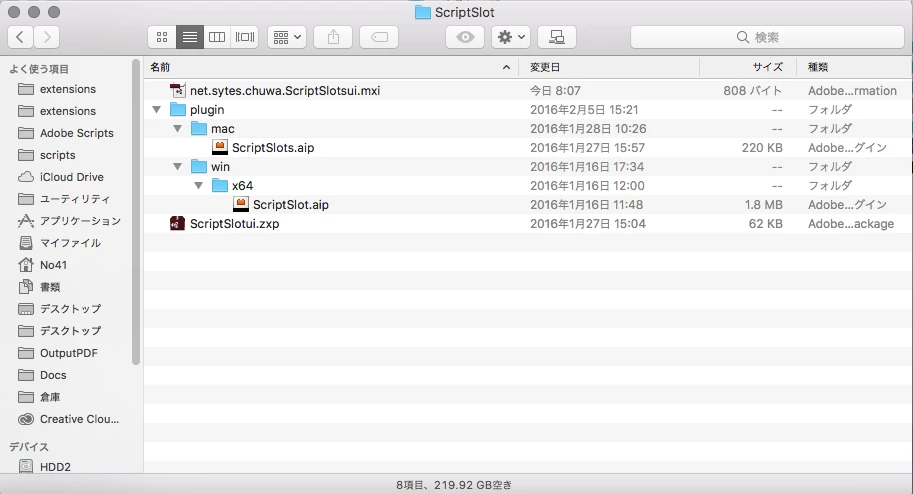
At first, you need to package your extensions ui(not include plugin).

Make mxi file like below.

<?xml version="1.0" encoding="UTF-8" standalone="no"?>

<macromedia-extension id="net.sytes.chuwa.ScriptSlotsui" name="Script Slot" requires-restart="true" version="1.0.2">

  <author name="Ten A"/>

  <description/>

  <license-agreement/>

  <products>

    <product familyname="Illustrator" maxversion="22.9" version="18.0"/>

  </products>

  <files>

    <file destination="" file-type="CSXS" products="" source="ScriptSlotUI.zxp"/>

    <file destination="$plugin/extensions" maxVersion="22.9" minVersion="18.0" platform="mac" products="Illustrator" shared="true" source="plugin/mac/ScriptSlots.aip"/>

    <file destination="$plugin/Extensions" maxVersion="22.9" minVersion="18.0" platform="win" products="Illustrator64" shared="true" source="plugin/win/x64/ScriptSlot.aip"/>

  </files>

</macromedia-extension>

And package again using ZXPSignCMD.

ex:

ZXPSignCmd -sign MXI net.sytes.chuwa.ScriptSlot.zxp <certfile> <cert_password> -tsa <timestamp_server>


1 reply

Ten A
Community Expert
Ten ACommunity ExpertCorrect answer
Community Expert
April 4, 2018

Here is a sample hybrid extensions directory structure.

At first, you need to package your extensions ui(not include plugin).

Make mxi file like below.

<?xml version="1.0" encoding="UTF-8" standalone="no"?>

<macromedia-extension id="net.sytes.chuwa.ScriptSlotsui" name="Script Slot" requires-restart="true" version="1.0.2">

  <author name="Ten A"/>

  <description/>

  <license-agreement/>

  <products>

    <product familyname="Illustrator" maxversion="22.9" version="18.0"/>

  </products>

  <files>

    <file destination="" file-type="CSXS" products="" source="ScriptSlotUI.zxp"/>

    <file destination="$plugin/extensions" maxVersion="22.9" minVersion="18.0" platform="mac" products="Illustrator" shared="true" source="plugin/mac/ScriptSlots.aip"/>

    <file destination="$plugin/Extensions" maxVersion="22.9" minVersion="18.0" platform="win" products="Illustrator64" shared="true" source="plugin/win/x64/ScriptSlot.aip"/>

  </files>

</macromedia-extension>

And package again using ZXPSignCMD.

ex:

ZXPSignCmd -sign MXI net.sytes.chuwa.ScriptSlot.zxp <certfile> <cert_password> -tsa <timestamp_server>

Participant
April 5, 2018

Thank you for your answer, i was able to create a zxp file with the CEP Part and the *.8bs file.

How it is possible to validate the zxp file?

do i have to upload it in the adobe exchange or could i test it offline on my computer?

Ten A
Community Expert
Community Expert
April 5, 2018

You don’t need to upload Exchange.

You can use ExMan command tool, reference below link.

ExMan Command Line Tool