I now have a resolution to this problem takes to Adobe Exchange Support ( support@adobe.com ). This is what they suggested :-
Please check in Creative cloud Desktop app Home tab if it is showing plugin installed like below
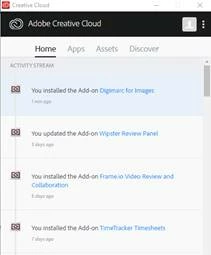
IF it does not, then please follow these steps
Please click on http://install.anastasiy.com/ and download the Win or Mac version of this tool depending on your OS It will download a zip file which you need to extract and then run the .exe file or .dmg file.
Now go to https://exchange.adobe.com/addons/patches/33095/install and under Where to Find Section, Select Download and install it other way.
This way you can download the “xxxxxx.zxp” file of the said addon.
Now launch Anastasiy Extension Manager and select "Application Name" and click on Install, It will open an explorer windows from where you need to select the downloaded "xxxxxxx.zxp" file and install the plug-in.
*Anastasiy Extension Manager will be an Adobe Managed Tool that will get incorporated in our upcoming release of Exchange website.
Regards,
Adobe Exchange Support
The Digimarc Plugin now seems to be install and appears in my Photoshop Menu.
One last thing for anyone who ends up looking at this post, particularly if they are from Digimarc. I have found that there is absolution zero support from Digimarc. To tried numerous ways ( phone, email, webpage form, something that looks like online chat ) to contact them about this issue, and obtained no response all, not even an automated one. So if you ever have any issue with the product it look like your on your own :-)



 AdChoices