Here's for some surprises.
1) Does CSInterface.evalScript() Work Asynchronously in Any Host Application? Yes on all of them (On Windows not on Mac).
2) Does Extendscript block the app and it's sub processes? No, just the apps UI
You probably want a bit of proof?
I was under the misunderstanding that ES blocks the app / sub-processes from everything but the script it's running, i.e. everything is put in a que and dealt with synchronously. If that would be the case then the $.sleep test would not be a proof. But it's not the case.
Here's a couple of screen shots
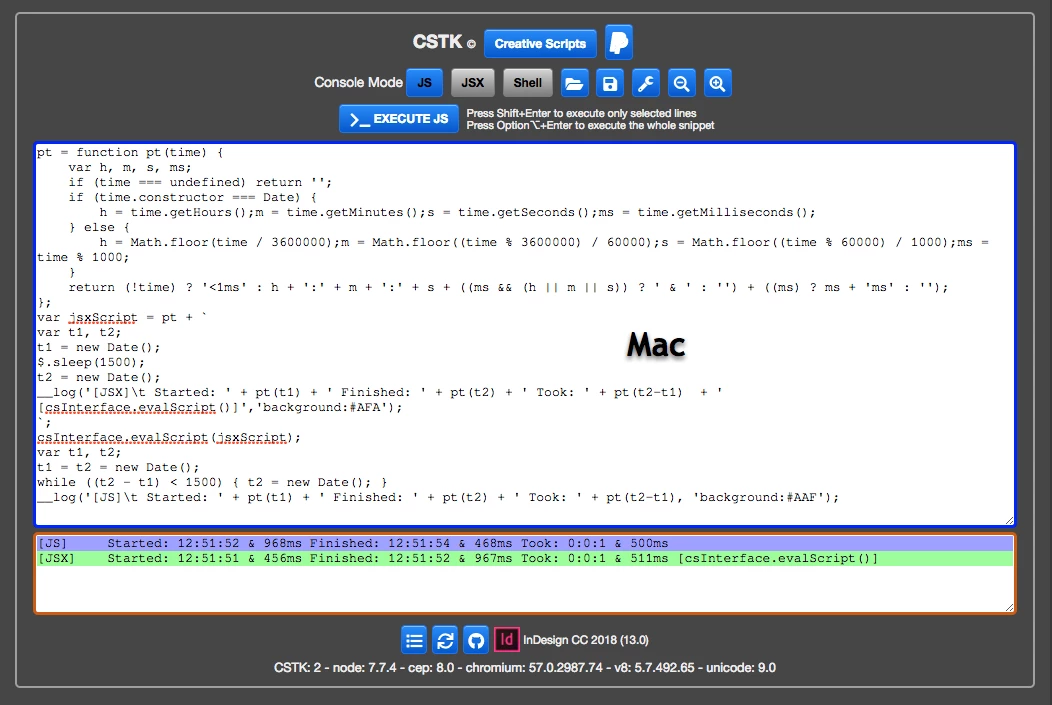
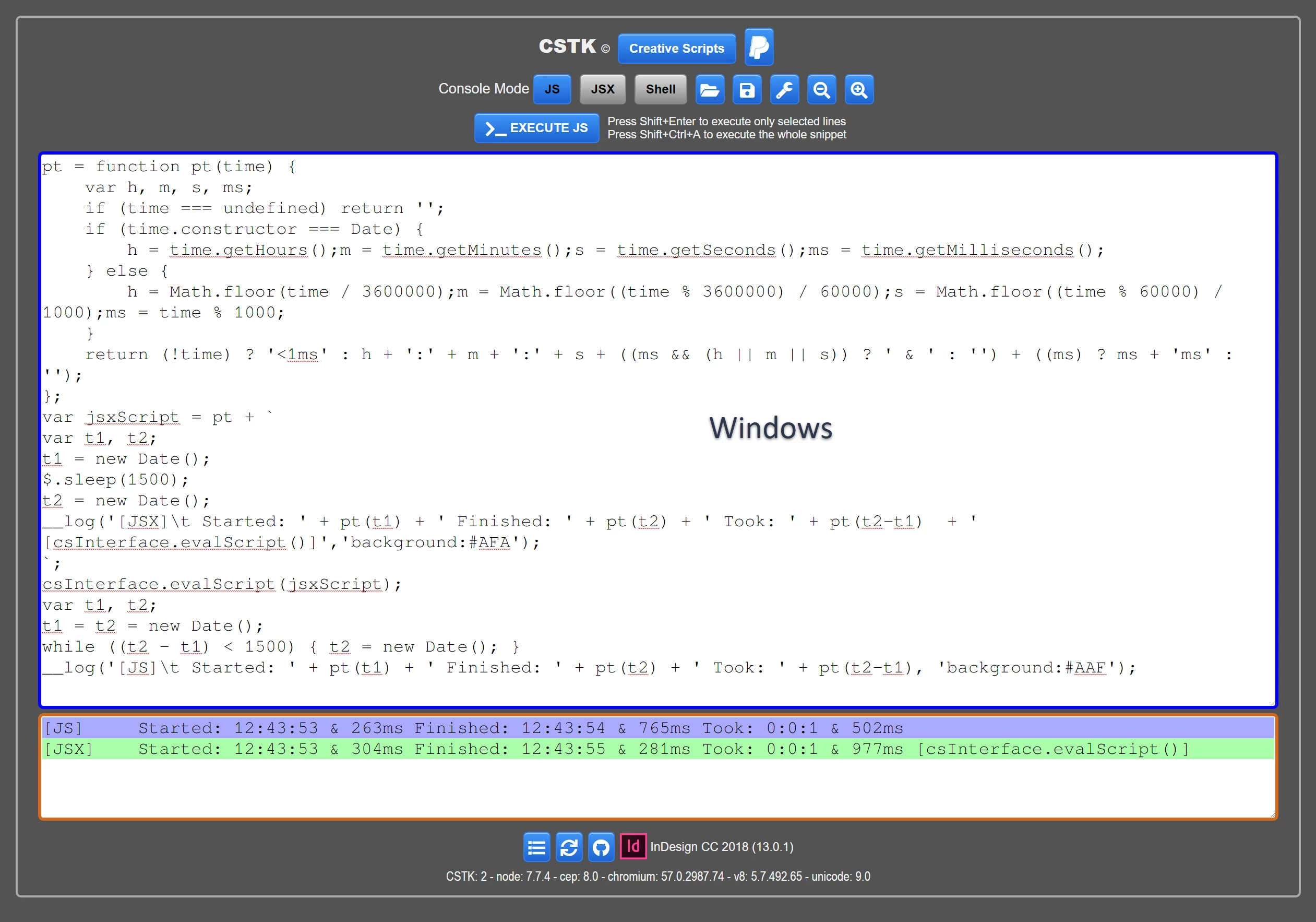
This is the code I used on the CSTK
pt = function pt(time) {
var h, m, s, ms;
if (time === undefined) return '';
if (time.constructor === Date) {
h = time.getHours();m = time.getMinutes();s = time.getSeconds();ms = time.getMilliseconds();
} else {
h = Math.floor(time / 3600000);m = Math.floor((time % 3600000) / 60000);s = Math.floor((time % 60000) / 1000);ms = time % 1000;
}
return (!time) ? '<1ms' : h + ':' + m + ':' + s + ((ms && (h || m || s)) ? ' & ' : '') + ((ms) ? ms + 'ms' : '');
};
var jsxScript = pt + `
var t1, t2;
t1 = new Date();
$.sleep(1500);
t2 = new Date();
__log('[JSX]\t Started: ' + pt(t1) + ' Finished: ' + pt(t2) + ' Took: ' + pt(t2-t1) + ' [csInterface.evalScript()]','background:#AFA');
`;
csInterface.evalScript(jsxScript);
var t1, t2;
t1 = t2 = new Date();
while ((t2 - t1) < 1500) { t2 = new Date(); }
__log('[JS]\t Started: ' + pt(t1) + ' Finished: ' + pt(t2) + ' Took: ' + pt(t2-t1), 'background:#AAF');
If you look at the Windows screenshot you can see that the JS execution is not halted by the JSX execution (Asynchronously).
On the Mac you can see that the JS execution is halted by the JSX execution (Synchronously).
You can see this with the following 2 gifs
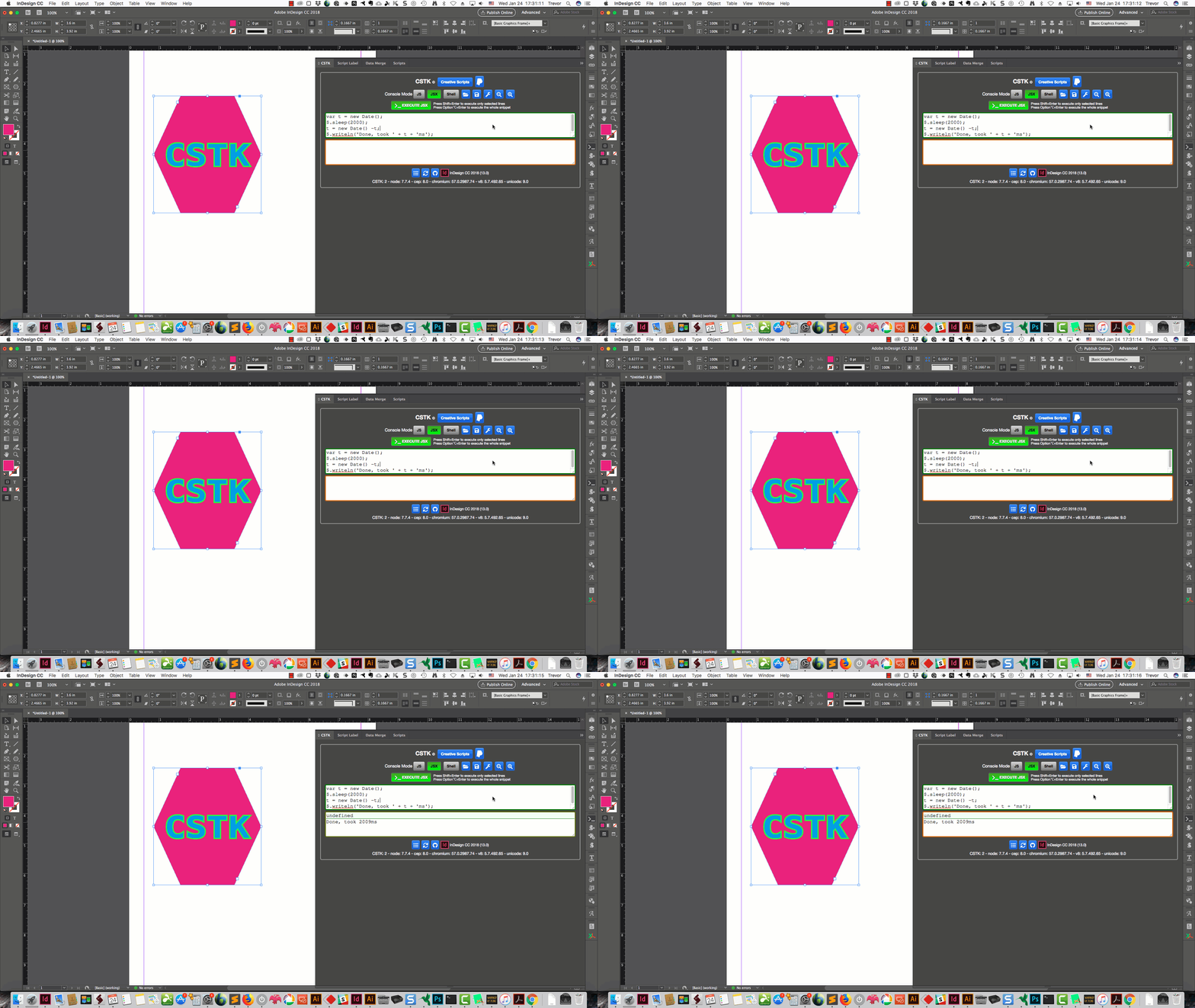
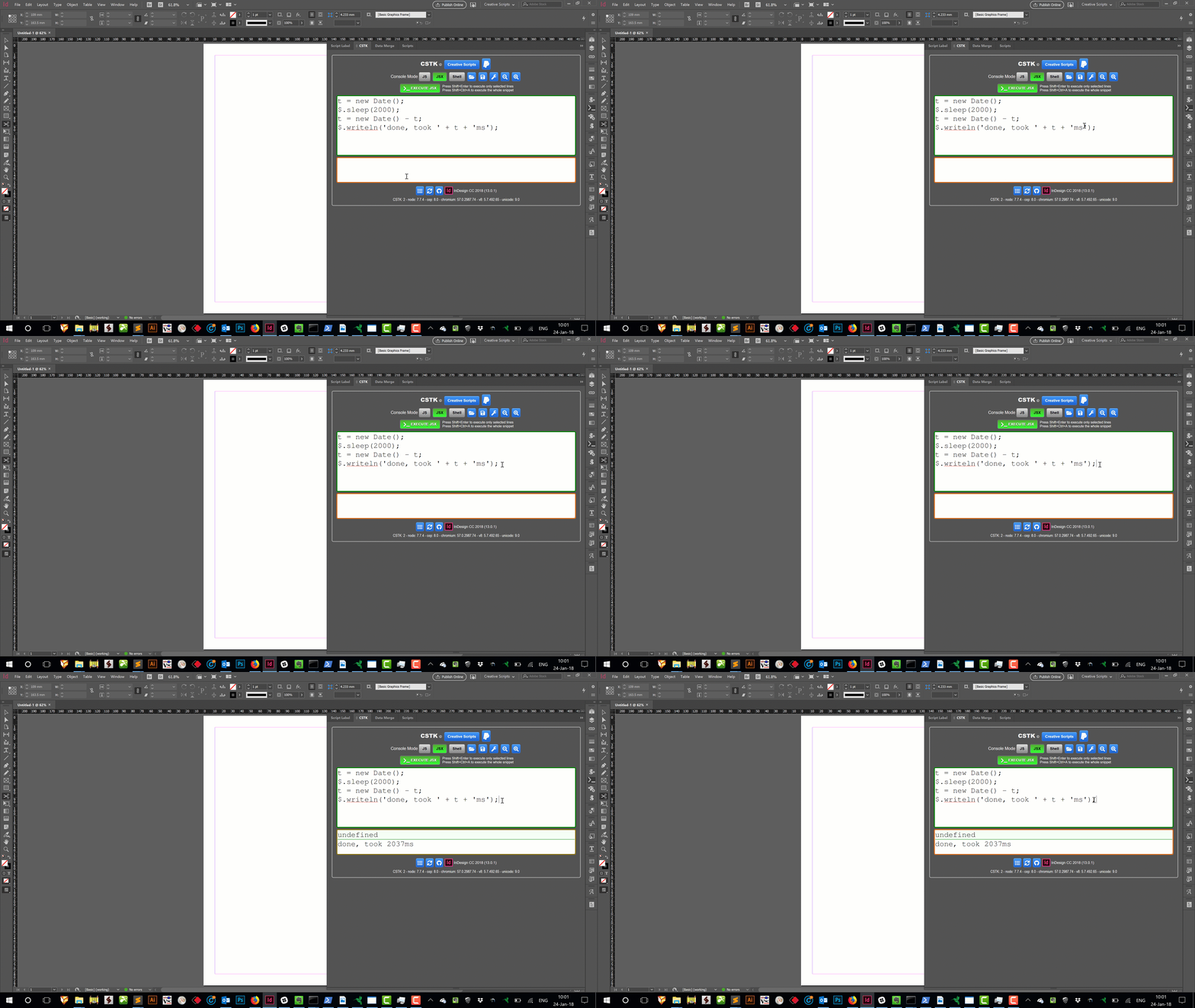
When one executes some code on the CSTK on executing the code the keyboard shortcut next to the execute button highlights.
After the codes been processed the bottom console changes color.
On Windows you can see the sleep time on the Mac you can't as the highlight that should happen before the sleep is blocked by the csInterface.evalScript
Now if you try this out on InDesign you can access the CSTK target engine. You can hard code it or use the ESTK for that.
Then you can run the JS while loop (make it a bit longer to make testing easier) on the CSTK
pt = function pt(time) {
var h, m, s, ms;
if (time === undefined) return '';
if (time.constructor === Date) {
h = time.getHours();m = time.getMinutes();s = time.getSeconds();ms = time.getMilliseconds();
} else {
h = Math.floor(time / 3600000);m = Math.floor((time % 3600000) / 60000);s = Math.floor((time % 60000) / 1000);ms = time % 1000;
}
return (!time) ? '<1ms' : h + ':' + m + ':' + s + ((ms && (h || m || s)) ? ' & ' : '') + ((ms) ? ms + 'ms' : '');
};
var t1, t2;
t1 = t2 = new Date();
while ((t2 - t1) < 8500) { t2 = new Date(); }
__log('[JS]\t Started: ' + pt(t1) + ' Finished: ' + pt(t2) + ' Took: ' + pt(t2-t1), 'background:#AAF');
And while that is going run from the ESTK
#targetengine CSTK
function pt(time) {
var h, m, s, ms;
if (time === undefined) return '';
if (time.constructor === Date) {
h = time.getHours();m = time.getMinutes();s = time.getSeconds();ms = time.getMilliseconds();
} else {
h = Math.floor(time / 3600000);m = Math.floor((time % 3600000) / 60000);s = Math.floor((time % 60000) / 1000);ms = time % 1000;
}
return (!time) ? '<1ms' : h + ':' + m + ':' + s + ((ms && (h || m || s)) ? ' & ' : '') + ((ms) ? ms + 'ms' : '');
}
var t1, t2;
t1 = new Date();
$.sleep(7500);
t2 = new Date();
__log('[JSX]\t Started: ' + pt(t1) + ' Finished: ' + pt(t2) + ' Took: ' + pt(t2-t1) + ' [csInterface.evalScript()]','background:#AFA');
You can see that the JSX does not block the apps sub-processes even on the Mac.
QED
All this points that it's a BUG in the evalScripts implementation on the Max
Regarding what I was referring to by current version of JS
8th Edition - ECMAScript 2017 makes the Synchronously functioning needed when dealing with DOM objects much easier to deal with than previous versions.
(Await, async, yeild, promise and all that stuff)
HTH
Trevor
Trevorׅ wrote
1) Does CSInterface.evalScript() Work Asynchronously in Any Host Application? Yes on all of them (On Windows not on Mac). |
That is super helpful, Trevorׅ! Thanks so much for checking this out! It makes a lot more sense that this would be a bug on macOS CEP implementations, rather than an intentional design decision.
The code that you provided is helpful, but there's a lot of extra printing/logging related functionality that distracts from the meat of it. It took me a little while to understand what you were referring to when you said:
Trevorׅ wrote If you look at the Windows screenshot you can see that the JS execution is not halted by the JSX execution (Asynchronously). On the Mac you can see that the JS execution is halted by the JSX execution (Synchronously). |
What I took away from that is that the timestamps were in an order that suggested either synchrony or asynchrony. To make it more clear (and more easily testable without your custom CSTK panel), I've created a "simplified" test case:
// Gets the current time in "M:S.ms" format.
var GetTime = function GetTime()
{
var t = new Date();
return t.getMinutes() + ":" + t.getSeconds() + "." + t.getMilliseconds();
}
// Run the sleep test.
var RunJSXTest = function RunJSXTest(testTime)
{
var msg = "JSX Start: " + GetTime() + "\n";
$.sleep(testTime);
msg += "JSX End: " + GetTime();
return msg;
}
function RunTest(jsxSleep)
{
// Prepare the JSX to eval.
var jsxScript = GetTime + RunJSXTest + `
RunJSXTest(${jsxSleep});`
console.log("Panel Start: " + GetTime());
new CSInterface().evalScript(jsxScript, console.log);
console.log("Panel End: " + GetTime());
}
You can copy that entire block of code (comments included) and paste it into a Chrome Debugger console to evaluate. You can then run it by simply typing something like this:
RunTest(3000);
Which will cause the JSX thread to sleep for 3 seconds in between a bunch of print statements. This is simply an expansion of the testing code I provided here. In addition to a noticeable pause during execution, this version will show you timestamps of each call.
Here is an example of a run on macOS:
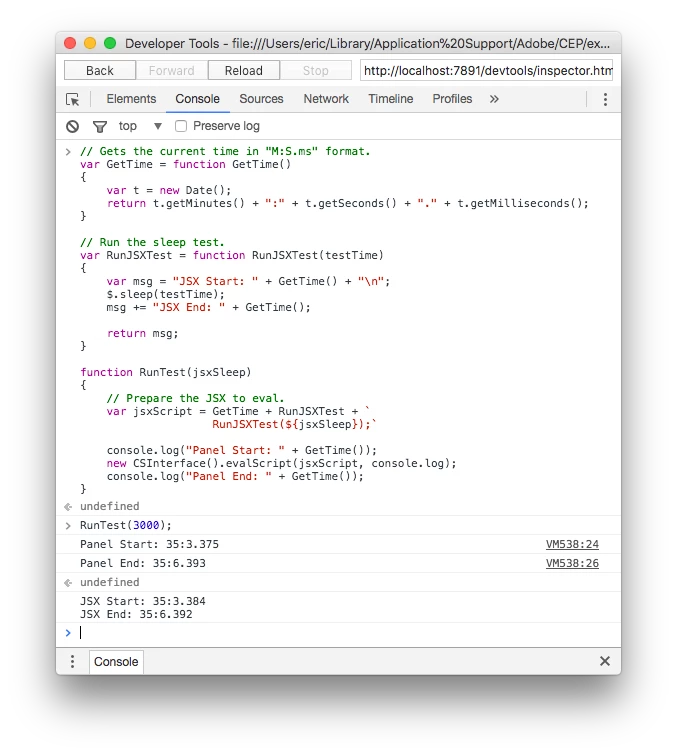
Note: When run from an external application (e.g. Chrome browser or cefclient), it appears that the target Adobe application needs to be the focused application (e.g. Premiere Pro) when running on macOS. Simply switch to the application to allow the code to process.
For clarity, the output (minus the "undefined") is:
Panel Start: 35:3.375
Panel End: 35:6.393
JSX Start: 35:3.384
JSX End: 35:6.392
If you reorder based on actual timing, it looks like the following:
Panel Start: 35:3.375
JSX Start: 35:3.384
JSX End: 35:6.392
Panel End: 35:6.393
On macOS, the Panel doesn't get to finish its work until the JSX is done.
On Windows, however, the image is rather different:
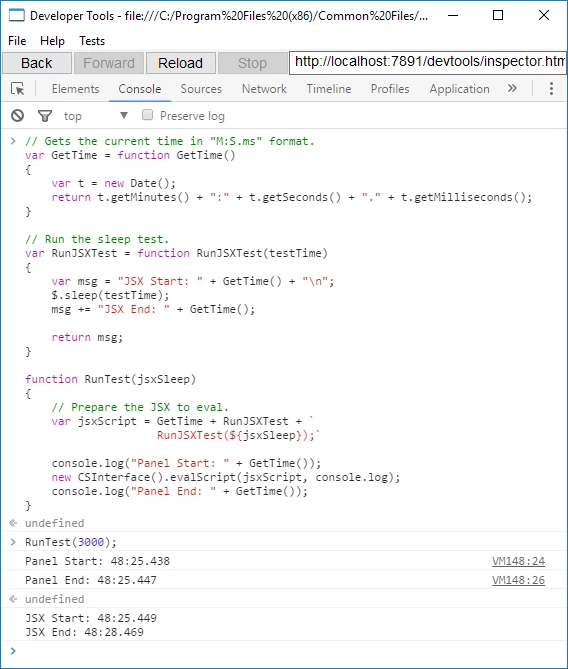
For readability, the output is:
Panel Start: 44:10.111
Panel End: 44:10.119
JSX Start: 44:10.199
JSX End: 44:13.233
No reordering is necessary whatsoever. The times are already in order. This is the expected output. On Windows, the Panel appears to send a request to run the JSX, rather than starting up the ExtendScript engine and waiting for it to complete.
Trevorׅ wrote 2) Does Extendscript block the app and it's sub processes? No, just the apps UI |
Yup. You're on-point about sub-processes. According to Bruce Bullis, ExtendScript will block an application's Main Thread, which is also where UI updates occur. Blocking that thread of execution will stop the UI from updating (the app will become unresponsive), but it will not interfere with other application background processes.
Trevorׅ wrote Regarding what I was referring to by current version of JS 8th Edition - ECMAScript 2017 makes the Synchronously functioning needed when dealing with DOM objects much easier to deal with than previous versions. (Await, async, yeild, promise and all that stuff) |
Ahh, gotcha. Yes, it is far, far easier to handle asynchronous coding with recent ECMAScript features. I should point out that there are ways to make use of those features with ExtendScript today. Polyfills exist for most of those features and many modern tools (e.g. TypeScript*) support transpiling to ECMAScript 3-compatible code (ExtendScript is ECMAScript 3 based).
* There are some cases where ExtendScript blows up on transpiled code (probably due to very old bugs with ternary operator handling) so your mileage may vary...
In your previous post you said "it would have been very ill advised to have scripts run asynchronously". I think the choice of "ill advised" here is a little unfortunate. Asynchronous code may be more difficult to write, but it is certainly necessary in many, many cases to keep user experience from being absolute garbage. Downloading a 100MB file from a server? Please do not do that synchronously, even if you're left with the simplistic callback-based approach that ECMAScript 3 languages (e.g. ExtendScript) leave you with 
That all aside, excellent work identifying the culprit as being specific to the implementation on macOS! Damn.




 AdChoices