Inspiring
May 16, 2019
Answered

[ES Debugger] Can't launch script using Photoshop

  • May 16, 2019
  • 1 reply
  • 1549 views

Hi,


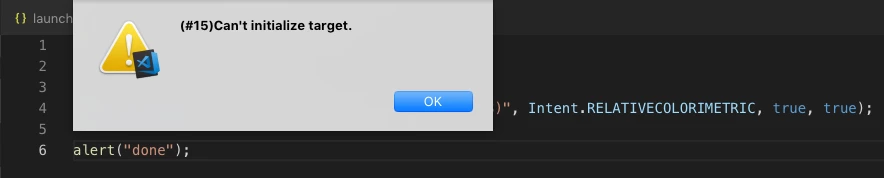
Using the Visual Studio Code ExtendScript Debugger plugin, I'm not able to run a script which targets Photoshop. An error is thrown.

Scripts targeting Indesign work well. I'm targeting Photoshop 2019, which is installed on my machine.


Thanks


Tim

This topic has been closed for replies.
Correct answer erinferinferinf

Hi Tim!

I just saw a pull request for a more specific error message, so we're working on this. Meanwhile...

In the current version only one instance of the plugin works at a time. So you can't have two VSCode workspaces open, with one targeting InDesign and the other targeting Photoshop.

Have you tried following the following troubleshooting steps?

  • Make sure the ExtendScript ToolKit stand-alone application is closed
  • Close the target application (or in your case all the target applications)
  • Close Visual Studio Code
  • Make sure there are no VS "Code Helper" processes in the Activity Monitor (Mac) or Task Manager (Windows)
  • Restart Visual Studio Code
  • Does it work then?
  • If not, does a reboot help?

Let us know!

1 reply

erinferinferinf
Adobe Employee
erinferinferinfCorrect answer
Adobe Employee
May 16, 2019

Hi Tim!

I just saw a pull request for a more specific error message, so we're working on this. Meanwhile...

In the current version only one instance of the plugin works at a time. So you can't have two VSCode workspaces open, with one targeting InDesign and the other targeting Photoshop.

Have you tried following the following troubleshooting steps?

  • Make sure the ExtendScript ToolKit stand-alone application is closed
  • Close the target application (or in your case all the target applications)
  • Close Visual Studio Code
  • Make sure there are no VS "Code Helper" processes in the Activity Monitor (Mac) or Task Manager (Windows)
  • Restart Visual Studio Code
  • Does it work then?
  • If not, does a reboot help?

Let us know!

tmmlsAuthor
Inspiring
May 21, 2019

Hi. The problem seems to be fixed. Thanks for all your help.