



Question
Following the CEP Quick Start, but my Open button isn't responding
Hi, I've been following the steps at Adobe-CEP/Getting-Started-guides
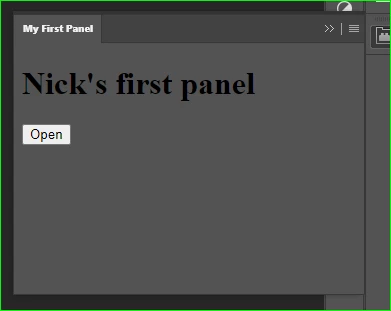
The panel displays correctly in Photoshop, but the Open button is not responding.
Also, I can't load the page to debugging at http://localhost:8088/. It gives me the msg "This site can't be reached."
Any ideas as to what I'm doing wrong?
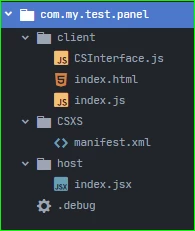
Here is my file structure at AppData\Roaming\Adobe\CEP\extensions\com.my.test.panel.
CSInterface.js is from the 11.x folder on the repo.
manifest.xml
<?xml version='1.0' encoding='UTF-8'?>
<ExtensionManifest ExtensionBundleId="com.my.test" ExtensionBundleVersion="1.0.0" Version="7.0" xmlns:xsi="http://www.w3.org/2001/XMLSchema-instance">
  <ExtensionList>
    <Extension Id="com.my.test.panel" Version="1.0.0" />
  </ExtensionList>
  <ExecutionEnvironment>
    <HostList>
      <Host Name="PHSP" Version="23" />
      <Host Name="PHXS" Version="23" />
    </HostList>
    <LocaleList>
      <Locale Code="All" />
    </LocaleList>
    <RequiredRuntimeList>
      <RequiredRuntime Name="CSXS" Version="7.0" />
    </RequiredRuntimeList>
  </ExecutionEnvironment>
  <DispatchInfoList>
    <Extension Id="com.my.test.panel">
      <DispatchInfo>
        <Resources>
          <MainPath>./client/index.html</MainPath>
          <ScriptPath>./host/index.jsx</ScriptPath>
          <CEFCommandLine />
        </Resources>
        <Lifecycle>
          <AutoVisible>true</AutoVisible>
        </Lifecycle>
        <UI>
          <Type>Panel</Type>
          <Menu>My First Panel</Menu>
          <Geometry>
            <Size>
              <Height>250</Height>
              <Width>350</Width>
            </Size>
          </Geometry>
          <Icons />
        </UI>
      </DispatchInfo>
    </Extension>
  </DispatchInfoList>
</ExtensionManifest>
index.html
<!DOCTYPE html>
<html>
<head>
    <meta charset="utf-8">
    <title>Nick's First Panel</title>
</head>
<body>
    <h1>Nick's first panel</h1>
    <button id="open-button">Open</button>
    <script type="text/javascript" src="CSInterface.js"></script>
    <script type="text/javascript" src="index.js"></script>
</body>
</html>
index.js
var csInterface = new CSInterface();

var openButton = document.querySelector("#open-button");
openButton.addEventListener("click", openDoc);

function openDoc() {
  csInterface.evalScript( 'openDocument()' )
}
index.jsx
function openDocument(){
  var fileRef = new File("~/Downloads/myFile.jpg");
  var docRef = app.open(fileRef);
}
.debug
<ExtensionList>
  <!-- 1 -->
  <Extension Id="com.my.test.panel">
     <HostList>

         <!-- 2 -->
         <Host Name="PHXS" Port="8088"/>
         <Host Name="PHSP" Port="8088"/>

      </HostList>
  </Extension>
</ExtensionList>
 AdChoices