


Inspiring
November 1, 2017
Answered

HTML Panel Number Input filed

  • November 1, 2017
  • 1 reply
  • 899 views

Hi,

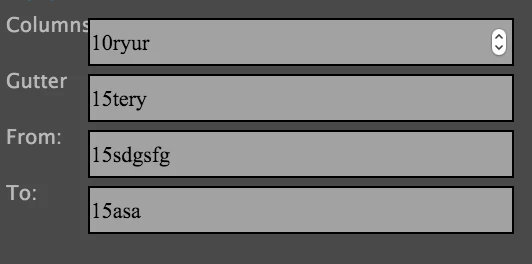
I'm trying to create an illustrator HTML panel. The panel has a few number input fields. They work fine in chrome: only accept numbers. But in illustrator, I can type numbers and letters. Am I missing something? I searched for solutions and couldn't find any. Thanks

This topic has been closed for replies.
Correct answer Trevor:

Works on CEP8 but not on CEP7

If your really need to get it working on CEP7 then it's a bit complicated.

You can use the selection jquery plugin and then detect a non-numeric keypress and remove the invalid entry and restore the cursor position.

An easier option is to on wrong key press fade in and out a span to annoy the user to only enter digits.

HTH

Trevor

1 reply

Trevor:
Legend
November 1, 2017

And what code are you trying?

tushardeAuthor
Inspiring
November 1, 2017

I want to make sure that the user input is always a number in that field. No letters. Chrome does that when I make the input type a "number". But that same thing doesn't work in the panel in illustrator. Here's the code in index file

<ul>

          <li>

              <label for="columns">Columns</label>

              <input type="number" id="columns" value="10">

          </li>

          <li>

              <label for="gutter">Gutter</label>

              <input type="number" id="gutter" value="15">

          </li>

          <li>

              <label for="moveFromH">From:</label>

              <input type="number" id="moveFromH" value="15">

          </li>

          <li>

              <label for="moveToH">To:</label>

              <input type="number" id="moveToH" value="15">

          </li>

</ul>

Trevor:
Trevor:Correct answer
Legend
November 1, 2017

Works on CEP8 but not on CEP7

If your really need to get it working on CEP7 then it's a bit complicated.

You can use the selection jquery plugin and then detect a non-numeric keypress and remove the invalid entry and restore the cursor position.

An easier option is to on wrong key press fade in and out a span to annoy the user to only enter digits.

HTH

Trevor